
Updated On: October 24, 2026
Measure PWM Frequency and Duty Cycle with Timer Input Capture
Many embedded devices send information as a PWM signal. RC receivers, motor feedback circuits, and some sensors encode speed, position, or a measured value in the width of each pulse. To use that information, the microcontroller has to measure both the frequency and the duty cycle of the incoming signal.
This tutorial shows how to measure a PWM input signal on an STM32 using the timer’s PWM input mode, STM32CubeMX, and the HAL library. The example runs on a Nucleo-F446RE. TIM1 generates a known test signal, and TIM2 measures it, so the measured values can be compared directly with the expected ones.
This is the second tutorial in the STM32 Timer Series. It builds on the previous part, STM32 PWM output with HAL, which explains how the test signal is generated.
Table of contents
PWM Signal Basics: Period, Frequency and Duty Cycle
A PWM signal switches between HIGH and LOW at a fixed rate, and the information it carries is stored in timing instead of voltage. Three values describe the signal.
- Period: This is the total time of one complete cycle.
- Frequency: This is the number of cycles per second, and it equals 1 divided by the period.
- Duty cycle: This is the percentage of each period during which the signal stays HIGH.
In most applications, the duty cycle represents a power level, a speed, or a position, while the frequency sets how often the value is updated. Devices such as ESCs, motor drivers, and RC receivers all use PWM in this way, so reading these two values correctly is a common task.
How STM32 PWM Input Mode Works
An STM32 timer counts at a known clock frequency, so the counter value at any moment represents elapsed time. The timer can store the counter value when an edge arrives on an input pin, and two such captures are enough to describe the PWM signal.
- The time from a rising edge to the next falling edge is the HIGH time, also called the pulse width.
- The time from one rising edge to the next rising edge is the full period.
The duty cycle and frequency follow from these two numbers.
Duty (%) = (pulse width / period) × 100
Frequency = timer clock / period
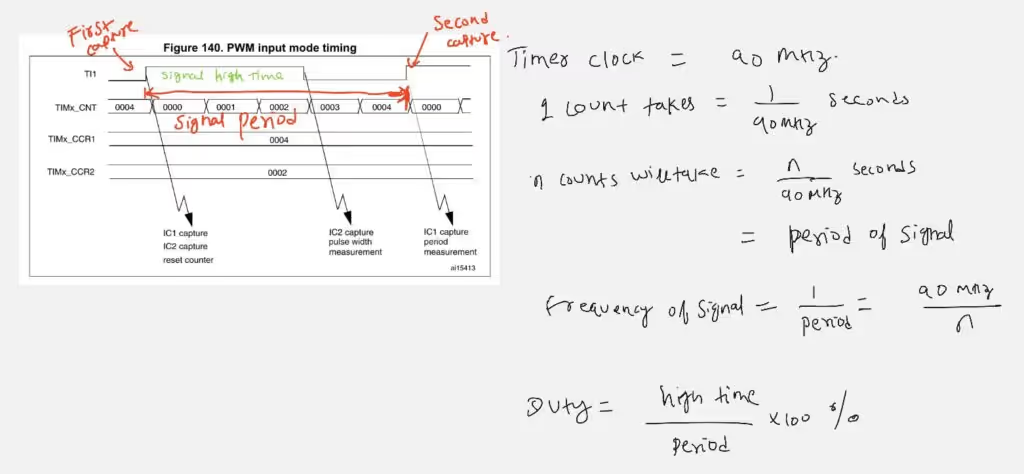
PWM input mode performs this measurement with two capture channels that watch the same input pin. The sequence works as follows.
- A rising edge arrives, and the timer resets its counter to zero. This starts a new measurement cycle.
- A falling edge arrives, and channel 2 stores the counter value. This value is the pulse width.
- The next rising edge arrives, and channel 1 stores the counter value. This value is the period, and the counter is reset again for the next cycle.
The interrupt is generated at the second rising edge, because at that moment the pulse width and the period of the same cycle are both available. This keeps the two values matched to one signal cycle.
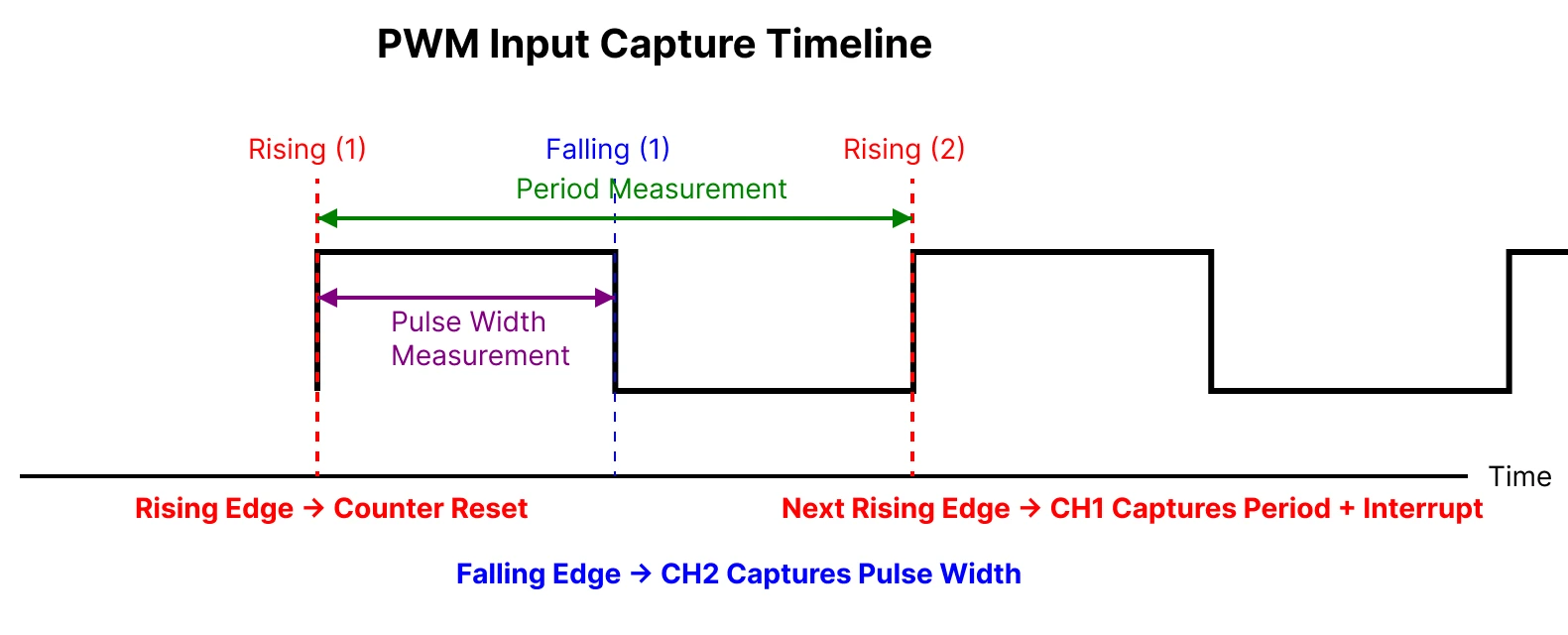
The internal wiring is handled by CubeMX. When PWM input mode is selected on channel 1, CubeMX sets the timer’s slave mode to Reset Mode and uses the filtered channel 1 input as the trigger, which is the mechanism that resets the counter on each rising edge.
STM32 PWM Input Setup in CubeMX
The setup uses two timers. TIM1 produces the test signal, and TIM2 measures it.
Clock Configuration
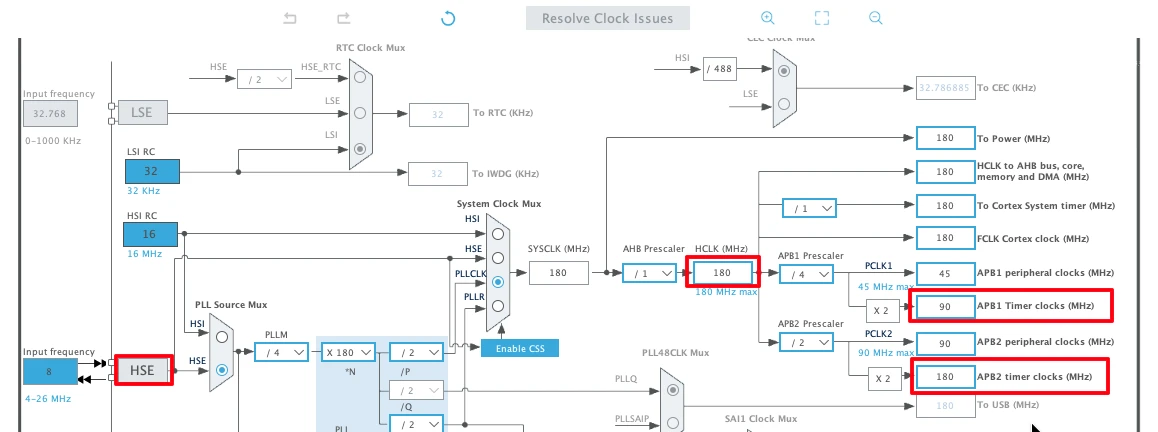
The Nucleo-F446RE has an 8 MHz crystal that is shared between the ST-LINK and the main MCU. The PLL raises the system clock to 180 MHz, which gives the following timer clocks.
- The APB1 timer clock, which drives TIM2, runs at 90 MHz.
- The APB2 timer clock, which drives TIM1, runs at 180 MHz.
TIM1 Configuration for the PWM Test Signal
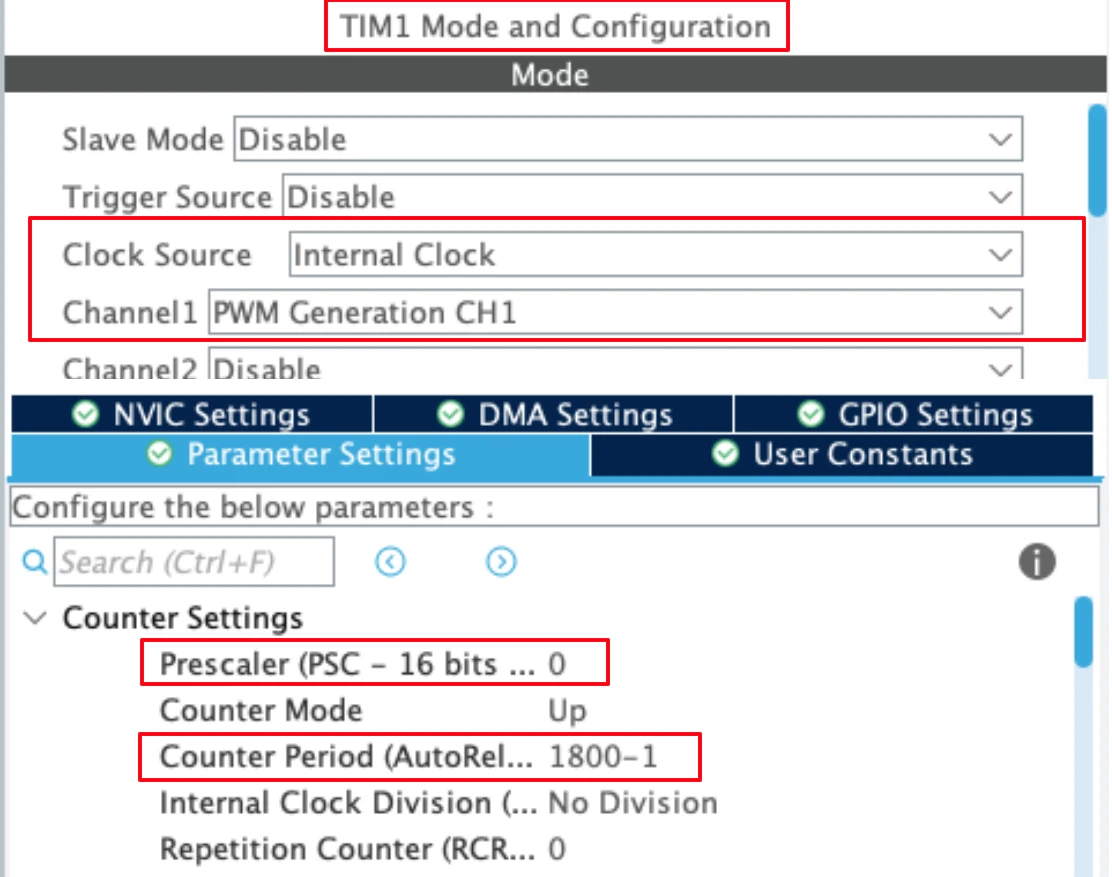
A signal with a known frequency and duty cycle makes it easy to check the measurement, so TIM1 channel 1 is set up as a PWM output.
- The timer clock is 180 MHz, and the prescaler is 1 (a value of 0 in CubeMX).
- The auto-reload value (ARR) is 1800, which gives a PWM frequency of about 100 kHz.
- Channel 1 is used as the PWM output, and the duty cycle is set later in the code.
The parameters are explained in detail in the earlier tutorial on generating PWM with STM32. For STM32F4 devices, the STM32F4 PWM calculator can work out the PSC and ARR values for a target frequency.
The TIM1 output pin must be connected to the TIM2 input pin with a jumper wire. TIM1 channel 1 uses PA8 by default, and TIM2 channel 1 uses PA0.
TIM2 Configuration for PWM Input
TIM2 measures the incoming signal. The image below shows its configuration.
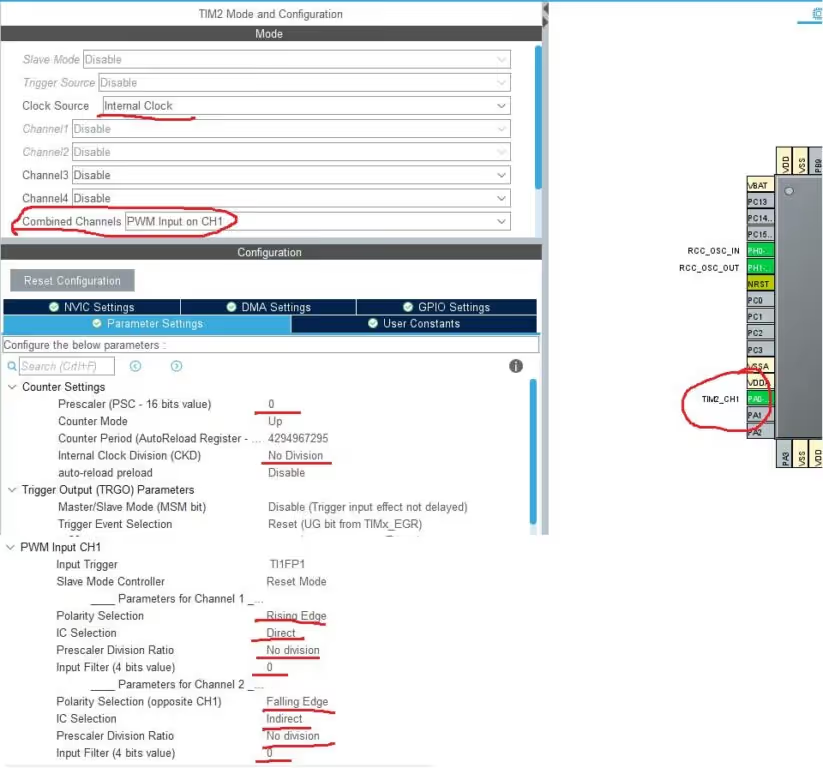
The main settings are listed here.
- Clock source: Internal Clock. The timer counts with the APB1 timer clock.
- Combined Channels: PWM Input on CH1. This option enables both capture channels for one input pin.
- Input pin: PA0. Only one pin is used, and it is the channel 1 pin. Channel 2 is connected to the same input internally, which allows it to measure the pulse width.
- Prescaler: 0. The timer runs at the full APB1 timer clock of 90 MHz.
- Channel 1 polarity: Rising Edge, with IC Selection set to Direct. The input signal from PA0 reaches this channel directly.
- Channel 2 polarity: Falling Edge, with IC Selection set to Indirect. This channel takes its input from the channel 1 pin internally.
Three more settings appear in the capture configuration and are described below.
Clock Division, Capture Prescaler and Input Filter
Internal clock division sets the ratio between the timer clock and the sampling clock that is used by the digital filters. It is set to No Division, so the sampling clock equals the 90 MHz timer clock.
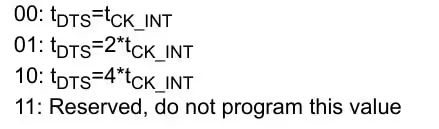
Input capture prescaler decides how many input edges are needed before a capture takes place. This tutorial keeps it at no division, so every rising edge is captured. A higher value lowers the number of interrupts, which can help with very fast input signals.

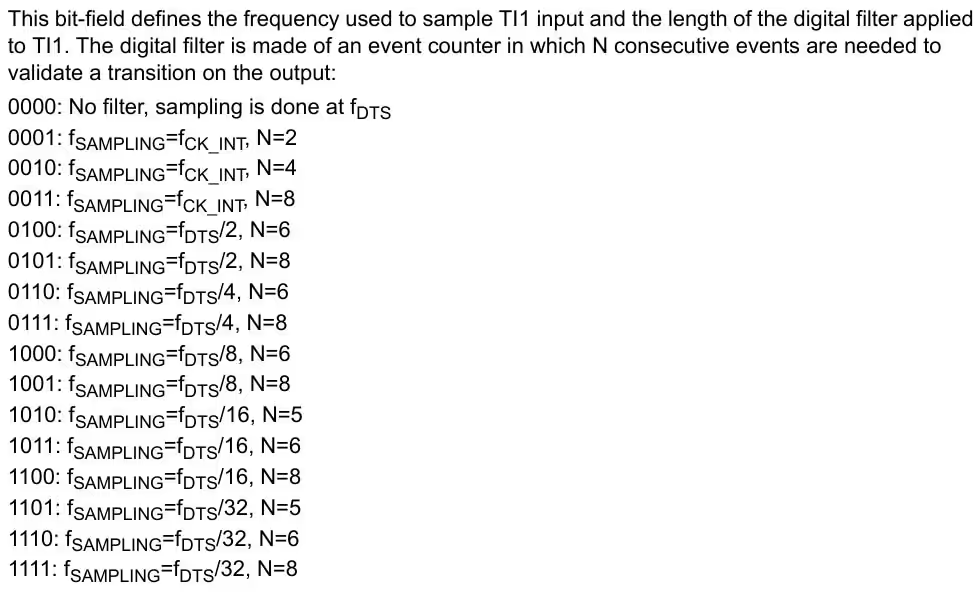
Input filter sets the sampling frequency and the number of consecutive samples needed to accept an edge. It is set to 0 here, so the sampling frequency equals the timer clock. A higher filter value helps with noisy signals, but it also delays the detected edge.
STM32 PWM Input Code with HAL
The code has three parts. It starts the test signal, starts the input capture, and calculates the results inside the capture callback.
Generate the Test PWM Signal
The following lines in the main function start TIM1 and set the duty cycle.
HAL_TIM_PWM_Start(&htim1, TIM_CHANNEL_1);
TIM1->CCR1 = 900;With an ARR of 1800, a CCR value of 900 gives a duty cycle of about 50%, because 900 divided by 1800 equals one half.
Start TIM2 Input Capture
Both capture channels of TIM2 must be started, even though the signal is connected to channel 1 only.
HAL_TIM_IC_Start_IT(&htim2, TIM_CHANNEL_1);   // main channel, interrupt mode
HAL_TIM_IC_Start(&htim2, TIM_CHANNEL_2); // indirect channelChannel 1 runs in interrupt mode, and channel 2 runs without an interrupt. The interrupt therefore occurs only at the rising edge, which is the moment when both values are ready.
Calculate Frequency and Duty Cycle in the Callback
After each rising edge, HAL calls HAL_TIM_IC_CaptureCallback, and the calculation is done inside it.
#define TIMER_CLOCK  90000000

uint32_t Frequency = 0;
float Duty = 0;

void HAL_TIM_IC_CaptureCallback(TIM_HandleTypeDef *htim)
{
  if (htim->Channel == HAL_TIM_ACTIVE_CHANNEL_1)
  {
    uint32_t period = HAL_TIM_ReadCapturedValue(htim, TIM_CHANNEL_1);
    uint32_t pulse  = HAL_TIM_ReadCapturedValue(htim, TIM_CHANNEL_2);

    if (period != 0)
    {
      Duty = ((float)pulse * 100.0f) / period;
      Frequency = (float)TIMER_CLOCK / period;
    }
  }
}TIMER_CLOCK is the clock that drives TIM2, which is 90 MHz in this project. It is needed because the timer measures time in clock ticks, and the tick count must be converted into a real frequency. If the TIM2 prescaler is not 0, the frequency becomes TIMER_CLOCK / ((PSC + 1) × period).
The code works as follows.
- The callback reads the captured value of channel 1 as the period and the captured value of channel 2 as the pulse width.
- The first rising edge only resets the counter, so the first period value is not valid. The check for a non-zero period skips it, and valid results appear from the next cycle onward.
- The duty cycle is the pulse width divided by the period, and the frequency is the timer clock divided by the period.
The figure below, taken from the reference manual, shows where each value is captured.
Move the Calculation to the Main Loop
The callback runs inside an interrupt, so it is good practice to keep it short. One option is to store the raw capture values in the callback and to do the floating-point math in the main loop. The shared variables must be declared volatile because they change inside an interrupt.
volatile uint32_t period = 0;
volatile uint32_t pulse  = 0;

void HAL_TIM_IC_CaptureCallback(TIM_HandleTypeDef *htim)
{
  if (htim->Channel == HAL_TIM_ACTIVE_CHANNEL_1)
  {
    period = HAL_TIM_ReadCapturedValue(htim, TIM_CHANNEL_1);
    pulse  = HAL_TIM_ReadCapturedValue(htim, TIM_CHANNEL_2);
  }
}

/* inside the main while loop */
if (period != 0)
{
  Duty = ((float)pulse * 100.0f) / period;
  Frequency = (float)TIMER_CLOCK / period;
}This approach was suggested by a reader who tested the project on an STM32F103C8T6 board.
STM32 PWM Input Result
The image below shows the values in the STM32CubeIDE debugger.
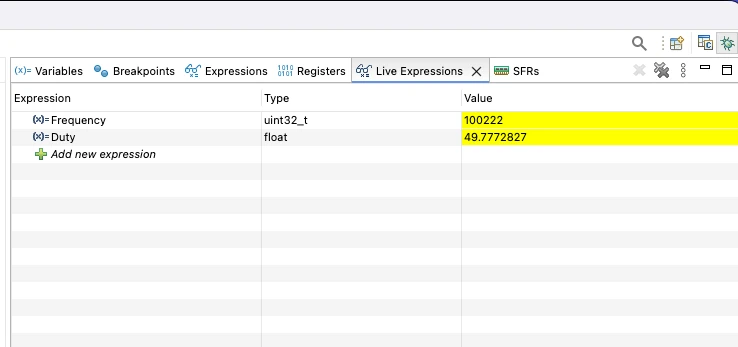
The measured frequency is close to 100 kHz, and the duty cycle is 49.7%. These values match the signal that TIM1 generates, so the measurement works as expected.
The resolution of the result depends on the timer clock. At 90 MHz, one tick lasts about 11 nanoseconds, and a 100 kHz signal has roughly 900 ticks per period, which is more than enough for an accurate reading. Readers who ran the code with a much slower timer clock reported a fixed error of one or two ticks, which becomes large when only a few ticks fit in one period. The timer clock should therefore be much higher than the frequency of the signal.
Conclusion
This tutorial showed how to measure the frequency and duty cycle of a PWM signal using the PWM input mode of an STM32 timer. TIM1 produced a known 100 kHz signal, TIM2 captured the period and pulse width with two linked channels, and the HAL callback converted those values into a duty cycle and a frequency.
Because the timer hardware handles the edge capture, the method is accurate and uses very little CPU time. It can be applied to RC receiver inputs, motor feedback signals, and other sensors that report values as PWM.
The next tutorial in the series covers the Timer Encoder Mode, which reads incremental encoders. For a more general method of measuring pulses, see the tutorial on STM32 Input Capture.
Download Project Here
Download the CubeMX project files and HAL source code — all tested on real hardware.
If you find this useful, you can support us with a Donation as well.
Browse More STM32 Timer Tutorials
STM32 Timers (Part 3): How to use the Timer Encoder Mode
STM32 Input Capture: Measure Frequency & Pulse Width
STM32 Timer Synchronization: Slave Trigger Mode with CubeMX & HAL
STM32 Timers (Part 6): Timer Synchronization for 3-Phase PWM Generation
STM32 Timers (Part 7): Timer synchronization using Slave Reset mode



I test this code in STM32F103C8T6 Chinese clone, controller, and i was able to made it batter even without DMA:
First i modify IRQ interrupt callback to:
volatile uint32_t period;
volatile uint32_t pulse;
void TIM2_IRQHandler(void)
{
if (TIM2->SR & TIM_SR_CC1IF)
{
TIM2->SR &= ~TIM_SR_CC1IF;
period = TIM2->CCR1;
TIM2->SR &= ~TIM_SR_CC2IF;
pulse = TIM2->CCR2;
}
}
and next i calculate in main loop:
while (1)
{
/* USER CODE END WHILE */
HAL_Delay(500);
if (period != 0)
{
Duty = ((float)pulse * 100.0f) / period;
Frequency = (float)TIMER_CLOCK / period;
}
/* USER CODE BEGIN 3 */
}
it work fine even on 4MHZ, but i always have stable mistake in 2 CPU tick. even if i set Prescaler TIM2 to 1 i have difference in 1 timer tick, if i set 0 – i get 2 tick. Independent what freq i use. But on 4MHZ it is too big mistake, because i have only 18 tick per period.
As I understand timers 1, 8, 9, 10, 11 are connected to APB 2 and 2, 3, 4, 5, 6, 7, 12, 13, 14 to APB 1
Yes you are correct, that is a typing mistake. I will fix it.
When I use the ADC value to dynamically change the pulse value of Timer 1 Channel 1 (
__HAL_TIM_SET_COMPARE(&htim1, TIM_CHANNEL_1, adc_value );), why doesn’t the duty cycle change? That is,HAL_TIM_ReadCapturedValue(htim, TIM_CHANNEL_2)does not change along with the ADC value.I observed the PWM generated by Timer 1 Channel 1 using a logic analyzer, and it indeed changes according to the ADC value.
chibba chibba
If I change the prescaler of TIM2, can I measure lower frequcy PWM
Is it possible to simulate this example with Proteus (PWM/Timers) for F103 or F401 ?
Thank you for all STM32 tutorials
Hi, do u know how to setup it by DMA?
Input pin Only connected to channel 2.
If u are getting Ic_VAl2 as 0, use channel 3 in indirect mode. However i will advice not to use this. There are 2 more posts on how to measure pulse width and frequency. Use them.. i was supposed to delete this post but forgot.
Sir, In your code IC_Val2, is not getting updated. Hence duty cycle is zero. Also How falling is detected?
Did you followed the steps correctly? As shown above it detects falling edge. I wouldn’t prefer this method though. Look for another tutorial “measure pulse width using input capture”. That is more effective