

Updated On: November 18, 2026
STM32 FreeRTOS Tutorial: Configure CMSIS-RTOS V2 and Run Your First Task
Most STM32 projects start with a while(1) superloop that calls several functions with HAL_Delay() between them. This works for a single job, but a delay of 500 ms stops everything else, UART data can be missed and sensor readings arrive late. FreeRTOS solves this by running independent tasks under a scheduler, and each task has its own stack, priority and timing.
This tutorial explains why the superloop breaks down, what tasks, task states and the Task Control Block are, and why CMSIS-RTOS V2 is used instead of the native FreeRTOS API. It then configures a FreeRTOS project in CubeMX on an STM32 Nucleo-L496ZG-P board, covering the clock, tick rate, stack and heap size, the HAL time base on TIM6 and newlib reentrancy, and ends with a task that blinks an LED using osDelay(). The same steps apply to other STM32 boards when the LED pin is adjusted.
This is part 1 of the STM32 CMSIS-RTOS series. Part 2 covers multiple tasks, priorities and preemption, and the later parts cover queues, semaphores, event flags and software timers.
Why STM32 FreeRTOS Replaces the Superloop
Most users write the whole application inside one while(1) loop, which is called the superloop approach. It works for small projects, but the problems appear as soon as the firmware has several jobs to do.
Superloop and HAL_Delay Problems
A typical superloop calls each job in turn and waits with HAL_Delay() between them.
while (1)
{
  sensor_task();
  HAL_Delay(200);    /* CPU waits here */
  display_task();
  HAL_Delay(500);    /* CPU waits here */
  uart_task();
  HAL_Delay(1000);   /* CPU waits here */
}HAL_Delay() is a busy wait, so the CPU spends the whole delay checking the HAL tick counter without doing any useful work. During a 500 ms delay, incoming UART data cannot be handled properly, sensor readings can be missed and time-critical operations are delayed. As more jobs are added, the timing of each job depends on all the others, and the loop fills with counters, flags and HAL_GetTick() checks.
State Machines Do Not Scale
A common workaround is to remove the delays and write non-blocking state machines.
switch (state)
{
  case READ_SENSOR:
    if (HAL_GetTick() - prevTime >= 200)
    {
      Read_Sensor();
      prevTime = HAL_GetTick();
      state = UPDATE_DISPLAY;
    }
    break;

  case UPDATE_DISPLAY:
    /* similar timing check */
    break;
}This approach works, but the code becomes harder to read once multiple sensors, UART communication, error handling and communication timeouts are added. A small change in one state can break the timing of unrelated states, which makes the code difficult to maintain.
One Task per Job
FreeRTOS replaces the single loop with separate tasks, and each task handles one job. The scheduler decides which task runs at any moment, so a task that is waiting does not stop the others. The code stays readable, the timing of each job is independent and the CPU is not wasted on busy waiting.
STM32 FreeRTOS Concepts: Tasks, Scheduler and TCB
FreeRTOS is more than a library that is added to a project. It changes how the application runs, because control moves from a single loop to a scheduler that switches between tasks.
What an RTOS Is
A real-time operating system (RTOS) is a small operating system designed for embedded devices. The word real-time describes predictable timing and not speed, which matters when a sensor has to be read every 10 ms or an interrupt has to be handled immediately. In an RTOS the scheduler always runs the highest-priority task that is ready, and tasks can wait without blocking each other. In a superloop, by comparison, all functions run one after another in a fixed order and every delay blocks the whole program.
What a FreeRTOS Task Is
A task is an independent function with its own stack, local variables, execution point and priority. When the scheduler switches from one task to another, it saves the state of the current task and restores the state of the next one. The tasks appear to run at the same time, although a single-core STM32 switches between them very quickly.
void StartTask(void *argument)
{
  for (;;)
  {
    /* task code */
  }
}A task function contains an infinite loop and must never return. FreeRTOS does not delete a task whose function returns, and the Cortex-M port stops the system in an error trap instead. A task that has to end must delete itself first, using osThreadExit() in CMSIS-RTOS V2 or vTaskDelete(NULL) in the native API.
FreeRTOS Task States
A FreeRTOS task is always in one of four states.
| State | Meaning |
|---|---|
| Running | The task currently uses the CPU. Only one task can be Running at a time on a single-core STM32. |
| Ready | The task can run but is waiting for CPU time. When several tasks are Ready, the one with the highest priority runs first. |
| Blocked | The task is waiting for an event such as an osDelay() timeout, a semaphore, a queue message or an event flag. A Blocked task uses no CPU time. |
| Suspended | The task is not scheduled until it is resumed explicitly with osThreadResume(). |
The Blocked state is the main advantage over HAL_Delay(), because osDelay(1000) pauses only the calling task while all other tasks continue to run. A deleted task no longer exists. CMSIS-RTOS V2 reports such a task as terminated, but FreeRTOS itself has no separate Terminated state, and most applications keep their tasks running forever.
Task Control Block
FreeRTOS stores the information about each task in a Task Control Block (TCB). The TCB holds the stack pointer, the priority, the current state, timing information and the name of the task.
Context Switching
Every time the scheduler switches tasks, it performs the same four steps.
- It saves the CPU registers of the current task on the stack of that task.
- It updates the TCB of the current task.
- It loads the stack pointer of the next task.
- It restores the registers of the next task.
The switch takes very little time and is invisible to the application, but it is what makes multitasking possible.
STM32 CMSIS-RTOS V2 vs Native FreeRTOS API
Once the task model is clear, the next question is why CubeMX offers CMSIS-RTOS in addition to the FreeRTOS API itself.
The Portability Problem
FreeRTOS is one of several RTOS kernels, and every kernel has its own API. A task is created with xTaskCreate() in FreeRTOS, with tx_thread_create() in Azure RTOS ThreadX and with k_thread_create() in Zephyr. A project written with native FreeRTOS calls has to be rewritten when the kernel changes, for example when a client requires Keil RTX5 or a company moves to ThreadX.
CMSIS-RTOS V2 as an Abstraction Layer
CMSIS-RTOS V2 is a standard RTOS API defined by Arm. It is not a kernel and does not schedule tasks. It is a thin layer that translates calls such as osThreadNew(), osDelay() and osSemaphoreAcquire() into calls of the kernel underneath. Application code that stays within this API does not depend on the kernel, so only the layer below changes when the kernel is replaced.
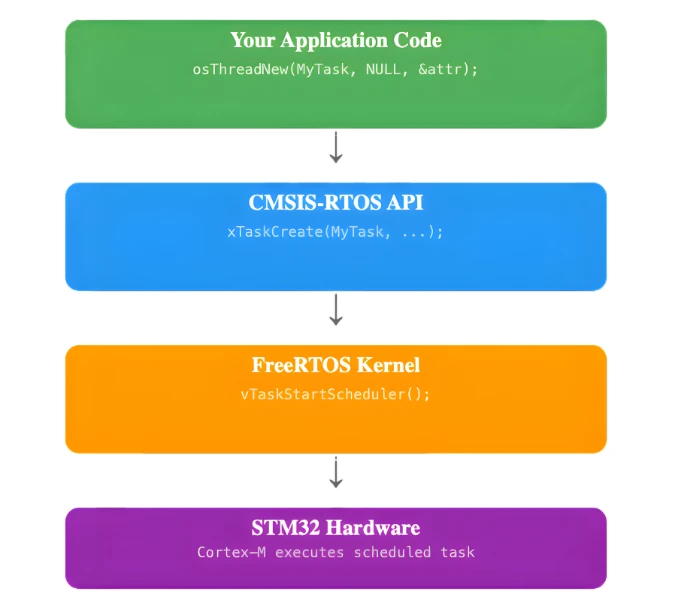
CMSIS-RTOS V2 to FreeRTOS API Mapping
| CMSIS-RTOS V2 | Native FreeRTOS |
|---|---|
| osThreadNew() | xTaskCreate() |
| osDelay() | vTaskDelay() |
| osKernelStart() | vTaskStartScheduler() |
| osSemaphoreNew() | xSemaphoreCreateBinary() or xSemaphoreCreateCounting() |
A call to osDelay(1000) ends up as vTaskDelay(1000) inside the wrapper, and both values are counted in ticks, which equal milliseconds at the default tick rate of 1000 Hz. This series uses CMSIS-RTOS V2 for every example, so the code stays independent of the kernel.
STM32 FreeRTOS CubeMX Configuration
This section creates a FreeRTOS project with CMSIS-RTOS V2 in STM32CubeMX, using an STM32 Nucleo-L496ZG-P board. If CubeMX is new to you, the first STM32 project tutorial explains the basic workflow.
Clock Configuration
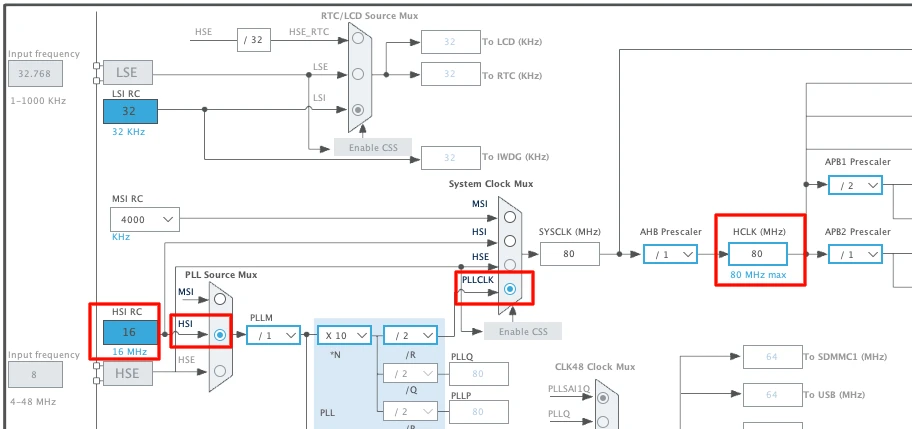
The project uses the internal HSI oscillator together with the PLL to run the system at 80 MHz, which is the maximum system clock of the STM32L496.
Enable CMSIS-RTOS V2 in Middleware
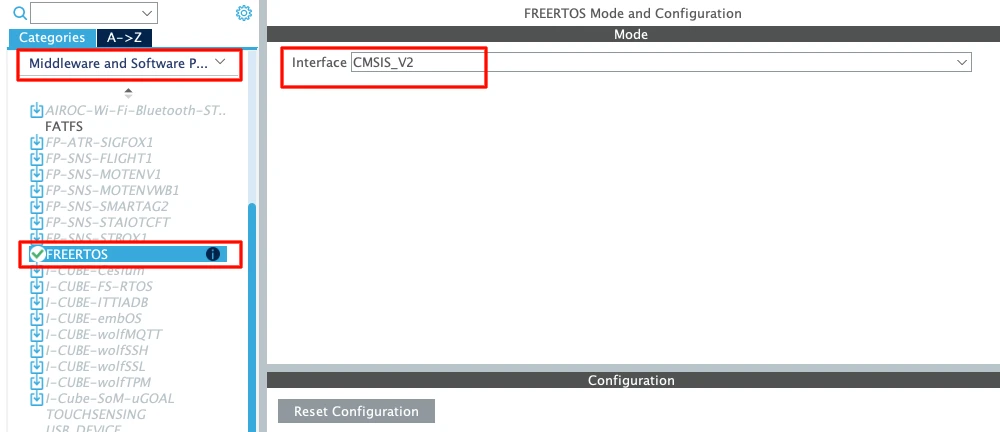
Open the Middleware section, enable FreeRTOS and select CMSIS_V2 as the interface. CMSIS-RTOS V2 is the newer version of the API and the better choice for new projects.
Tick Rate
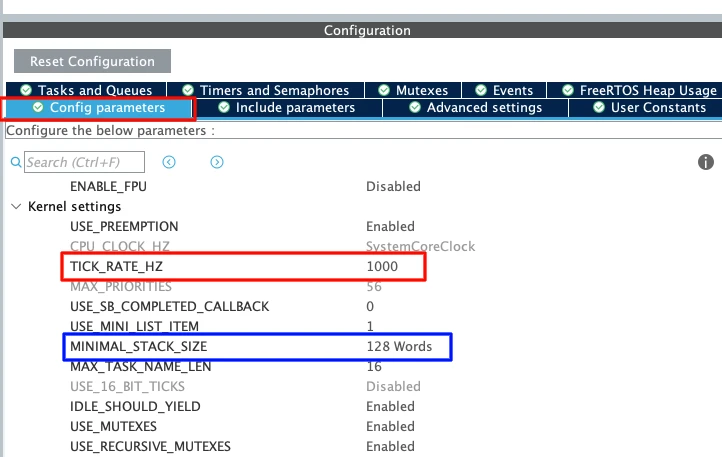
The default tick rate is 1000 Hz, so the SysTick interrupt fires every 1 ms and delays have a resolution of 1 ms. The call osDelay(1) waits for one tick, and because the call usually happens in the middle of a tick period, the real delay is somewhere between 0 and 1 ms. Delays shorter than one tick need a hardware timer. A higher tick rate is possible, but it increases the scheduler overhead.
Minimal Stack Size
The Minimal Stack Size is the stack used by the idle task, and it is also the default for new tasks. It is counted in words and not in bytes. The STM32 is a 32-bit device, so one word is 4 bytes and 128 words are 512 bytes. In the generated code the same value is written in bytes as 128 * 4. Every task has its own stack, and a stack that is too small causes a stack overflow and crashes the system. For a simple LED task, 128 words are sufficient.
Total Heap Size
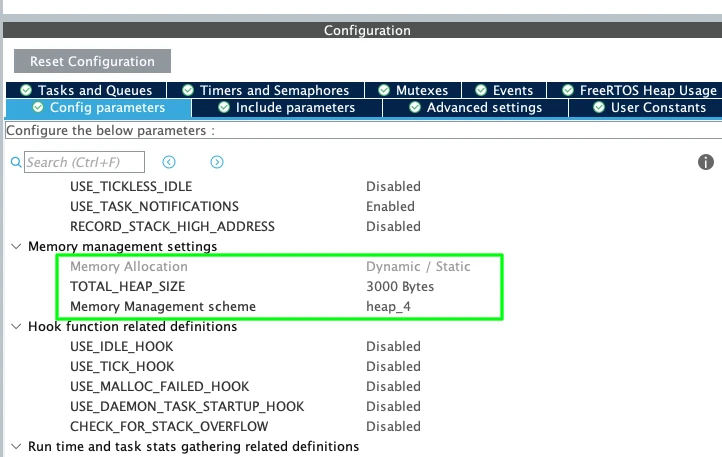
The default heap size is about 3 KB. With dynamic allocation, the stacks and TCBs of all tasks come from this heap, as do queues, semaphores and timers, and the idle task created by the kernel uses it as well. The heap must therefore grow as tasks and RTOS objects are added. If osThreadNew() returns NULL, the heap is the first setting to check.
Configure the DefaultTask
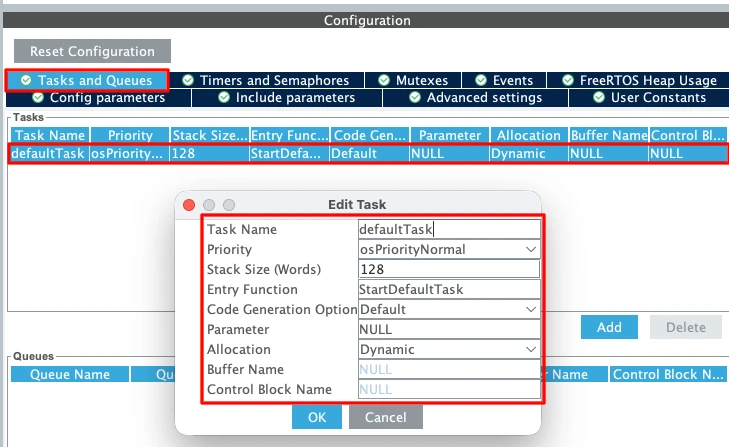
The Tasks and Queues tab already contains one task named DefaultTask, and its settings are listed below.
| Parameter | Value | Purpose |
|---|---|---|
| Task Name | DefaultTask | Identifies the task and has no effect on its behavior. |
| Priority | Normal | Kept at the default for this example. |
| Stack Size | 128 words | Taken from the minimal stack size. |
| Entry Function | StartDefaultTask | The function where the task code is written. |
| Argument | NULL | No parameter is passed to the task. |
| Memory Allocation | Dynamic | The stack and TCB are taken from the heap at runtime. |
Move the HAL Time Base from SysTick to TIM6
By default, the HAL uses SysTick as its time base, and FreeRTOS also needs SysTick for its own tick. FreeRTOS runs the SysTick interrupt at the lowest interrupt priority, while the HAL needs its tick to interrupt other handlers, because HAL functions with timeouts can be called from them. Sharing SysTick therefore leads to timing conflicts, and CubeMX warns about it in FreeRTOS projects.
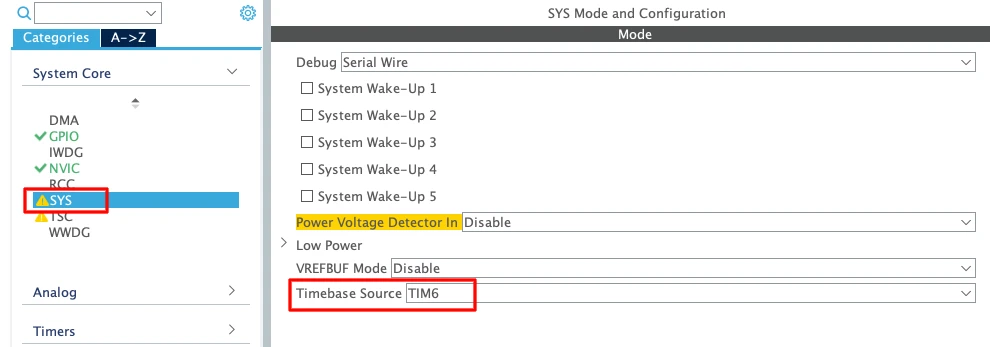
The solution is to give each a timer of its own, with SysTick for the FreeRTOS scheduler and TIM6 or TIM7 for the HAL time base. Open System Core, then SYS, and change the Timebase Source from SysTick to TIM6. TIM6 and TIM7 are basic timers without PWM or capture functions, which makes them a good choice for this job, and the STM32 timer tutorials cover the other timers.
Enable Newlib Reentrant
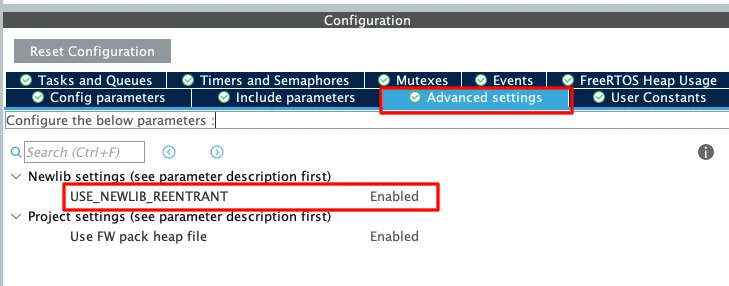
Open Middleware, then FreeRTOS, then Advanced Settings, and enable Use newlib reentrant. Standard C library functions such as printf(), sprintf() and malloc() keep internal state, and they are not safe to call from several tasks by default. The reentrant option gives every task its own copy of that state, which prevents hard-to-find bugs. It does not replace a mutex when two tasks share one output such as a UART, and it increases the memory used by each task. If osThreadNew() fails after enabling this option, increase the heap size.
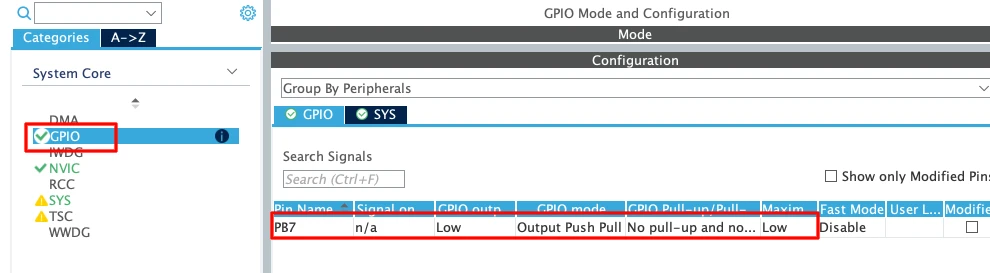
Configure the LED Pin PB7
According to the board schematic, the blue LED of the Nucleo-L496ZG-P is connected to PB7. Configure PB7 as a GPIO output, and leave all other GPIO settings at their defaults. The task toggles this pin with HAL_GPIO_TogglePin().
STM32 FreeRTOS Generated Code Explained
After the project is generated and opened in STM32CubeIDE, most of the FreeRTOS code is already written. Three CMSIS-RTOS V2 functions control how the RTOS starts.
osKernelInitialize()
This function prepares the kernel for use and must be called before any other RTOS function. It checks that it is not called from an interrupt and marks the kernel as ready. It appears in main() before any task is created.
osThreadNew()
This function creates a task. CubeMX generates its parameters from the Tasks and Queues tab, which are the entry function, the stack size, the priority and the name. When osThreadNew() runs, the memory for the stack and the TCB is taken from the FreeRTOS heap and the task is added to the list of Ready tasks. The task does not start running at this point, because it only runs after the scheduler has started. The function can be called repeatedly to create more tasks, and it returns NULL when the task could not be created.
osKernelStart()
This is the most important call. It starts the scheduler, the SysTick interrupt begins to generate RTOS ticks, context switching becomes active and the Ready task with the highest priority starts to run. The function does not return under normal conditions, so any code after it in main() never executes. All application logic must therefore be written inside tasks.
Structure of main()
The generated code follows the order shown below. Depending on the CubeMX version, the osThreadNew() call is placed in MX_FREERTOS_Init() inside freertos.c or directly in main.c, and it must exist only once.
osThreadId_t defaultTaskHandle;
const osThreadAttr_t defaultTask_attributes = {
  .name = "defaultTask",
  .stack_size = 128 * 4,                        /* bytes (128 words) */
  .priority = (osPriority_t) osPriorityNormal,
};

int main(void)
{
  HAL_Init();
  SystemClock_Config();
  MX_GPIO_Init();

  osKernelInitialize();       /* prepare the kernel */
  MX_FREERTOS_Init();         /* creates the tasks with osThreadNew() */
  osKernelStart();            /* starts the scheduler and never returns */

  while (1)
  {
    /* never reached */
  }
}

/* Inside MX_FREERTOS_Init() */
defaultTaskHandle = osThreadNew(StartDefaultTask, NULL, &defaultTask_attributes);
/* USER CODE BEGIN RTOS_THREADS */
if (defaultTaskHandle == NULL)
{
  Error_Handler();            /* task creation failed, usually the heap is too small */
}
/* USER CODE END RTOS_THREADS */STM32 FreeRTOS LED Blink Task
Task Code
The project has one task, DefaultTask, and its entry function is StartDefaultTask(). The task code is written inside this function.
/* USER CODE BEGIN Header_StartDefaultTask */
void StartDefaultTask(void *argument)
{
  /* USER CODE BEGIN StartDefaultTask */
  for (;;)
  {
    HAL_GPIO_TogglePin(GPIOB, GPIO_PIN_7);   /* toggle the blue LED */
    osDelay(500);                            /* block this task for 500 ticks (500 ms) */
  }
  /* USER CODE END StartDefaultTask */
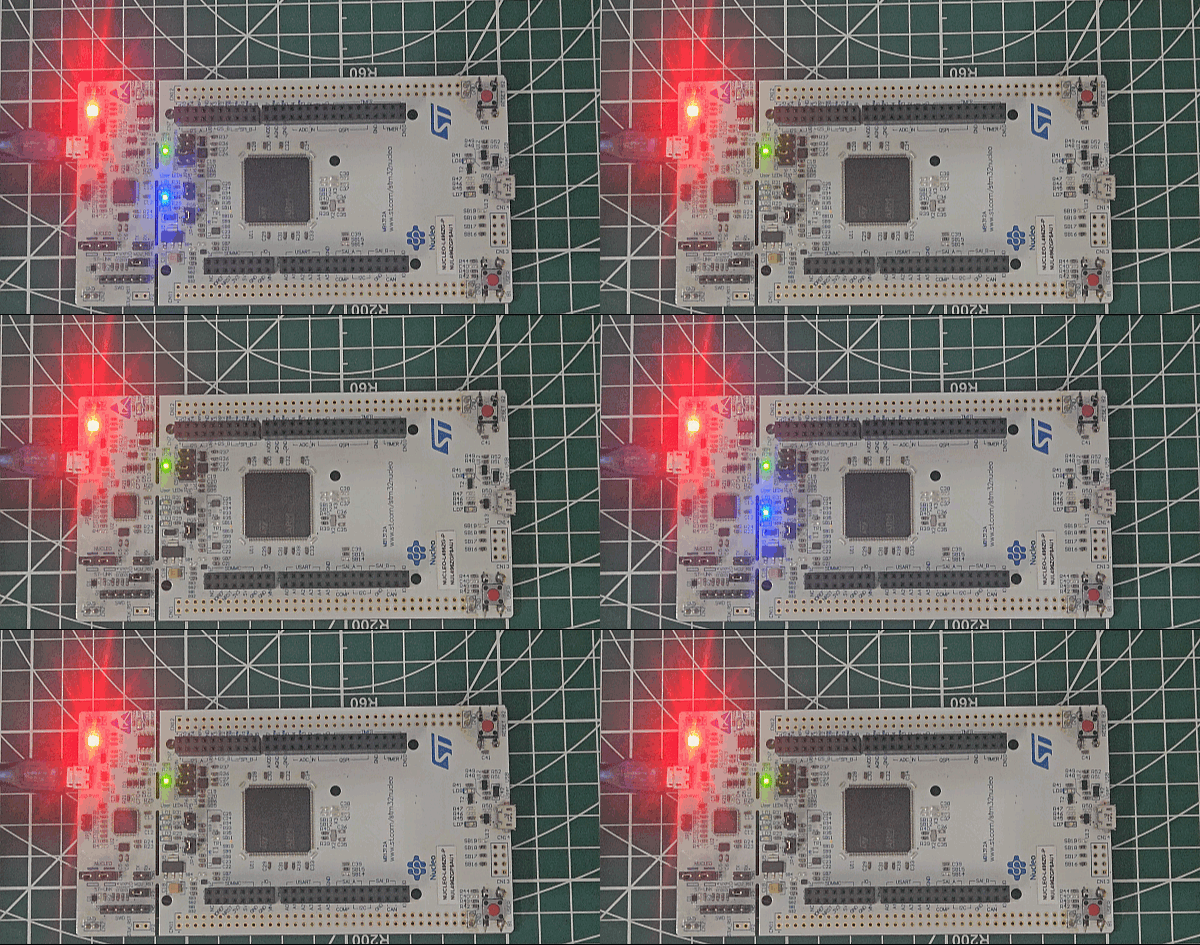
}The LED toggles every 500 ms, and during each delay the task sleeps in the Blocked state, so FreeRTOS can run other tasks. Two toggles make one full blink cycle of one second.
osDelay() vs HAL_Delay()
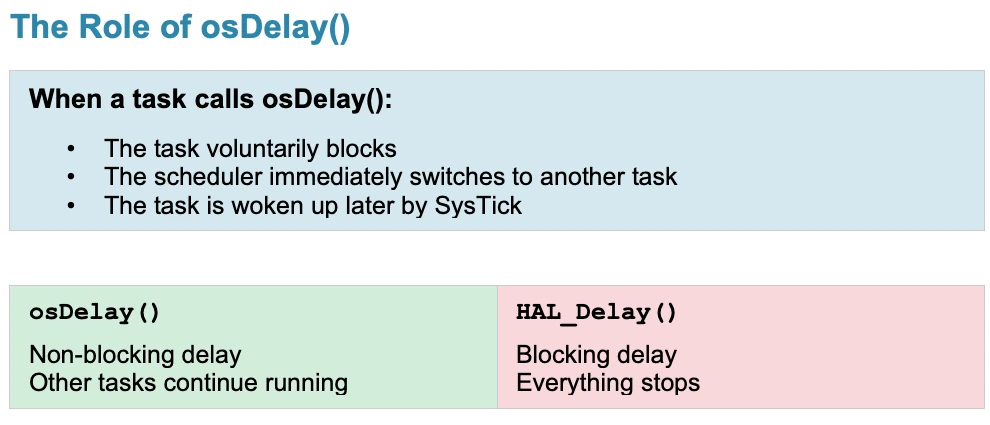
Bare-metal projects use HAL_Delay(), but a FreeRTOS project should use osDelay(). HAL_Delay() is a busy wait on the HAL time base, so the calling task stays in the Running state and keeps the CPU busy while it waits. Tasks with a lower priority get no CPU time during that period, and even higher-priority tasks only run because they can preempt the waiting task.
osDelay() is aware of the RTOS. It moves the calling task into the Blocked state, the scheduler switches to another Ready task and the CPU time is used for real work. The task returns to the Ready state when the delay has elapsed.
LED Blink Output
After the project is flashed to the board, the blue LED on PB7 blinks once per second and keeps doing so, while the scheduler runs in the background.
STM32 FreeRTOS Troubleshooting
| Symptom | Likely cause | What to check |
|---|---|---|
| The LED does not blink. | The task was not created, or the scheduler never started. | Check that osThreadNew() returns a valid handle and that osKernelStart() is reached. |
| Code written after osKernelStart() does not run. | The scheduler takes over and the function never returns. | Move the code into a task. |
| The system freezes or hard faults after more tasks are added. | A stack is too small or the heap is used up. | Increase the stack size or the heap size in CubeMX and check the result of osThreadNew(). |
| The system stops when a task function ends. | The task function returned, which is not allowed in FreeRTOS. | Keep the infinite loop or call osThreadExit() before the function ends. |
| HAL timeouts or HAL_Delay() behave incorrectly. | SysTick is used by both the HAL and FreeRTOS. | Change the Timebase Source in SYS to TIM6 or TIM7. |
| A short osDelay() ends earlier than expected. | The delay is counted in ticks, and a one-tick delay can be shorter than 1 ms. | Use a longer delay or a hardware timer for fine timing. |
STM32 FreeRTOS Conclusion
This tutorial prepared the base for every STM32 FreeRTOS project in the series. HAL_Delay() blocks a task while it keeps the CPU busy, and state machines become hard to maintain as features grow, whereas FreeRTOS tasks block independently and the scheduler uses the gaps for other work. In CubeMX the project used CMSIS-RTOS V2, the default tick rate, a 128-word stack, TIM6 as the HAL time base, newlib reentrancy and PB7 as the LED output.
The generated code calls osKernelInitialize(), creates the task with osThreadNew() and starts the scheduler with osKernelStart(). The LED task is intentionally small, yet the same pattern scales to many tasks that sleep and wake independently. The next part, multiple tasks, priorities and preemption, creates several tasks with different priorities and shows how the scheduler chooses between them.
Download Project Here
Download the CubeMX project files and HAL source code — all tested on real hardware.
If you find this useful, you can support us with a Donation as well.
Browse More STM32 FreeRTOS Tutorials

Subscribe
Login
0 Comments
Newest


