
Published: February 2, 2024
Last Updated: March 23, 2026
Last Updated: March 23, 2026
STM32 UART: Receive Data Using IDLE Line Detection
Receiving data of unknown length over UART can be tricky when working with STM32 microcontrollers. Traditional methods often rely on fixed-size buffers or special end characters, which are not always efficient or reliable. A better solution is to use the UART IDLE line detection feature, which allows the microcontroller to detect when the sender stops transmitting and trigger an interrupt automatically.
This is the 5th tutorial in the STM32 UART Series. In this tutorial, we’ll learn how to use STM32 UART IDLE line detection to receive variable-length data efficiently. We’ll cover both interrupt-based and DMA-based approaches using STM32 HAL functions, and explain how to configure the peripheral in CubeMX, handle incoming data, and process complete messages seamlessly.
This method is ideal for applications like Modbus communication, serial data streaming, and protocols without fixed frame lengths.
Understanding the UART IDLE Line Feature in STM32
UART communication operates at a fixed baud rate, which means there is a predictable and consistent timing between transmitted bits and bytes. As long as data continues to arrive within this expected timing, the UART peripheral considers the line active. However, when the transmitter stops sending data for a duration longer than a normal character frame, the UART peripheral detects this condition as an IDLE line.
This IDLE line detection is extremely useful because it allows the microcontroller to determine when a transmission has paused or ended, without knowing the message length in advance. Once an IDLE condition is detected, the UART can trigger an interrupt, giving the application a chance to process whatever data has been received so far.
In practice, the sender typically stops transmitting in two common scenarios. The first is when the complete message has been sent and no more data follows. The second occurs when large amounts of data are transmitted in multiple chunks, with short delays between each chunk. These small pauses are long enough to trigger the IDLE line condition on the receiver.
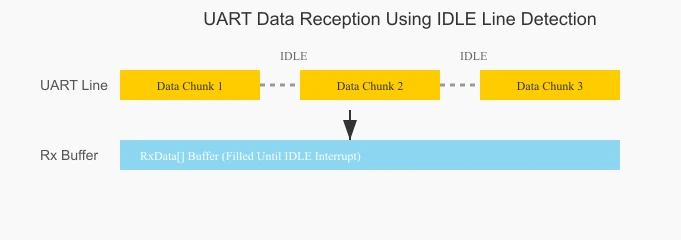
For example, when receiving a large dataset over UART, the data may arrive in bursts rather than as one continuous stream. Between these bursts, the UART line remains idle for a brief period. As soon as the STM32 detects this IDLE state, it generates an interrupt, allowing the firmware to process the current buffer and get ready for the next incoming chunk. In this tutorial, we’ll learn how to use the UART IDLE line feature in STM32 to handle both complete messages and chunked data transfers efficiently.
Using UART IDLE Line Interrupt in STM32
The interrupt method should be used when receiving small amount of unknown data. Here the interrupt is triggered when all the required data has been received or an IDLE Line is detected before that. We should note that the receive buffer should be large enough to store all the data.
STM32 UART CubeMX Configuration
Let’s start by configuring the UART peripheral in the STM32 CubeMX. The image below shows the UART configuration in CubeMX.
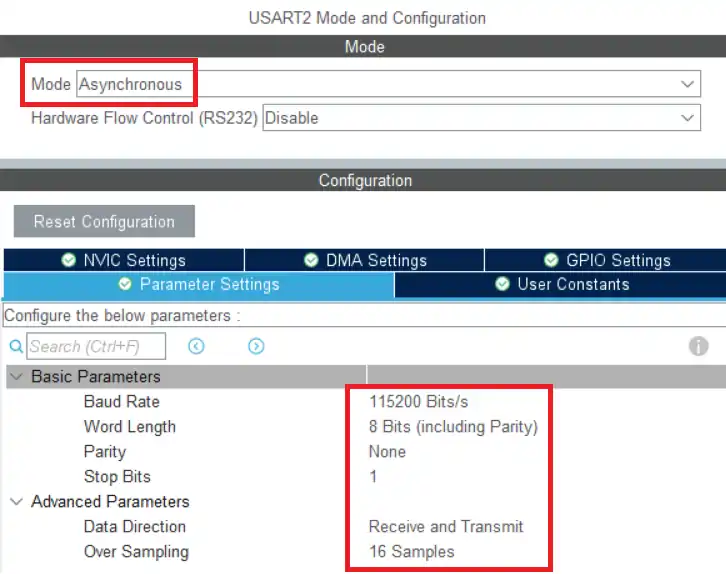
We will use the Asynchronous Mode for the communication. Only 2 pins are used in the Asynchronous mode, TX and RX. The baud rate is set to 115200. We need to use the same baud rate for the transmitter device also.
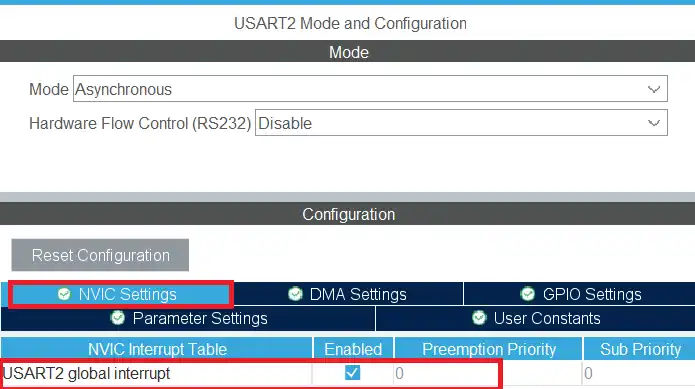
We shall enable the UART interrupt in the NVIC Settings as shown in the image below.
UART IDLE Line Interrupt Handling
We will call the function HAL_UARTEx_ReceiveToIdle_IT inside the main function. This function will enable the UART to receive the data in IDLE line interrupt mode.
uint8_t RxData[30];
int indx = 0;
int main()
{
  ....
  HAL_UARTEx_ReceiveToIdle_IT(&huart2, RxData, 30);
  while (1)
  {
    HAL_GPIO_TogglePin(GPIOA, GPIO_PIN_5);
    HAL_Delay(1000);
  }
}The RxData buffer is defined to store a maximum of 30 bytes of data. The indx variable will be used to store the size. In the main function we will call the function HAL_UARTEx_ReceiveToIdle_IT to receive 30 bytes of data in the interrupt mode.
When 30 bytes of data is received or an IDLE Line is detected before that, an interrupt will trigger and the HAL_UARTEx_RxEventCallback will be called. We can process the received data in this callback.
void HAL_UARTEx_RxEventCallback(UART_HandleTypeDef *huart, uint16_t Size)
{
  indx = Size;
  HAL_UARTEx_ReceiveToIdle_IT(&huart2, RxData, 30);
}The @Size parameter of this callback represents how many data bytes has been received when the interrupt is triggered. We will store the size to the indx variable so that it can be later used in the while loop or any other function.
The interrupt is disabled after it gets triggered, so we need to call the interrupt again at the end of the callback. This is to make sure that the data reception is continuous.
UART IDLE Line Interrupt Results in STM32
The following output demonstrates how the UART IDLE line interrupt works in STM32. These images show the transmitted data from the serial monitor and how the microcontroller receives and processes it using the IDLE line detection feature.
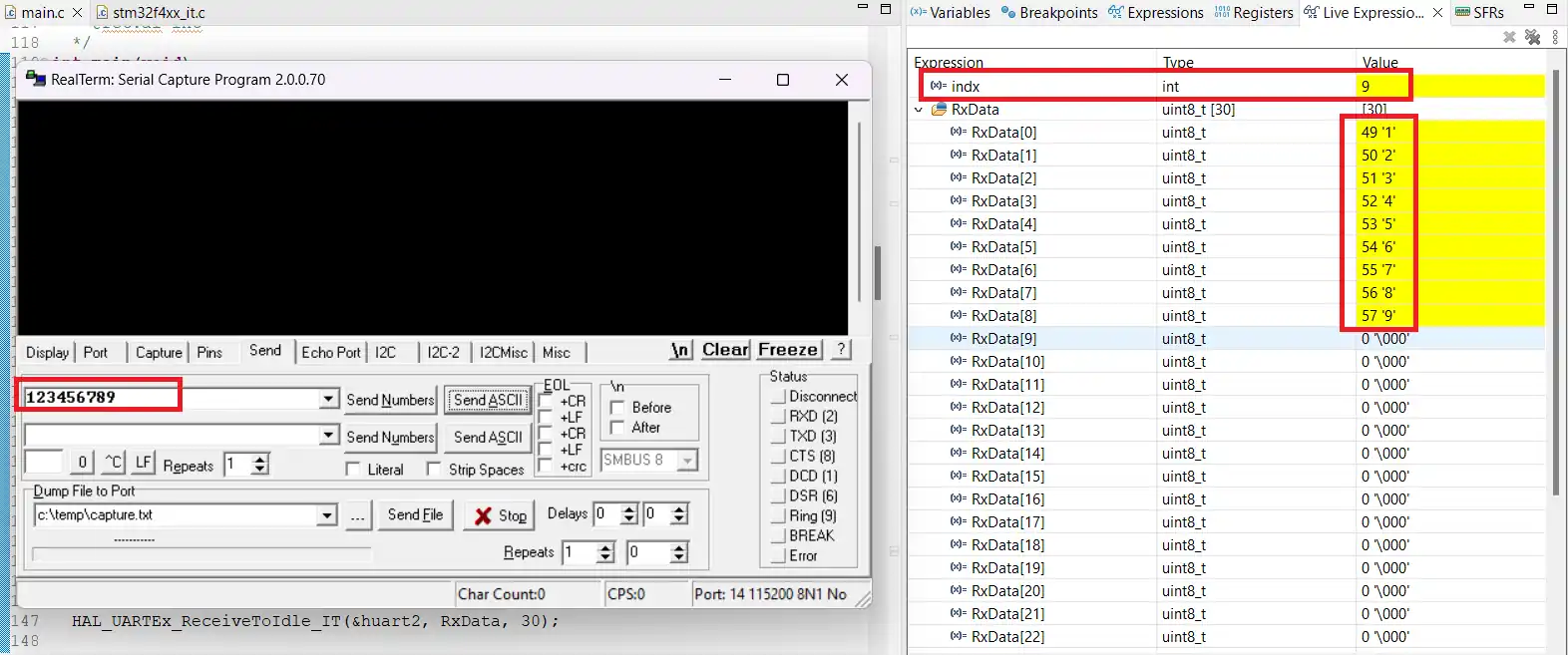
In the first image, you can see 9 data bytes being sent from the serial monitor. The second part of the output displays how these bytes are stored in the RxData buffer, along with the current value of the indx variable. This confirms that the IDLE line interrupt correctly detects the end of transmission and processes the data.
This interrupt-based method works well for receiving small packets of data when the exact size is unknown. As long as the data size is less than or equal to the buffer length, the reception will be reliable.
Using UART IDLE Line DMA in STM32
Just like how we use interrupt to receive small amount of data, we will use UART DMA to receive large amount of data.
STM32 UART CubeMX Configuration
Let’s start by configuring the UART peripheral in the STM32 CubeMX. The image below shows the UART configuration in CubeMX.
We will use the Asynchronous Mode for the communication. Only 2 pins are used in the Asynchronous mode, TX and RX. The baud rate is set to 115200. We need to use the same baud rate for the transmitter device also.
We shall enable the UART_RX DMA in the DMA Settings as shown in the image below.
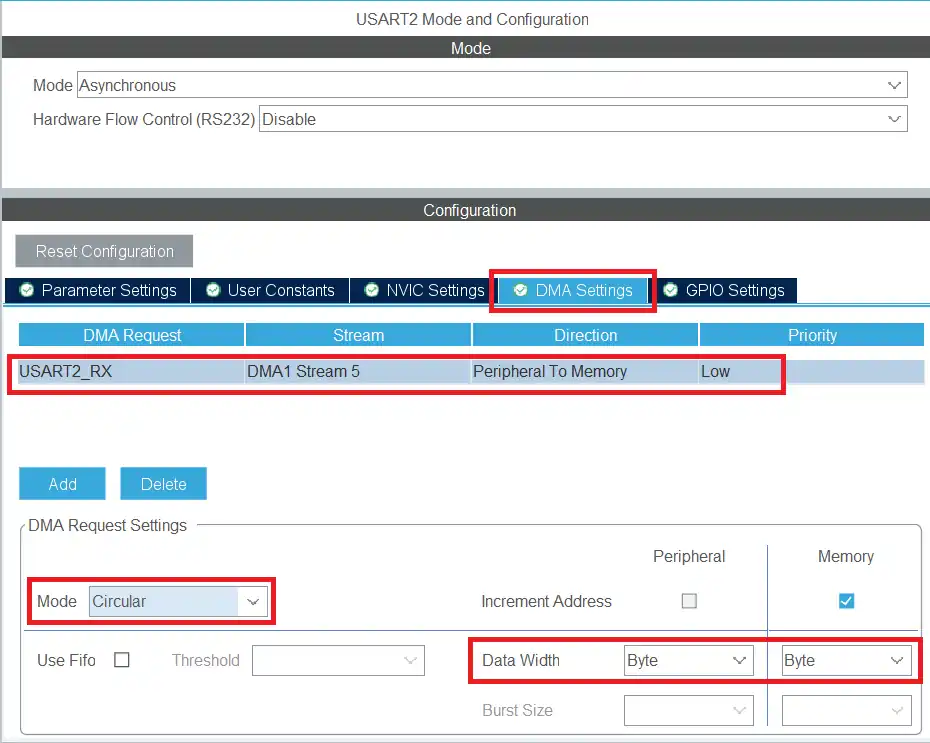
Note: The DMA is configured in Circular mode, which is essential when working with large or continuous data streams. In circular mode, once the DMA reaches the end of the buffer, it automatically wraps around to the beginning and continues receiving data without stopping. This ensures that no data is lost, even if the incoming stream is longer than the buffer size or arrives continuously.
STM32 UART IDLE Line DMA Code
If the data is in few kilobytes, we can receive the entire data in the buffer. This can be done by calling the function HAL_UARTEx_ReceiveToIdle_DMA just once. Below is the code for the same.
uint8_t RxData[4096];
uint16_t indx = 0;
int count = 0;
int main()
{
  ....
  HAL_UARTEx_ReceiveToIdle_DMA(&huart2, RxData, 4096);
  while (1)
  {
    HAL_GPIO_TogglePin(GPIOA, GPIO_PIN_5);
    HAL_Delay(1000);
  }
}The RxData buffer is defined to store a maximum of 4096 bytes of data. The indx variable will be used to store the size. The count variable tracks how many times the callback was called. In the main function we will call the function HAL_UARTEx_ReceiveToIdle_DMA to receive 4096 bytes of data in the DMA mode.
When 4096 bytes of data is received or an IDLE Line is detected before that, an interrupt will trigger and the HAL_UARTEx_RxEventCallback is called. We can process the received data in the callback.
void HAL_UARTEx_RxEventCallback(UART_HandleTypeDef *huart, uint16_t Size)
{
  indx = Size;
  count++;
}The @Size parameter of this callback represents how many data bytes has been received when the interrupt is triggered. We will store the size to the indx variable so that it can be later used in the while loop or any other function. We will also increment the count variable to track how many times this callback was called.
STM32 UART IDLE Line Reception Using DMA – Results
The image below demonstrate the output when receiving data using the UART IDLE line detection with DMA in circular mode on an STM32 microcontroller. They show how the MCU handles large data streams efficiently without losing any bytes.
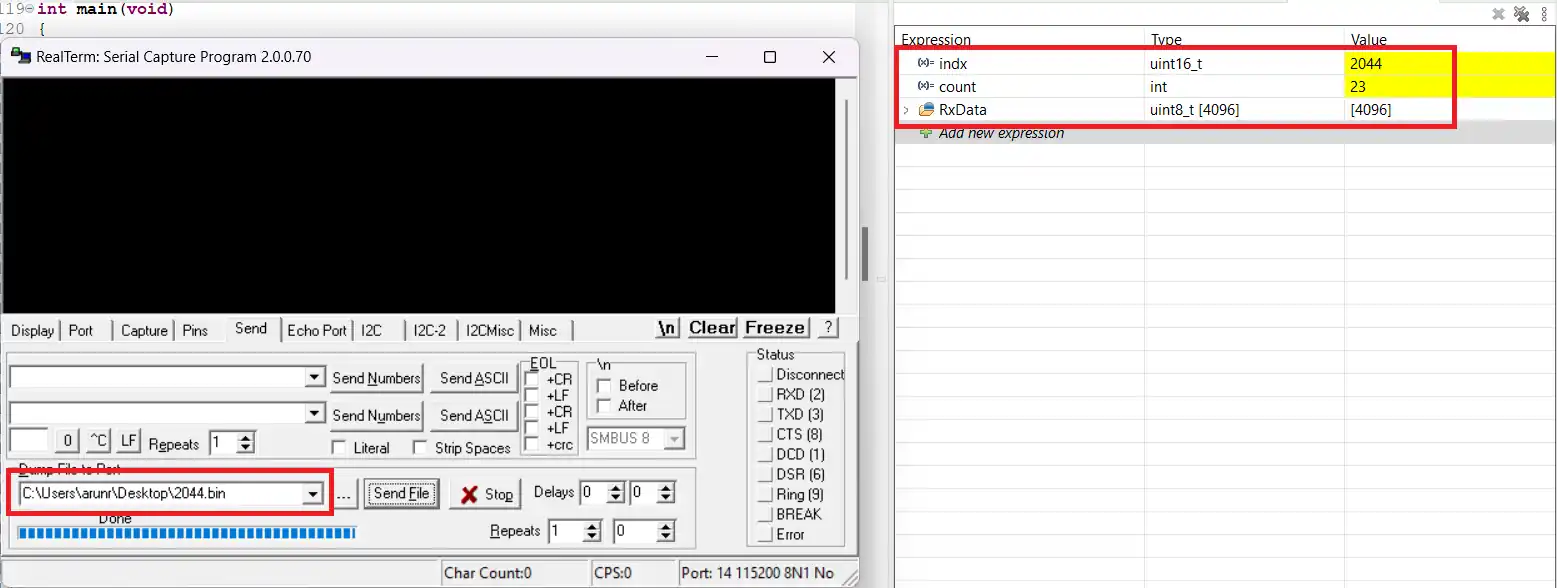
In the example above, the microcontroller successfully receives the entire dataset. The indx variable reflects the total size of the transmitted data, confirming that all bytes were captured correctly.
When transmitting large datasets, the sender often divides the data into smaller chunks (23 bytes per chunk in this example). Each pause between chunks triggers the IDLE line interrupt multiple times. With DMA in circular mode, new data is written sequentially into the buffer, and the Size variable retains its value across multiple calls. This cumulative approach ensures that the indx variable represents the total data received, not just the bytes from the most recent interrupt.
The count variable indicates how many times the interrupt callback was triggered during the transfer, providing insight into the chunking behavior of the sender.
This DMA-based method is ideal for receiving data in the range of a few kilobytes, as the buffer can store all incoming bytes in RAM. The received data can then be processed either immediately within the callback or later in the main loop. The indx variable serves as a reliable measure of the total data received.
STM32 UART DMA for Receiving Large Data
When handling very large amounts of data, often in the range of megabytes, a simple UART reception approach may fail. This happens because defining a buffer large enough to hold all the data in RAM is impractical. To overcome this, we use a smaller buffer to receive data in chunks. Each chunk is then transferred to an external memory storage, such as an SD card or external flash memory.
The following code demonstrates this approach using STM32 HAL functions.
Code Explanation
Here, RxData is a 256-byte buffer used for chunked reception, while FinalBuf represents the complete data storage in an external memory device. The indx1 variable keeps track of the current position in RxData, and indx2 tracks the position in FinalBuf. The rxcplt variable counts how many 256-byte chunks have been received, which helps update indx1 and indx2 correctly. Finally, count tracks the number of times the RX callback is triggered.
In the main function, we call HAL_UARTEx_ReceiveToIdle_DMA to start receiving data in DMA mode. This function enables the UART peripheral to receive data until the buffer is full or an IDLE line is detected.
#define RXSIZE 256
uint8_t RxData[RXSIZE];
uint8_t FinalBuf[4096];
uint16_t indx1 = 0, indx2=0, rxcplt=0;
int count = 0;
int main()
{
  ....
  HAL_UARTEx_ReceiveToIdle_DMA(&huart2, RxData, RXSIZE);
  while (1)
  {
    HAL_GPIO_TogglePin(GPIOA, GPIO_PIN_5);
    HAL_Delay(1000);
  }
}Processing Received Data in the Callback
When 256 bytes are received or an IDLE line is detected before that, an interrupt triggers the RX event callback. This is where the received data is processed and stored in the FinalBuf buffer.
void HAL_UARTEx_RxEventCallback(UART_HandleTypeDef *huart, uint16_t Size)
{
	memcpy (FinalBuf+indx2, RxData+indx1, Size);
	if (Size == RXSIZE)
	{
		rxcplt++;
		indx2 = RXSIZE*rxcplt;
		indx1=0;
	}
	else
	{
		indx2 = indx2 + (Size-indx1);
		indx1 = Size;
	}
}In the callback function:
- The
memcpyfunction copies the received data from RxData to FinalBuf. - If a full 256-byte chunk is received, rxcplt is incremented, and indx2 and indx1 are updated accordingly.
- If less than 256 bytes are received, indx2 is incremented by the actual number of bytes received, and indx1 is updated to the new position in RxData.
This approach ensures large data can be reliably received in small chunks without exhausting the MCU’s RAM.
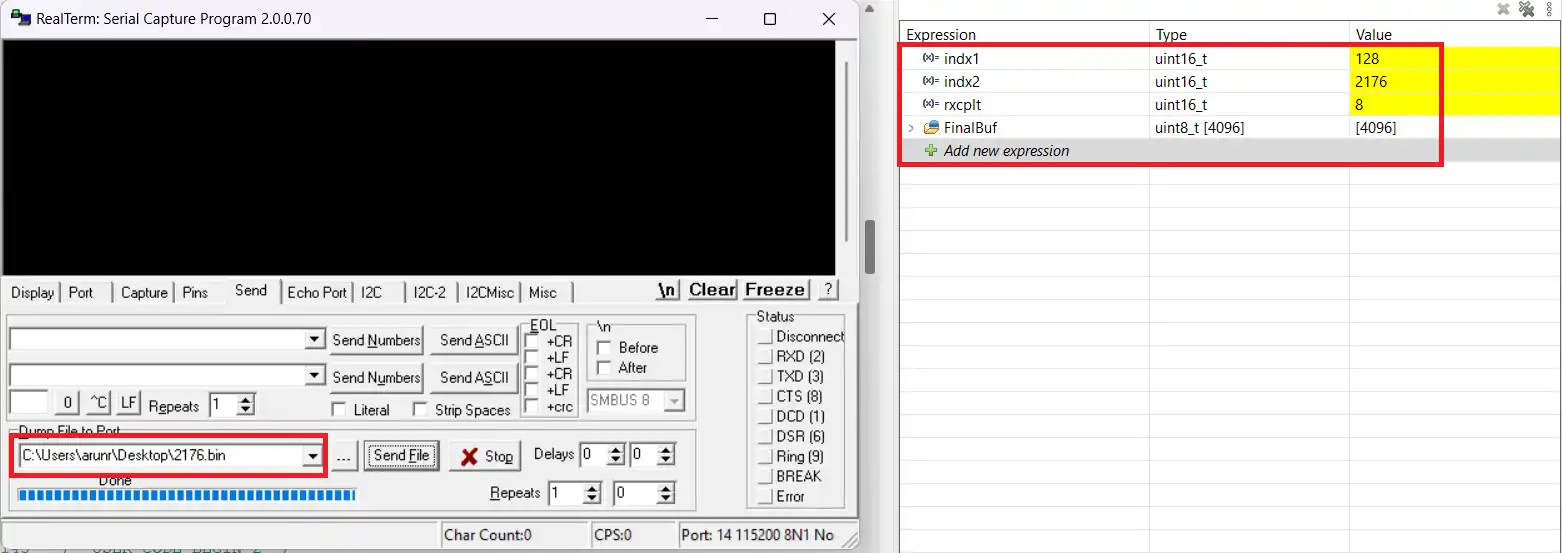
As you can see above, the indx2 variable is the same as the size of the file sent by the software. The rxcplt is 8, which represents how many times the entire 256 bytes were received. The indx1 variable represents the number of bytes received after last time the 256 bytes were received. 256*8 + 128 = 2176.
Video Tutorial
STM32 UART Receive Using IDLE Line – Video Tutorial
This video explains how to use the IDLE line detection feature in STM32 UART to receive data of unknown length efficiently. Watch the step-by-step setup, CubeMX configuration, and code implementation for both interrupt and DMA methods. Follow along with the video to fully understand how IDLE line reception works in real applications.
Watch the VideoConclusion
In this tutorial, we learned how to efficiently receive large amounts of data using STM32 UART with DMA, even when the data size exceeds the available RAM. By using a small intermediate buffer and transferring the received data to an external memory like an SD card or flash, we can handle data in megabytes without any issues. The HAL_UARTEx_ReceiveToIdle_DMA function combined with the RX event callback provides a robust solution for high-speed, large-scale data reception.
If you want to deepen your understanding of STM32 UART communication, check out our other UART tutorials, including STM32 UART Interrupt Communication, STM32 UART Polling Method, and STM32 UART DMA for Small Data Transfers. These tutorials will help you master UART in different scenarios and optimize your embedded projects.
Browse More STM32 UART Tutorials
STM32 UART Part 2 – Transmit using DMA & Interrupt
STM32 UART Part 3 – Receive Data in Blocking & Interrupt mode
STM32 UART Part 4 – How to Receive Data using UART DMA
STM32 UART Part 6 – Half-Duplex Communication (Single-Wire Mode)
STM32 UART Part 7 – How to use one-Wire Protocol
STM32 UART Part 8 – LIN Communication Tutorial
STM32 UART Part 9 – LIN Transceiver Connections & Master-Slave Communication
UART IDLE Line Project Download
STM32 UART IDLE Line FAQs
Subscribe
Login
0 Comments
Newest

