
Home ▸ Uncategorized ▸
Updated On: October 5, 2026
CANopen with STM32: Connect Objects to Variables
This is Part 7 of the CANopen with STM32 series. In Part 6, we covered the RPDO protocol and used a single RPDO message to write three objects inside the object dictionary of our STM32 node.
Every object we have used so far was only a value stored inside the object dictionary. None of those objects was connected to a variable in the STM32 application, and none of them controlled any hardware on the board. In this part, we connect objects to real STM32 variables, so that the data received over the CAN bus can be used directly by the application.
To demonstrate this, we will create two new objects, a single variable and an array that holds three LED values. We will map them into two separate RPDOs and then control three LEDs from the TSMaster software on the computer.
I am using the same STM32H562 project from the earlier parts of this series. Because this part needs many edits in the object dictionary files, I will first reset the CANopen library to its default form, so the only new objects are the ones we add today.
This is Part 7 in the STM32 CANopen series. You can check the other tutorials below:
- PART 1: Understanding CANopen protocol
- PART 2: Configuring CAN and Adding I-CUBE-CANOPEN
- PART 3: Understanding the Object Dictionary
- PART 4: Understanding the NMT Protocol
- PART 5: Understanding the SDO Protocol
- PART 6: Understanding the RPDO Protocol
CANopen with STM32: Connect Objects to Variables — Video Tutorial
This video explains how the implementation type of an object changes from managed variable to variable, and how an object in the object dictionary is linked to a variable in the STM32 project. We then map two objects into two RPDOs, update the generated object dictionary files, and control three LEDs on the STM32 board from TSMaster.
Managed Variable vs Variable
Every object in the CANopen library has an implementation type, which we select in CANopen Device Designer and which decides where the value of the object is stored. The library uses several types, and three of them matter most in this tutorial.
- A managed variable keeps its value inside the library, in the storage arrays of the
gen_objdict.cfile such asod_u8,od_u16andod_u32. Almost every object that the library provides by default uses this type, and the application has no variable of its own to read or write. - A managed constant also keeps its value inside the library, in the
od_const_u8,od_const_u16andod_const_u32arrays, but the master can only read it. One of the example of a managed constant is the subindex 0 of every array and record objects. It stores the number of sub-indexes the array has and it is a managed constant. - The third type is the variable, which is the one we use for the new objects. In this case, the object dictionary does not store the value at all. It stores the address of a variable that exists in our STM32 application, and the generated descriptor uses a pointer data type such as
CO_DTYPE_U8_PTR. When the master writes the object, the stack follows that address and changes the application variable directly, so the main loop can use the new value without any extra copy code.
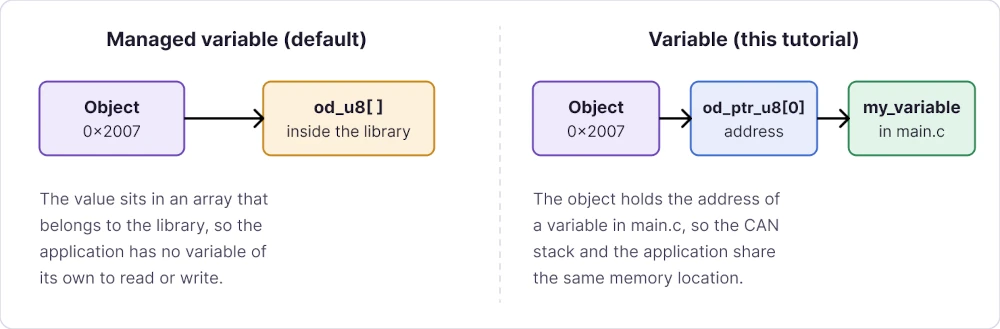
The name that we enter for the variable object in the Device Designer must be identical to the name of the variable that we define later in the STM32 project. The generated code refers to the variable by that name, so a mismatch can cause an undefined reference error at build time.
Reset the CANopen Library
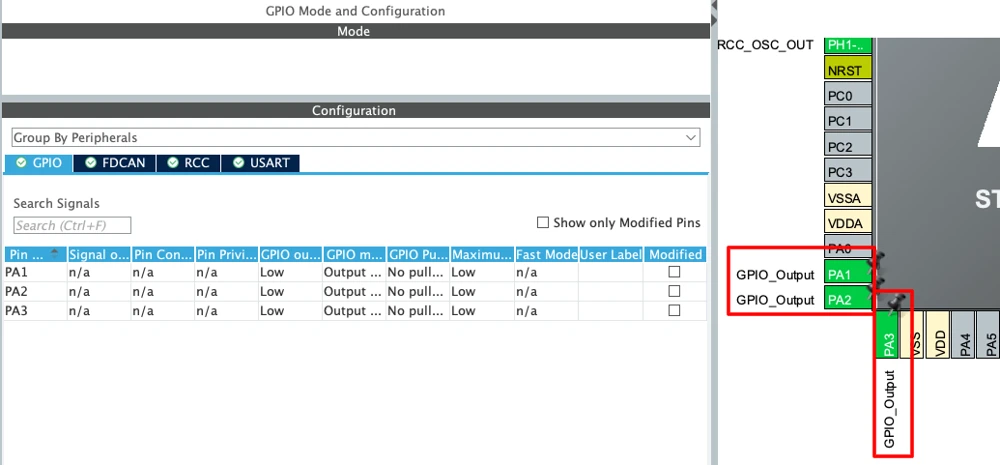
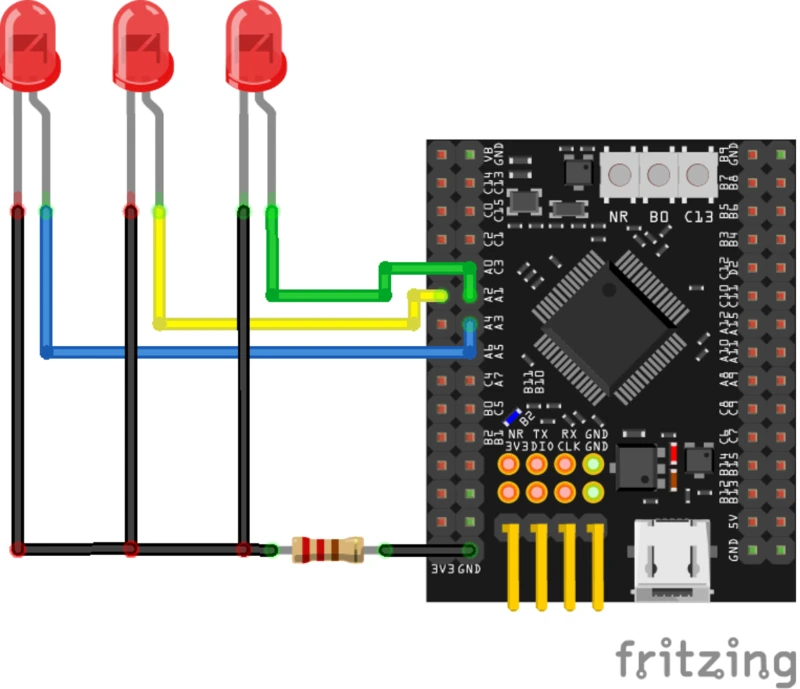
We start with the hardware side. Open the project in STM32CubeMX and set PA1, PA2 and PA3 as GPIO output pins in push-pull mode, with one LED connected to each pin. No other change is required in STM32CubeMX.
Now regenerate the project. This resets the CANopen library files to their default form, so every change from the earlier parts disappears, including the object array at index 0x2007. This is intentional, because a clean library makes it easier to see exactly what we change today.
Since the library is now reset, we need to make few modifications to make it work with our project again. In gen_define.h, change the node ID to 1, update the the 200 MHz CAN clock definition, and comment out NO_PRINTF so the printf output can work. In the interrupt source file (stm32h5xx_it.c), comment out the FDCAN interrupt handler generated by STM32CubeMX, because the CANopen library already handles that interrupt. After these edits, the relevant lines in gen_define.h look like this, and the project should build without errors.
#define CO_NODE_IDS	1

/* application-specific defines as defined in DeviceDesigner */
#define CODRV_BIT_TABLE_EXTERN 1
#define CODRV_CANCLOCK_200MHZ 1

//#define NO_PRINTFConfigure Objects in Device Designer
I am using the evaluation version of CANopen Device Designer, which cannot edit our existing project because these changes exceed its demo limit. For this reason, I will create a new project, generate the files from it, and then copy the required parts into our STM32 project.
With a licensed version, you can open the current project from the configuration folder of your STM32 project, edit it and regenerate it directly. In that case you do not need to edit the library files manually, the generated project will have all the additions.
Add Two RPDOs
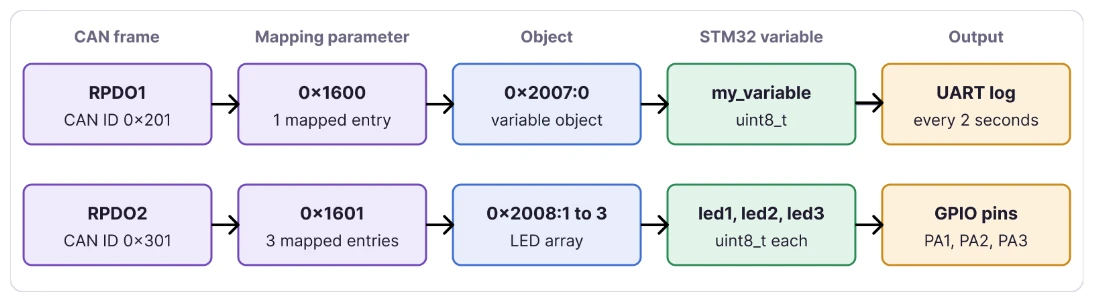
Open the object dictionary, click on the communication segment, and add a CANopen service of type PDO. Select the receive direction, set the PDO count to 2, choose dynamic mapping, keep the transmission type at 254, and enable both the inhibit time and the event timer. These parameters are already explained in Part 6. The designer creates two communication parameters at 0x1400 and 0x1401, together with two mapping parameters at 0x1600 and 0x1601.
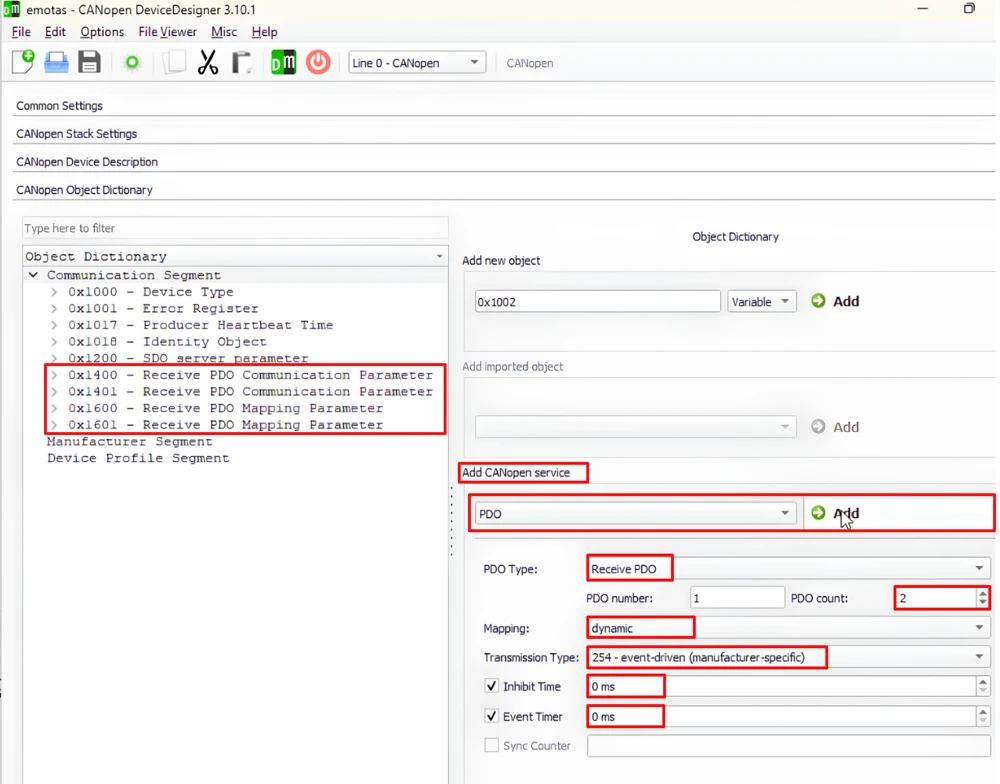
The communication parameters already match the library defaults, so we leave them unchanged. The COB-ID of 0x1400 is the node ID + 0x200, which gives 0x201. Similarly, the COB-ID of 0x1401 is the node ID + 0x300, which gives 0x301. A single RPDO is enough to carry all the data, but here I am using two RPDOs to show more clearly how the mapping and the CAN IDs work together.
Create the Objects
The manufacturer segment already have seven objects from 0x2000 to 0x2006 provided by default by the CANopen library. Therefore we will add two new objects at 0x2007 and 0x2008. The first one will be a single variable, and the second one will be an array that holds the three values to control the LEDs connected to STM32.
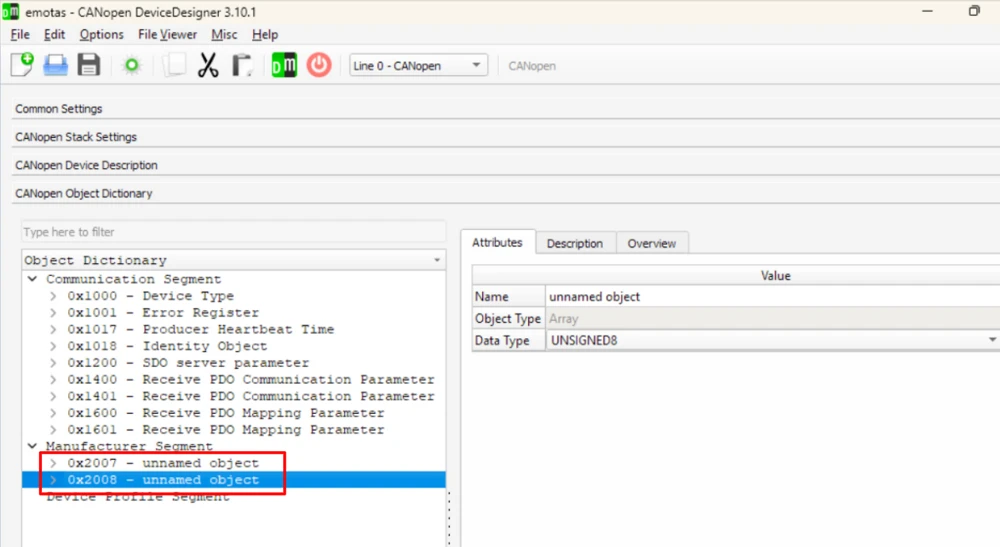
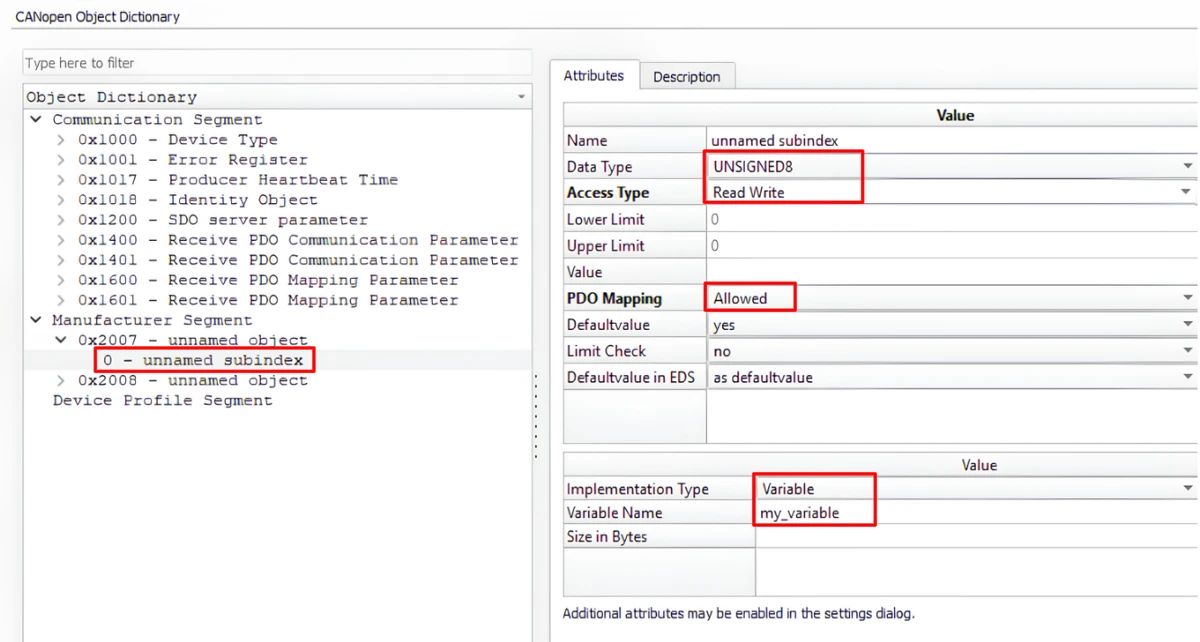
For subindex 0 of 0x2007, set the implementation type to variable and enter the name my_variable.
For the object at 0x2008, make the same change on subindex 1 and name it led1. Then add two more subindexes and name them led2 and led3. Set the data type to unsigned 8-bit and the access to read and write for all four objects. Also set PDO mapping to allowed for each one, because an object cannot be mapped into a PDO without this setting. Subindex 0 of the array already holds the value 3, so it does not need any change.
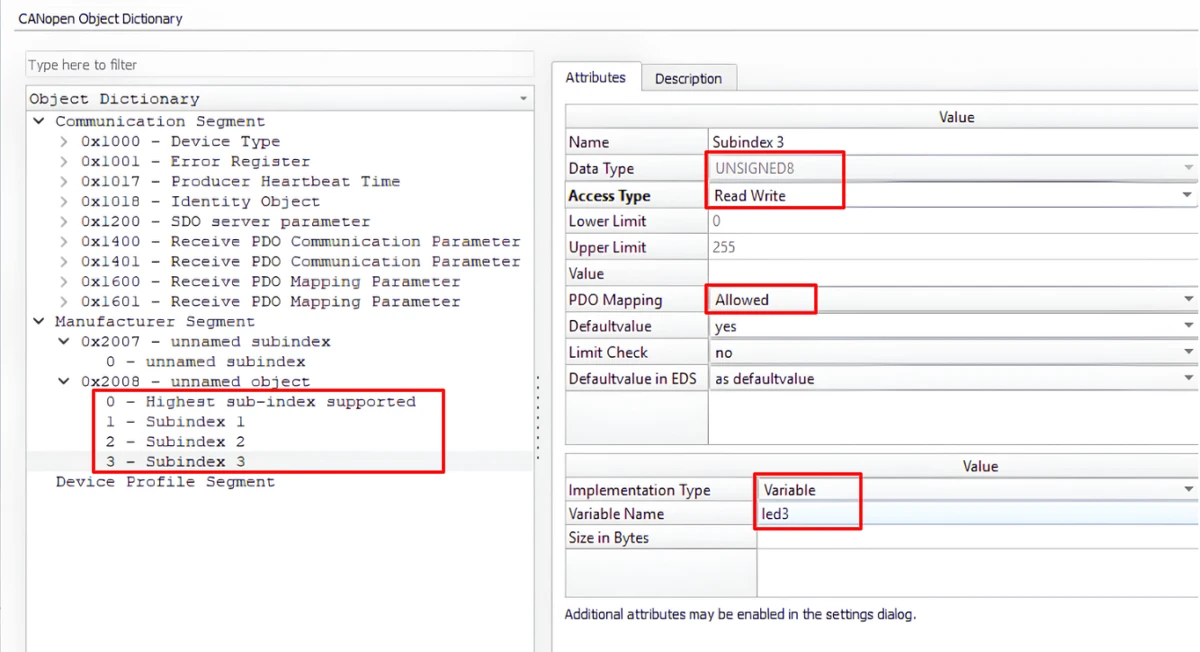
The table below summarizes the four objects.
| Index | Subindex | Variable Name | Data Type | Access | PDO Mapping |
|---|---|---|---|---|---|
0x2007 | 0 | my_variable | Unsigned 8-bit | Read and write | Allowed |
0x2008 | 1 | led1 | Unsigned 8-bit | Read and write | Allowed |
0x2008 | 2 | led2 | Unsigned 8-bit | Read and write | Allowed |
0x2008 | 3 | led3 | Unsigned 8-bit | Read and write | Allowed |
Map Objects into the RPDOs
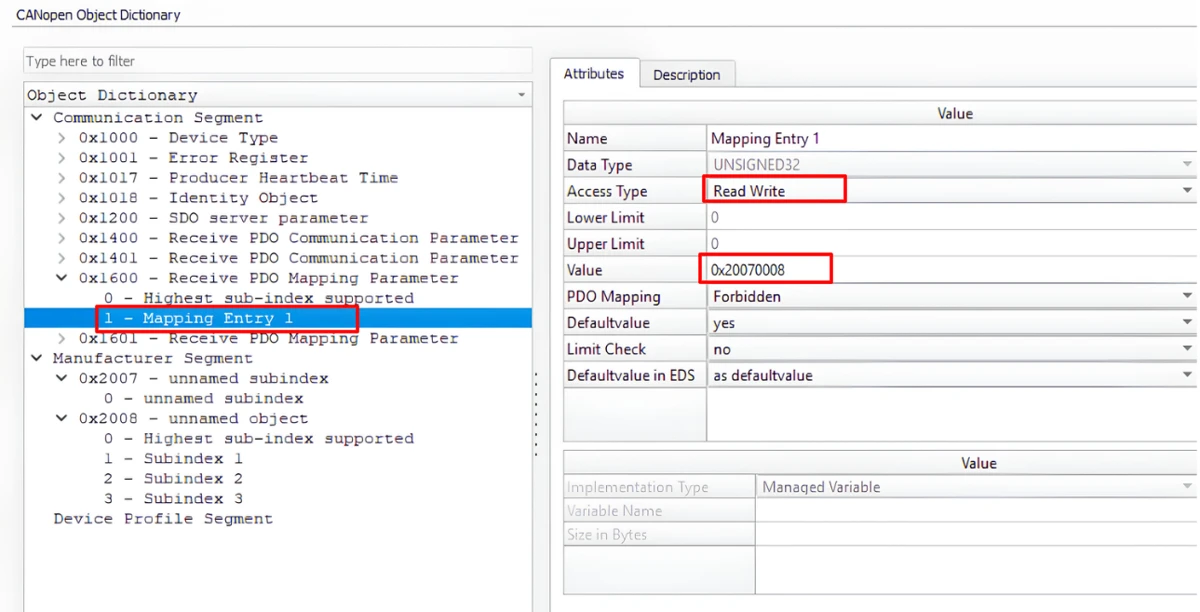
At index 0x1600, map the object at 0x2007, which creates the entry 0x20070008. As explained in PDO Mapping Entry Format, the first part (2007) is the index, the next part (00) is the subindex, and the last part (08) is the length in bits. Because this RPDO carries one object, we change the highest supported subindex to 1.
At index 0x1601, we will map the three LED objects, which all belong to 0x2008. Also make sure the highest supported subindex of 0x1601 to 3.
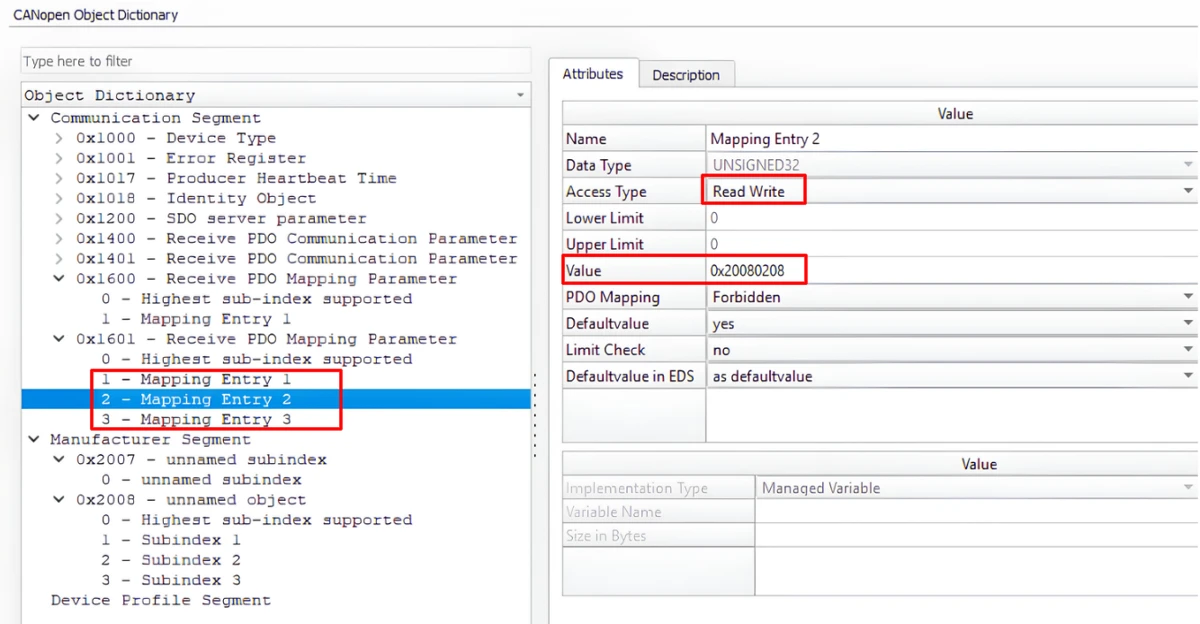
Save the project in a folder and click Generate.
Update the Define File
We added two objects, so the object count in gen_define.h increases by two. The indexes 0x1400, 0x1401, 0x1600 and 0x1601 are included in the default library, so they are already part of the existing count.
#define CO_OBJECTS_LINE_0_CNT	36+2u
#define CO_OBJECT_COUNTS 36+2uUpdate the Object Dictionary File
The gen_objdict.c file needs a lot of changes, and we make them in two passes. The first pass updates the counts and the constant arrays, and the second pass copies the descriptors from the generated file and corrects their lookup values.
Counts and Constants
The object assignment count increases by two. The description count increases by five, because 0x2007 has one descriptor and 0x2008 has four, one for subindex 0 and three for the LEDs.
#define CO_OD_ASSIGN_CNT 36+2u
#define CO_OBJ_DESC_CNT 148+5uWe do not need to modify the managed variables, because all the new subindexes we defined are variables. However, we added a few managed constants in the CANopen Device Designer. Subindex 0 of 0x2008 holds the value 3, and this value is already present in the 8-bit array. The mapping parameters also use managed constants, because subindex 0 of each mapping parameter stores the number of mapped objects. Subindex 0 of 0x1601 holds the value 3, and this value already present in the array. For 0x1600 this value is 1, which is not in the array yet, so add it at the end of the array and increase the array count by one.
static CO_CONST UNSIGNED8 CO_CONST_STORAGE_CLASS	od_const_u8[7+1] = {
	(UNSIGNED8)0u,  // 0
	(UNSIGNED8)3u,  // 1
	(UNSIGNED8)4u,
	(UNSIGNED8)2u,
	(UNSIGNED8)5u,
	(UNSIGNED8)254u,
	(UNSIGNED8)6u,  // 6
(UNSIGNED8)1u}; // 7The mapping entries are 32-bit constants, so we must add the four new values to the 32-bit array in the same order as in the Device Designer. The array count will increase by four, and the new values will occupy the positions 23 to 26.
static CO_CONST UNSIGNED32 CO_CONST_STORAGE_CLASS	od_const_u32[23+4] = {
	(UNSIGNED32)0UL,
	(UNSIGNED32)128UL,
	/* the other 20 existing values stay unchanged */
	(UNSIGNED32)2147484800UL,
	(UNSIGNED32)0x20070008,  // 23
	(UNSIGNED32)0x20080108,  // 24
	(UNSIGNED32)0x20080208,  // 25
(UNSIGNED32)0x20080308}; // 26The same rule applies to any default value that you give to a subindex, since each value must exist in the constant array of its data type.
Descriptions and Assignment
Open the generated gen_objdict.c from the CANopen device designer generated project. Copy the descriptors for 0x2007 and 0x2008 into the end of our od_description array, and copy the two new entries into the end of our od_assign array. These values are correct for the generated project but not for ours, because our library contains many more descriptors and constants.
The first correction we need to make is in subindex 0 of 0x2008. The last value in this descriptor is not the number of subindexes but an index into the 8-bit constant array. The copied index points to the value 6 in our array, which would make the library assume that 0x2008 has six subindexes. We change it to 1, which points to the value 3.
{ (UNSIGNED8)0u, CO_DTYPE_U8_PTR   , (UNSIGNED16)0u, CO_ATTR_NUM | CO_ATTR_READ | CO_ATTR_WRITE | CO_ATTR_MAP_TR | CO_ATTR_MAP_REC | CO_ATTR_DEFVAL,  (UNSIGNED16)0u},/* 0x2007:0*/
{ (UNSIGNED8)0u, CO_DTYPE_U8_CONST , (UNSIGNED16)6u, CO_ATTR_NUM | CO_ATTR_READ | CO_ATTR_DEFVAL,  (UNSIGNED16)1u},/* 0x2008:0*/  CHANGE FROM 6 to 1
{ (UNSIGNED8)1u, CO_DTYPE_U8_PTR   , (UNSIGNED16)1u, CO_ATTR_NUM | CO_ATTR_READ | CO_ATTR_WRITE | CO_ATTR_MAP_TR | CO_ATTR_MAP_REC | CO_ATTR_DEFVAL,  (UNSIGNED16)0u},/* 0x2008:1*/
{ (UNSIGNED8)2u, CO_DTYPE_U8_PTR   , (UNSIGNED16)2u, CO_ATTR_NUM | CO_ATTR_READ | CO_ATTR_WRITE | CO_ATTR_MAP_TR | CO_ATTR_MAP_REC | CO_ATTR_DEFVAL,  (UNSIGNED16)0u},/* 0x2008:2*/
{ (UNSIGNED8)3u, CO_DTYPE_U8_PTR , (UNSIGNED16)3u, CO_ATTR_NUM | CO_ATTR_READ | CO_ATTR_WRITE | CO_ATTR_MAP_TR | CO_ATTR_MAP_REC | CO_ATTR_DEFVAL, (UNSIGNED16)0u},/* 0x2008:3*/The second correction is in the od_assign entries, where the last value is the position at which the descriptors of that object start in the od_description array. The generated file uses 27 and 28, but in our project the object 0x2006 starts at 147 and occupies one position. Therefore, the object 0x2007 starts at 148, and the four-entry array 0x2008 starts at 149 and ends at 152.
{ 0x2006u, 1u, 0u, CO_ODTYPE_VAR, 147u },
{ 0x2007u, 1u, 0u, CO_ODTYPE_VAR, 148u },  // CHANGE FROM 27 to 148
{ 0x2008u, 4u, 3u, CO_ODTYPE_ARRAY, 149u },  // CHANGE FROM 28 to 149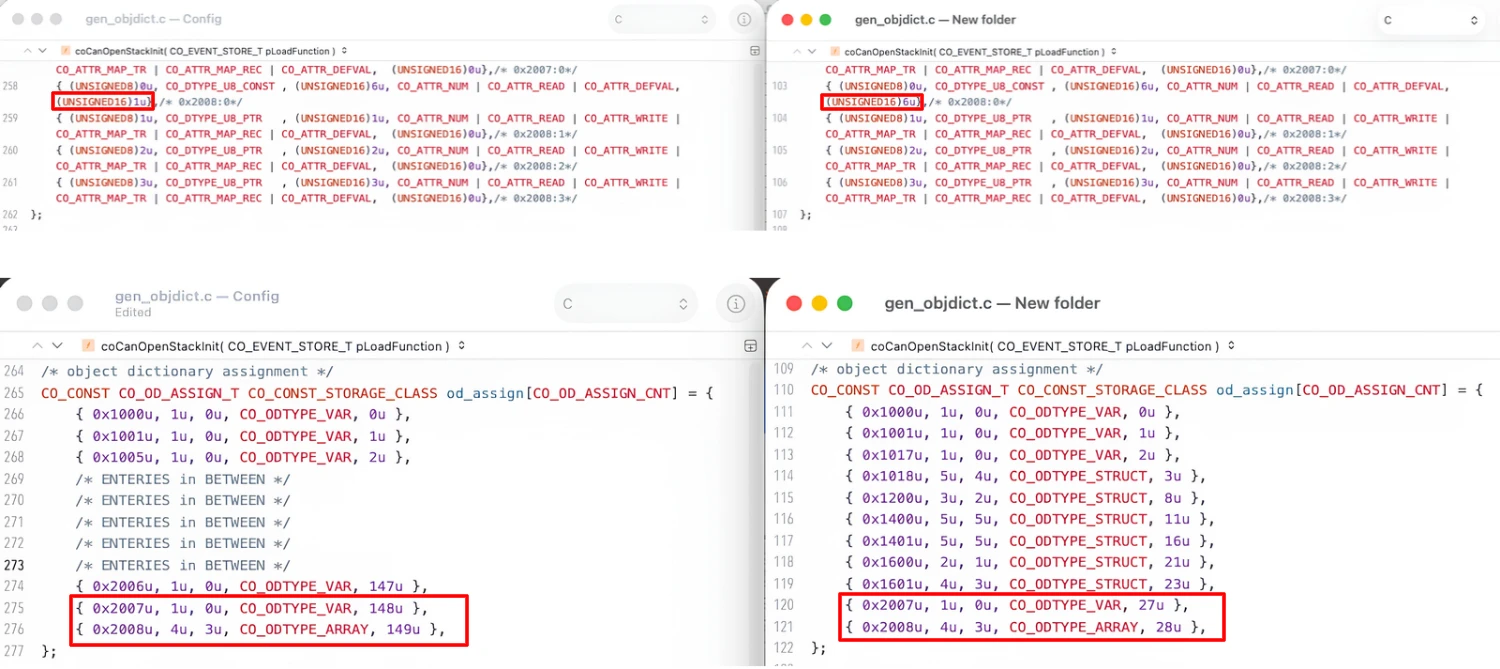
Mapping Parameters
The third correction we need to make is in the mapping parameters 0x1600 and 0x1601, which are records that hold a group of values. There are no changes in the communication parameters 0x1400 and 0x1401, as we did not modify them. We copy the two mapping descriptors from the generated file and correct their lookup values as listed below.
| Descriptor | Last Value | Points To |
|---|---|---|
0x1600:0 | 7 | Position 7 of the 8-bit array, which holds the value 1 |
0x1600:1 | 23 | Position 23 of the 32-bit array, which holds 0x20070008 |
0x1601:0 | 1 | Position 1 of the 8-bit array, which holds the value 3 |
0x1601:1 | 24 | Position 24 of the 32-bit array, which holds 0x20080108 |
0x1601:2 | 25 | Position 25 of the 32-bit array, which holds 0x20080208 |
0x1601:3 | 26 | Position 26 of the 32-bit array, which holds 0x20080308 |
{ (UNSIGNED8)0u, CO_DTYPE_U8_RMAP  , (UNSIGNED16)1u, CO_ATTR_NUM | CO_ATTR_READ | CO_ATTR_WRITE | CO_ATTR_DEFVAL,  (UNSIGNED16)7u},/* 0x1600:0*/
{ (UNSIGNED8)1u, CO_DTYPE_U32_RMAP , (UNSIGNED16)1u, CO_ATTR_NUM | CO_ATTR_READ | CO_ATTR_WRITE | CO_ATTR_DEFVAL,  (UNSIGNED16)23u},/* 0x1600:1*/
{ (UNSIGNED8)0u, CO_DTYPE_U8_RMAP  , (UNSIGNED16)2u, CO_ATTR_NUM | CO_ATTR_READ | CO_ATTR_WRITE | CO_ATTR_DEFVAL,  (UNSIGNED16)1u},/* 0x1601:0*/
{ (UNSIGNED8)1u, CO_DTYPE_U32_RMAP , (UNSIGNED16)2u, CO_ATTR_NUM | CO_ATTR_READ | CO_ATTR_WRITE | CO_ATTR_DEFVAL,  (UNSIGNED16)24u},/* 0x1601:1*/
{ (UNSIGNED8)2u, CO_DTYPE_U32_RMAP , (UNSIGNED16)2u, CO_ATTR_NUM | CO_ATTR_READ | CO_ATTR_WRITE | CO_ATTR_DEFVAL,  (UNSIGNED16)25u},/* 0x1601:2*/
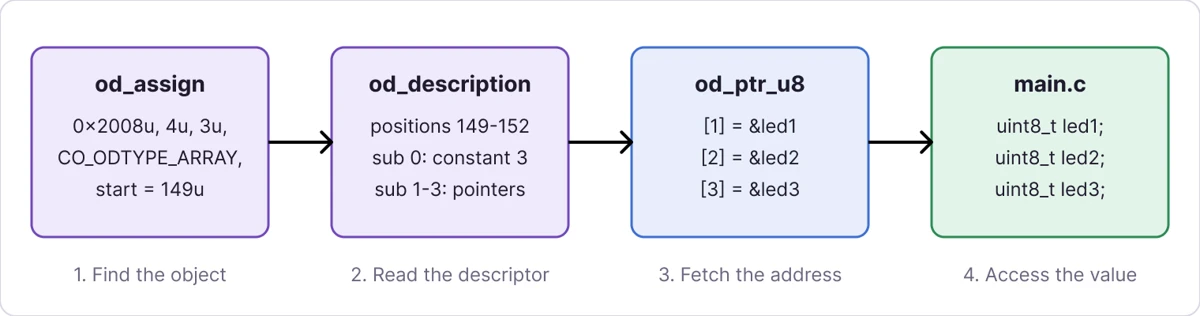
{ (UNSIGNED8)3u, CO_DTYPE_U32_RMAP , (UNSIGNED16)2u, CO_ATTR_NUM | CO_ATTR_READ | CO_ATTR_WRITE | CO_ATTR_DEFVAL, (UNSIGNED16)26u},/* 0x1601:3*/The unused subindexes can stay as they are, because subindex 0 of each mapping parameter states how many entries are valid. The diagram below shows how the stack uses these arrays to reach the LED variables.
Define STM32 Variables
Copy the Index Definitions
Copy the definitions of the new objects from the generated gen_indices.h into the same file in our project. The names are generic because we did not name the objects themselves in the Device Designer.
#define I_UNNAMED_SUBINDEX       	0x2007u
#define I_UNNAMED_OBJECT         	0x2008u
#define  S_SUBINDEX_1             	0x1u
#define  S_SUBINDEX_2             	0x2u
#define  S_SUBINDEX_3             	0x3u
#define S_NUMBER_OF_ENTRIES 0x0uDeclare the Variables
Now we need to define the four unsigned 8-bit variables in main.c. The variables name should be the same as defined the the CANopen device designer.
/* USER CODE BEGIN 0 */

uint8_t my_variable = 0;
uint8_t led1 = 0;
uint8_t led2 = 0;
uint8_t led3 = 0;Also define the same variables as external variables inside the gen_objdict.c. This file also contains the od_ptr_u8 array, which stores the address of each linked variable, and we can copy the whole block from the generated file.
/* definition of application variables */
extern uint8_t my_variable;
extern uint8_t led1;
extern uint8_t led2;
extern uint8_t led3;

static UNSIGNED8 CO_CONST_STORAGE_CLASS * CO_CONST 	od_ptr_u8[4] = {
	&(my_variable) /* 0x2007:0 */,
	&(led1) /* 0x2008:1 */,
	&(led2) /* 0x2008:2 */,
&(led3) /* 0x2008:3 */};The od_data_variables structure must also refer to this array, and in our file the entry should be right after the one for od_i32. If the compiler warns that od_ptr_u8 is declared but not used, this entry is the most likely thing that is missing.
    , &od_i32[0]
    , &od_ptr_u8[0]  // ADD THIS
    , NULL
, NULLWrite the LED Control Code
TSMaster will write and read these variables with RPDO or SDO commands, and what we do with the data is up to us. For my_variable, I am printing its value in hexadecimal on the serial console every two seconds.
void Application_Process (void)
{
	static uint32_t lastTick = 0;

	if ((HAL_GetTick() - lastTick) >= 2000)
	{
		lastTick = HAL_GetTick();
		printf ("Application Running Variable: 0x%x\r\n", my_variable);
	}
}The LED code goes into the main loop next to the call to Application_Process. Both parts run only when the node is in the operational state and the CAN bus is on.
while (1)
{
	MX_CANopen_Process();

	if ((nmtState == CO_NMT_STATE_OPERATIONAL) && (CANState == CO_CAN_STATE_BUS_ON))
	{
		Application_Process();
		HAL_GPIO_WritePin(GPIOA, GPIO_PIN_1, led1);
		HAL_GPIO_WritePin(GPIOA, GPIO_PIN_2, led2);
		HAL_GPIO_WritePin(GPIOA, GPIO_PIN_3, led3);
	}
}
Test RPDO with TSMaster
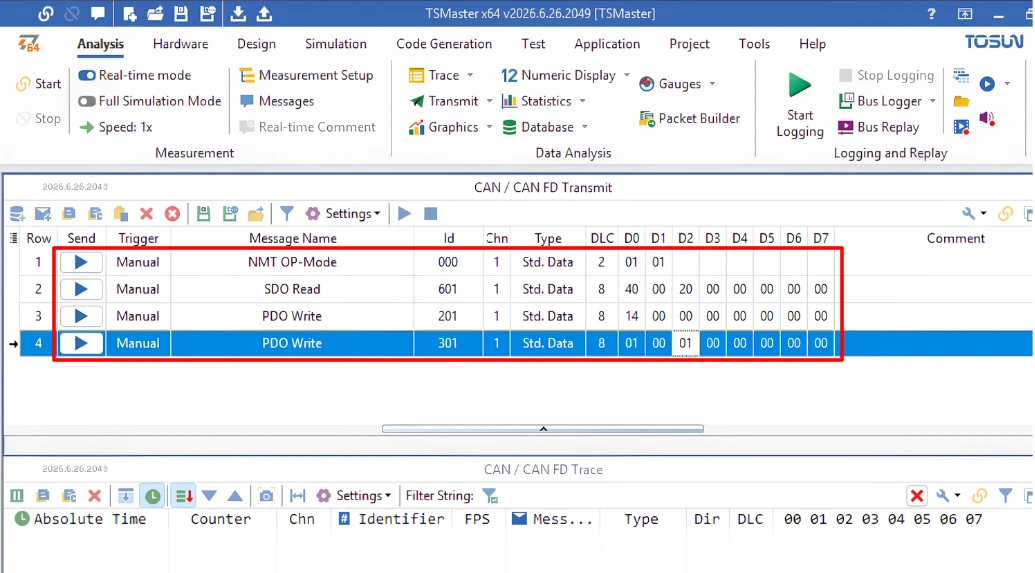
In TSMaster, I have added four commands. The NMT command puts the node into the operational mode, which is always the first step, because PDOs and our application do not run in the pre-operational mode. The SDO read command confirms the object values, since we are not using any TPDO yet. The two RPDO write commands use the CAN ID 0x201 with one data byte for 0x1600, and the CAN ID 0x301 with three data bytes, one for each LED, for 0x1601.
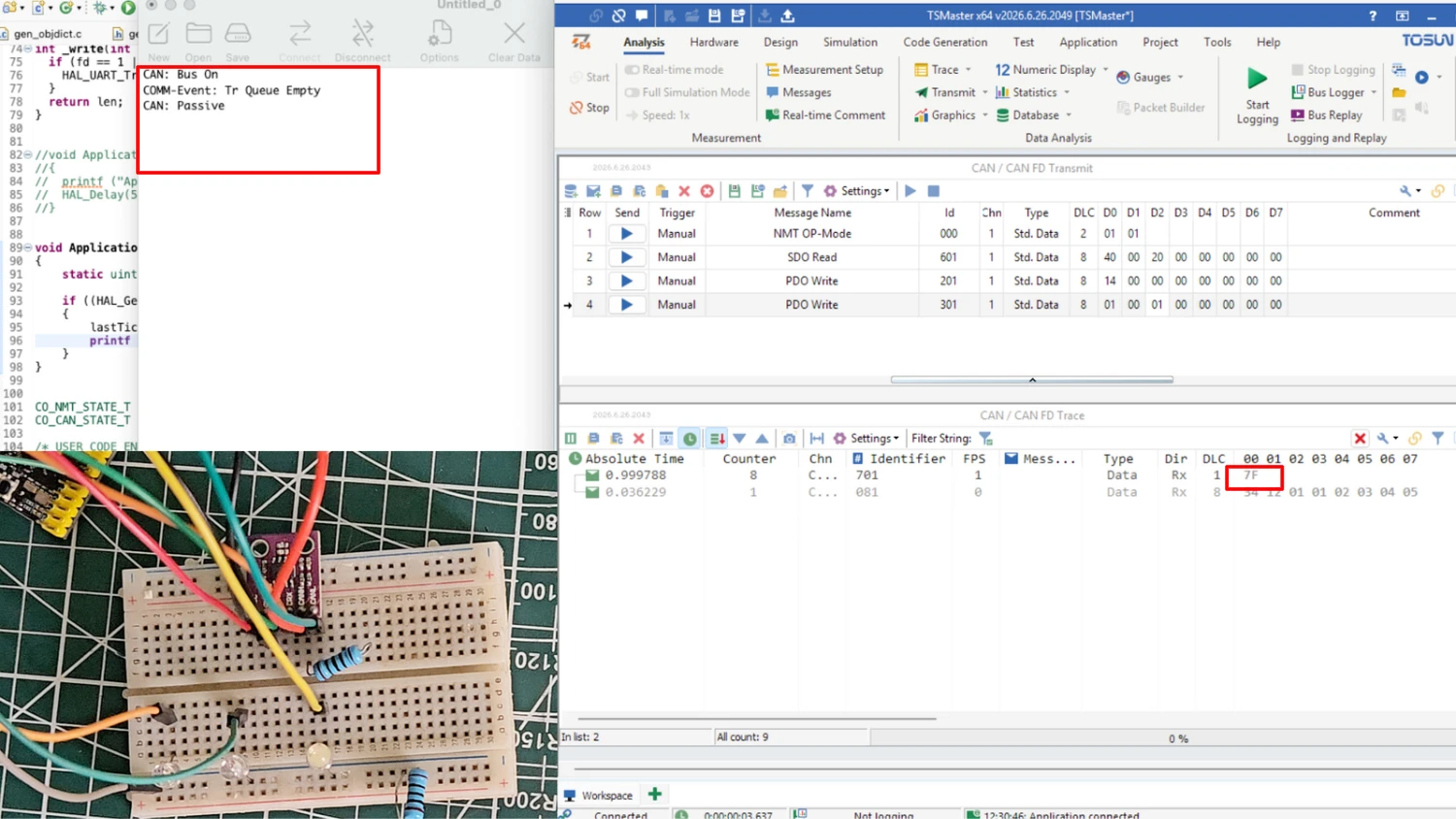
After connecting TSMaster to the CAN bus, the STM32 node is in the pre-operational mode. The heartbeat sends the value 0x7F, which indicates this mode, and the serial console does not print any application log, because our application runs only in the operational mode.
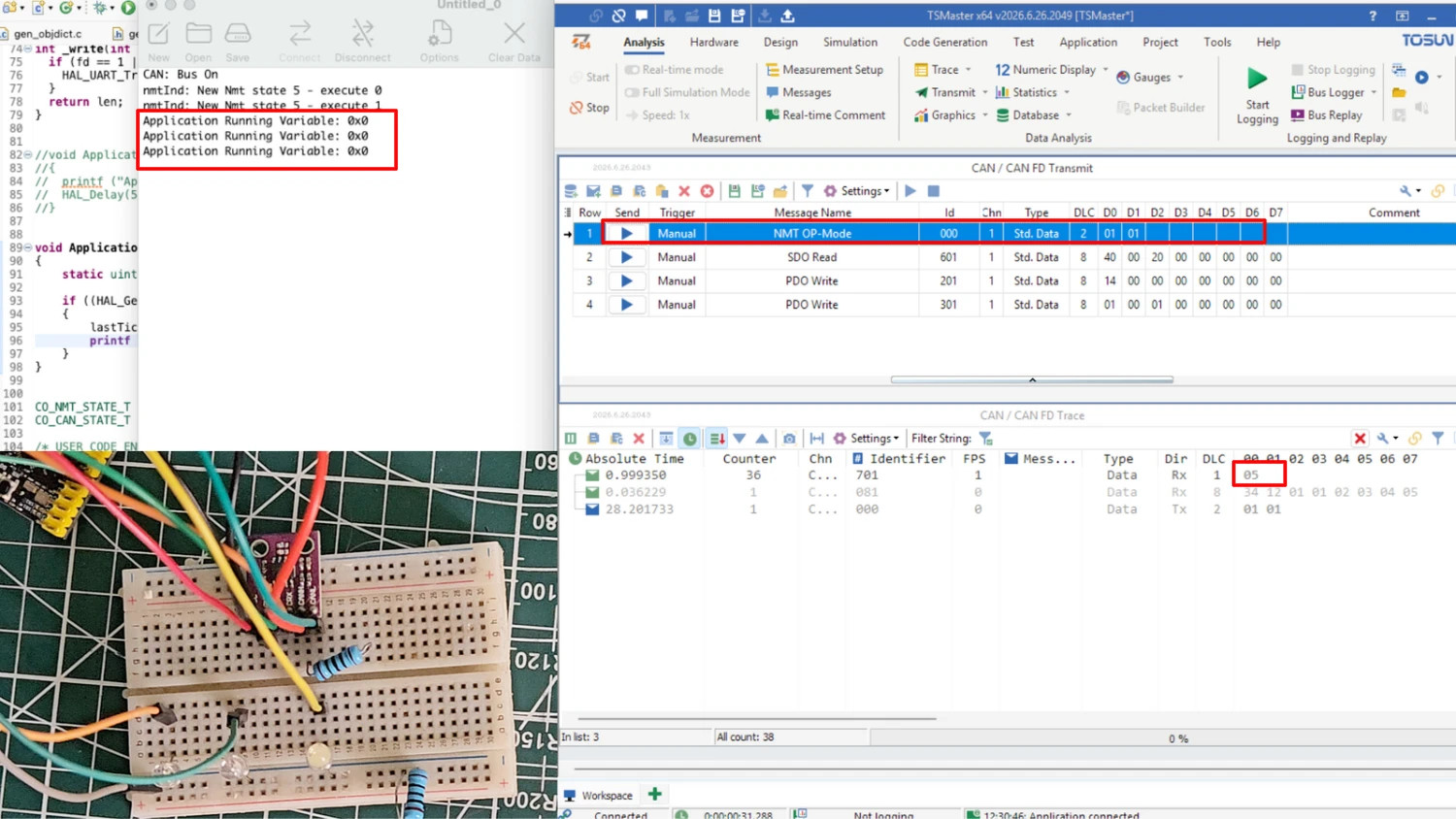
First of all, we change the STM32 node from the pre-operational mode to the operational mode by sending the NMT command. The image below shows the heartbeat changing from 0x7F to 0x05, and the serial console printing the value of my_variable every two seconds. The value is 0 at this point, and all three LEDs are off.
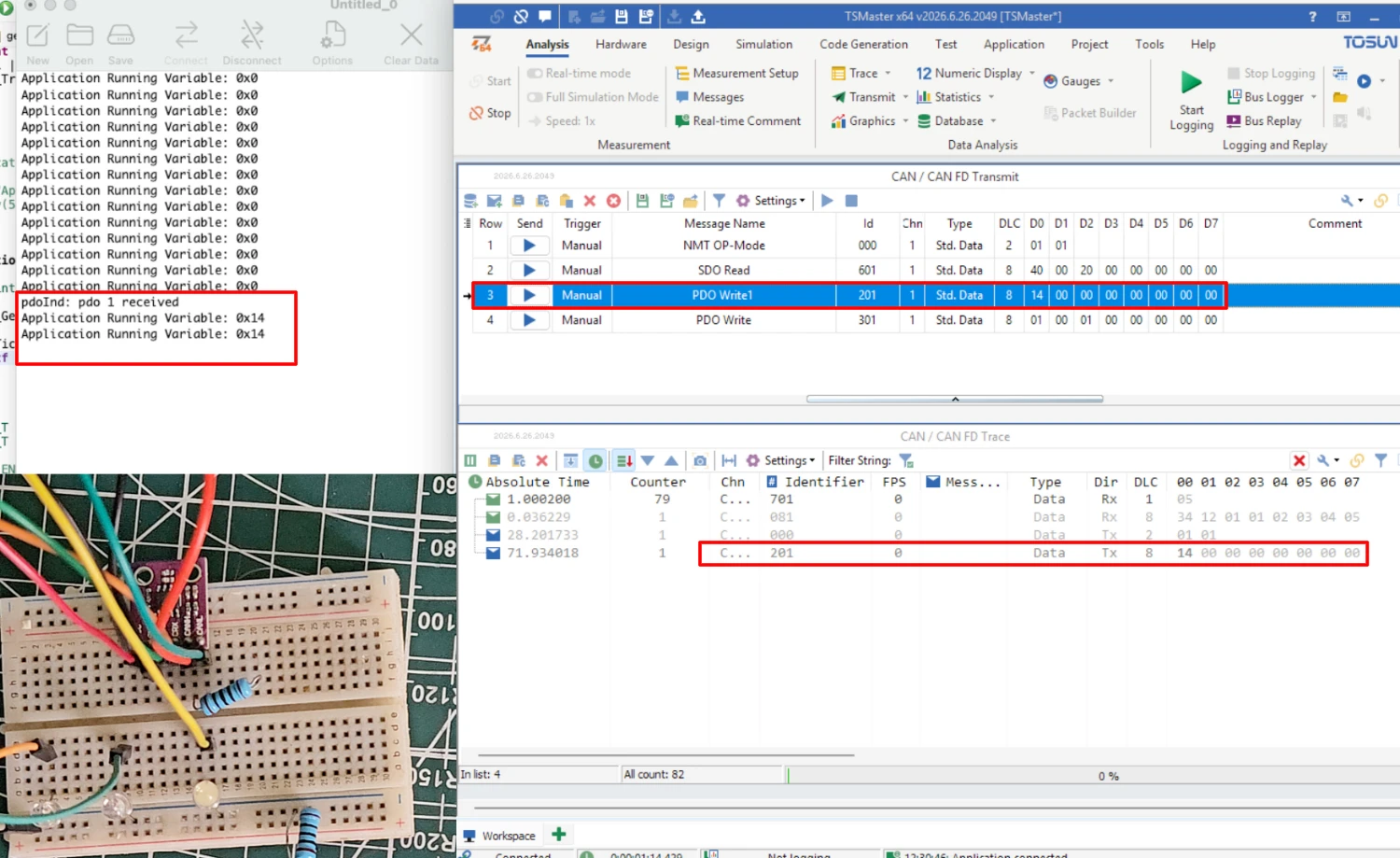
Next, we send the first RPDO to write data into my_variable. This RPDO uses the CAN ID 0x201 and carries the single data byte 0x14. The image below shows the RPDO frame in TSMaster and the serial console printing the new value 0x14.
Then we send the second RPDO to control the LEDs. This RPDO uses the CAN ID 0x301 and carries three data bytes, for example 01 00 01. A byte of 0x01 turns an LED on and a byte of 0x00 turns it off, so the first and last LEDs turn on and the second one stays off. The image below shows the board after this command.
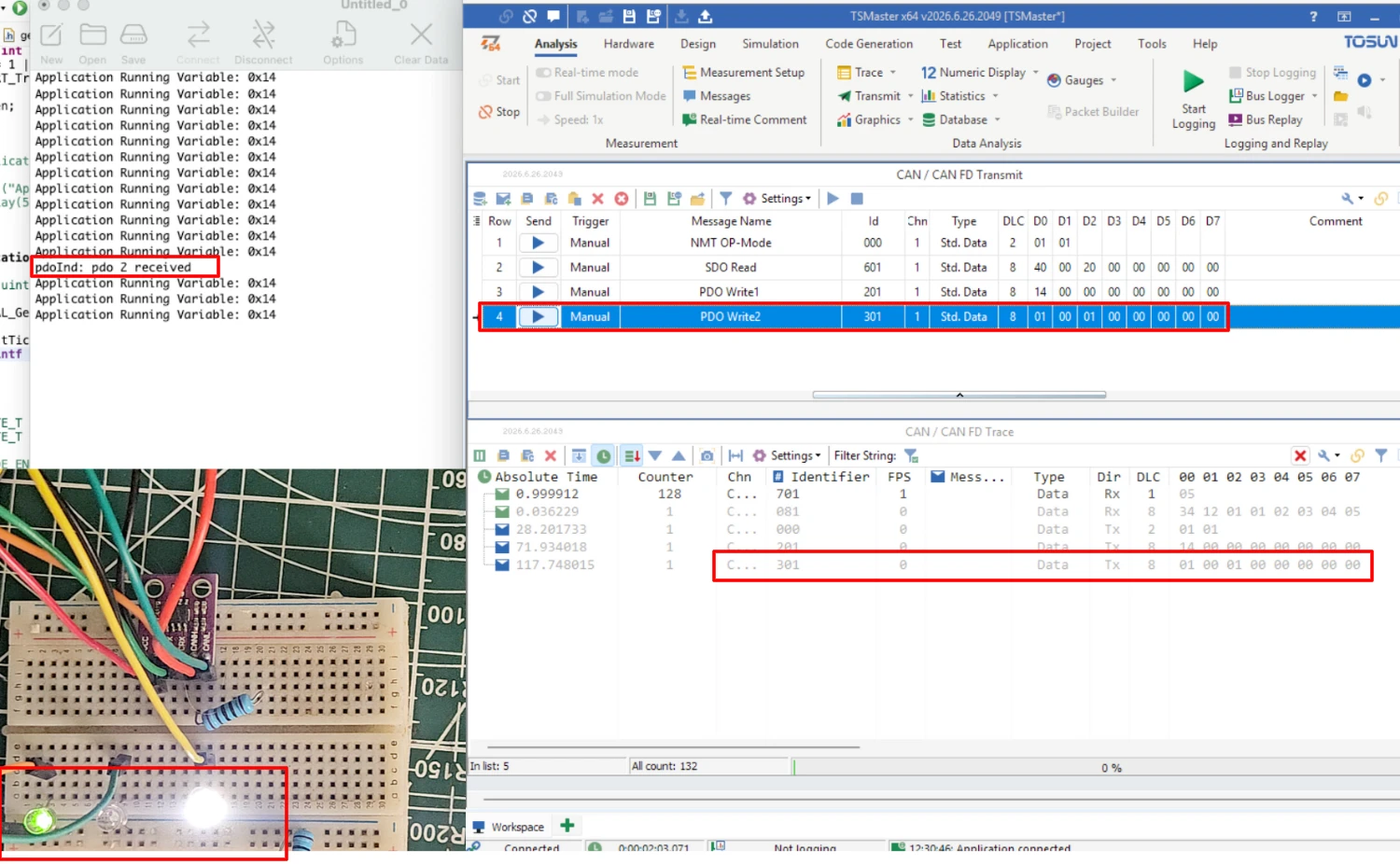
Finally, we send different data to both RPDOs to confirm that the values update every time. For example, the data 00 01 01 turns off the first LED and turns on the second and third LEDs, and a new value in the first RPDO appears on the serial console. This shows that each received byte is written directly to the STM32 variable, and that the object dictionary is now connected to the STM32 variables.
Conclusion
In this part, we connected the object dictionary of our CANopen node to real STM32 variables. We saw that a variable stores the address of an application variable, while a managed variable keeps its value inside the library. We then reset the library, created two objects with the variable implementation type, and mapped them into two RPDOs using the Device Designer.
After that, we updated the generated files in our STM32 project. This included the object counts, the constant arrays, the descriptors, the assignment positions and the mapping lookup values. We also defined the four variables that the object dictionary points to. In the TSMaster test, the first RPDO updated my_variable, and the second RPDO controlled the three LEDs on the board.
With this part, the RPDO protocol is covered completely, since the STM32 node receives data from the master and uses it to update the object dictionary or to control hardware. In the next part of this series, we will work with the TPDO, where the STM32 node sends data to the CANopen master, and we will monitor that data in TSMaster.
Download STM32 CANopen Variable Mapping Project Files
CubeMX project files and HAL source code with the objects at 0x2007 and 0x2008 linked to STM32 variables and mapped into two RPDOs, tested on real hardware. Free to download — support the work if it helped you.
Browse More STM32 CANopen Tutorials

Subscribe
Login
0 Comments
Newest