

Home ▸ STM32 Tutorials ▸
STM32 Custom Bootloader Tutorial: Application Validation Using Magic Number
In this tutorial, we continue the STM32 custom bootloader series and move to Part 2, where we focus on application validation. In Part 1, we created separate projects for the bootloader and the application. We also divided the flash memory correctly and implemented the jump from the bootloader to the application.
Now we add an important safety layer to the bootloader. Before jumping to the application, the bootloader will first validate it. This step is critical because an invalid or corrupted firmware can crash the system or leave the device unusable.
In this part, we implement a magic number–based validation method. The application places a fixed magic number at a known flash address inside the application header. During startup, the bootloader reads this value and checks whether it matches the expected constant. If the value matches, the application is considered valid and safe to execute.
This approach is simple, fast, and widely used in real-world bootloader designs. It also forms the foundation for more advanced checks such as application size and CRC, which we will implement in the next part of this series.

Understanding Application Validation in STM32 Bootloader
Before a bootloader jumps to an application, it must make sure that the application is safe to run. This process is called application validation. Without validation, the bootloader may jump to a corrupted or incomplete firmware, which can cause the system to crash or behave unpredictably.
Let’s understand the key ideas behind this validation step.
Why Application Validation Is Important
In many systems, the application is updated using OTA or external flashing tools. During this update process, the firmware can get corrupted due to power loss, communication errors, or incomplete transfers. If the bootloader blindly jumps to such an application, the device may stop working.
Application validation helps avoid this situation. The bootloader first checks whether the application meets certain conditions. Only if these checks pass, the bootloader transfers control to the application. If the validation fails, the bootloader stays active and waits for a new firmware update. This makes the system more reliable and safer to use.
What Is a Magic Number
A magic number is a fixed constant value that uniquely identifies a valid application. This value is chosen by the developer and remains the same across all versions of the application. It acts like a signature that tells the bootloader that the application is genuine.
During startup, the bootloader reads the magic number stored in the application header. If the value matches the expected constant, the bootloader assumes that the application was built correctly. If the value does not match, the bootloader treats the application as invalid and stops the jump process.
Where the Application Header Is Stored
The application header is stored at a fixed and known flash address. This address is outside the main application code region but still within the internal flash memory. Keeping the header at a fixed location allows the bootloader to always find it, regardless of the application size.
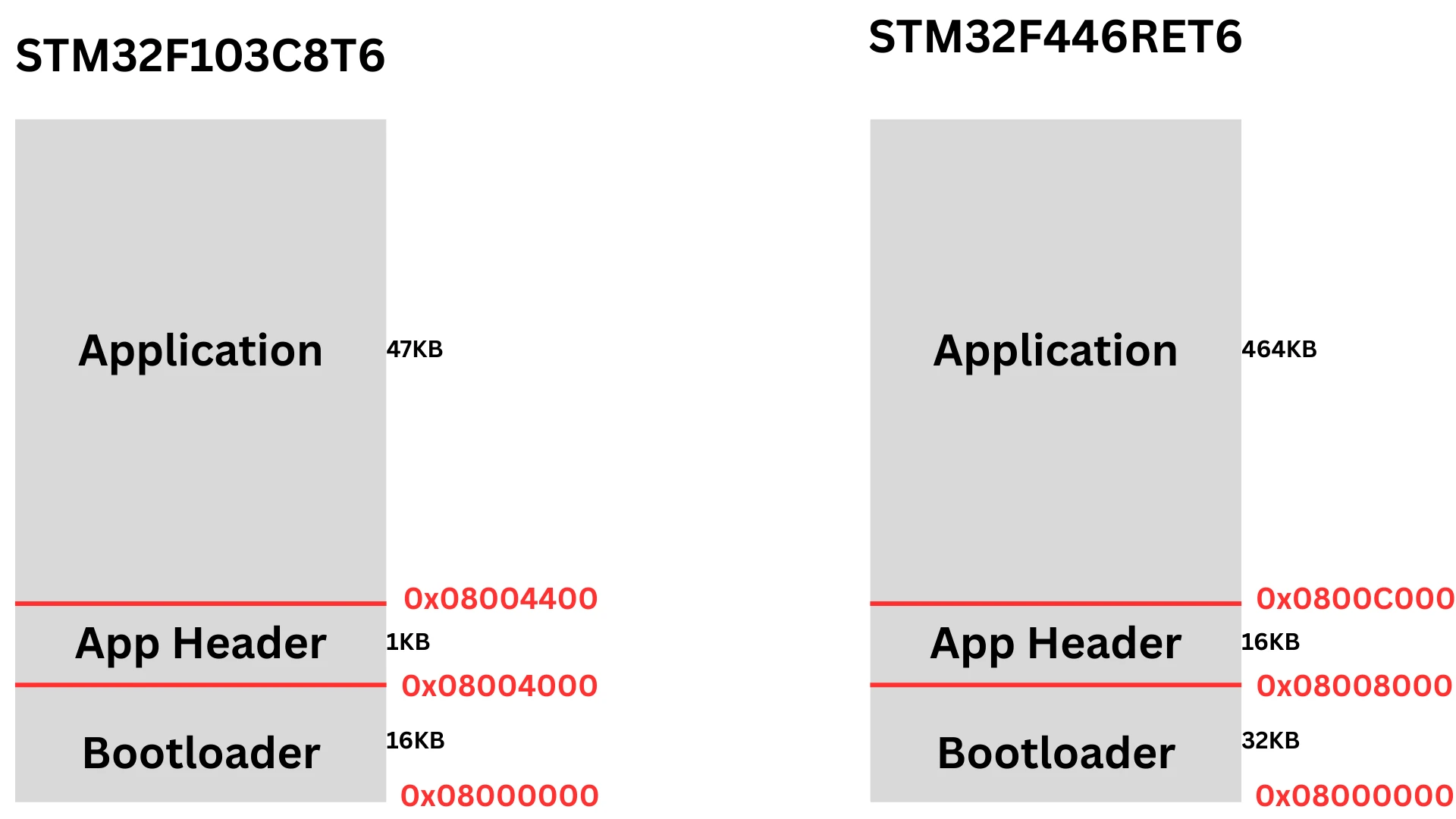
In this project, the application header is placed at the end of the bootloader region and before the application code. This layout keeps the header separate from the application binary and prevents it from being overwritten accidentally. The bootloader reads the header directly from this address to perform the validation checks.
Creating app_header.h for Application and Bootloader
Before using the application header in code, we first need a common header file. This file will define the structure used by both the bootloader and the application. Using the same header on both sides avoids mismatch issues and keeps the validation logic clean.
Purpose of app_header.h
The app_header.h file defines the layout of the application header stored in flash. This header acts as a contract between the bootloader and the application. The application writes the data, and the bootloader reads and validates it.
By keeping this definition in a separate header file, we ensure consistency. Any change made to the structure will automatically apply to both projects.
Defining the app_header Structure
Inside app_header.h, we define a structure that holds all the metadata related to the application. This includes the magic number, application size, CRC, and version. Each field has a specific purpose during validation and update.
The magic number is used in this part of the tutorial. The size and CRC will be used in later parts of the series.
A typical definition looks like this.
typedef struct
{
    uint32_t magic;
    uint32_t size;
    uint32_t crc;
    uint32_t version;
} app_header_t;This structure must match exactly in both the bootloader and the application. Even a small change in order or size can break the validation logic.
Application Side Implementation of Magic Number
On the application side, we need to store the magic number in a way that the bootloader can always find it. For this purpose, we use a dedicated application header structure and place it at a fixed flash address. This ensures that the bootloader and the application follow the same agreement for validation.
Let’s see how this is implemented step by step.
Creating and Using app_header Structure
First, we define a structure that represents the application header. This structure stores important metadata such as the magic number, application size, CRC, and version. Both the bootloader and the application use the same structure definition, which avoids any mismatch during validation.
The application then creates a constant instance of this structure and fills in the magic number. For now, the other fields are kept as zero and will be used in Part 3 of this series.
__attribute__((section(".header")))
const app_header_t app_header =
{
    .magic   = APP_MAGIC_VALUE,
    .size    = 0,   // will be used in Part 3
    .crc     = 0,   // will be used in Part 3
    .version = 0
};This structure becomes part of the application image and is later read by the bootloader during startup.
Placing app_header at a Fixed Flash Address
The application header must be stored at a fixed and known flash address so that the bootloader can always locate it. This address is defined in the linker script using a dedicated memory region named APP_HEADER.
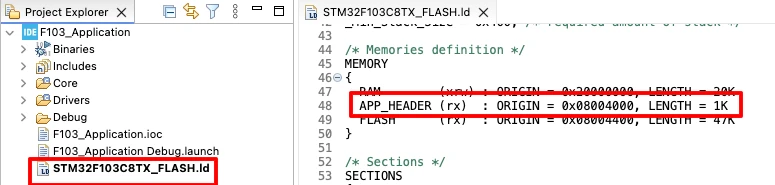
When the bootloader starts, it reads the application header directly from this fixed address. Since the address never changes, the validation logic stays simple and reliable.
Why Section Attribute Is Required
The section attribute forces the compiler to place the application header into a specific linker section instead of the normal application code area. Without this attribute, the header would be merged into the application flash region.
To make sure the linker does not remove this section during optimization, we also define it explicitly in the linker script using the KEEP attribute.
.header :
{
    KEEP(*(.header))
} > APP_HEADERSince the application header lies outside the main application flash region and is not directly referenced by the code, the linker may otherwise discard it. Using the section attribute together with KEEP guarantees that the magic number is always placed at the expected flash address, allowing the bootloader to validate the application correctly.
Rest of the Application Code
Apart from adding the application header, no other changes are required in the application code. The remaining code stays exactly the same as shown in the previous tutorial.
The vector table relocation, peripheral initialization, UART prints, and LED toggling logic are unchanged. This confirms that the bootloader validation logic works independently and does not affect normal application behavior.
Bootloader Side Validation Logic
On the bootloader side, we implement the logic that decides whether the application is safe to execute. The bootloader performs this check immediately after startup and before jumping to the application. If any validation step fails, the bootloader stays active and signals the error.
First of all copy the app_header.h file we created in the application to the bootloader project.
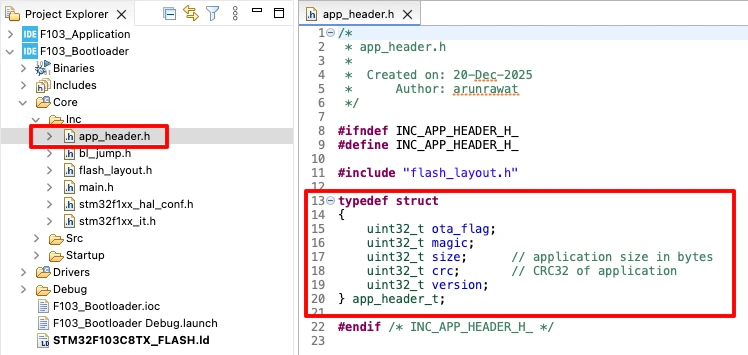
Reading Application Header from Flash
The bootloader first reads the application header directly from flash memory. Since the application header is stored at a fixed address, the bootloader can access it using a pointer.
The header address is defined using APP_HEADER_ADDR, and the data is cast to the app_header_t structure. This allows the bootloader to easily read fields such as the magic number.
uint32_t HDR_ADDR = APP_HEADER_ADDR;
const app_header_t *app_hdr = (const app_header_t *)HDR_ADDR;At this point, the bootloader has access to the application metadata stored by the application itself.
Magic Number Validation Logic
The first validation step is checking the magic number. This is the most basic and fastest way to confirm that a valid application is present. The bootloader compares the magic number stored in flash with the expected constant value.
if (app_hdr->magic != APP_MAGIC)
return 1;If the values do not match, the function immediately returns an error. This prevents the bootloader from jumping to an unknown or corrupted application image.
Reset Handler Address Check
If the magic number check passes, the bootloader performs a second safety check. It verifies the reset handler address of the application. The reset handler is read from the application vector table, which is located at the application start address plus an offset of 4 bytes.
uint32_t reset_handler = *(uint32_t *)(APP_START_ADDR + 4);This address must point to a valid flash location. To verify this, the bootloader checks whether the address lies inside the flash memory range.
if ((reset_handler & 0xFF000000) != 0x08000000)
return 2;If the reset handler address is invalid, the bootloader treats the application as unsafe and stops the jump process.
When both checks pass, the function returns 0, which means the application is valid.
return 0; // VALIDComplete bootloader_is_app_valid() Function
int bootloader_is_app_valid(void)
{
uint32_t HDR_ADDR = APP_HEADER_ADDR;
const app_header_t *app_hdr = (const app_header_t *)HDR_ADDR;
/* 1. Magic number check */
if (app_hdr->magic != APP_MAGIC)
    return 1;
/* 2. Reset handler sanity check */
uint32_t reset_handler = *(uint32_t *)(APP_START_ADDR + 4);
if ((reset_handler & 0xFF000000) != 0x08000000)
    return 2;
return 0; // VALID
}This function keeps the validation logic simple and efficient. If any check fails, the bootloader immediately stops the jump process. Only when all conditions are satisfied does the bootloader allow execution of the application.
Bootloader Main Flow and Error Handling in main()
Inside the main function, the bootloader first prints a debug message and then checks the application validity.
HAL_UART_Transmit(&huart1, (uint8_t *)"Inside Bootloader!!\r\n", 21, 100);

if (bootloader_is_app_valid() != 0)
{
    HAL_UART_Transmit(&huart1, (uint8_t *)"Failed to Jump!!\r\n", 18, 100);
    while (1)
    {
        HAL_GPIO_TogglePin(GPIOA, GPIO_PIN_4);
        HAL_Delay(100);
    }
}

JumpToApplication();If the validation fails, the bootloader prints an error message and blinks the red LED continuously. This clearly indicates a jump failure. If the validation succeeds, the bootloader calls JumpToApplication() and transfers control to the application.
Flashing the Application and Bootloader
Once the code is ready, the next step is flashing both images into the target device. The flashing process must be done correctly, otherwise the bootloader validation will fail even if the code is correct.
Flashing Bootloader Binary
- Connect the ST-Link programmer to your STM32 board.
- Open STM32CubeProgrammer and go to the Download section.
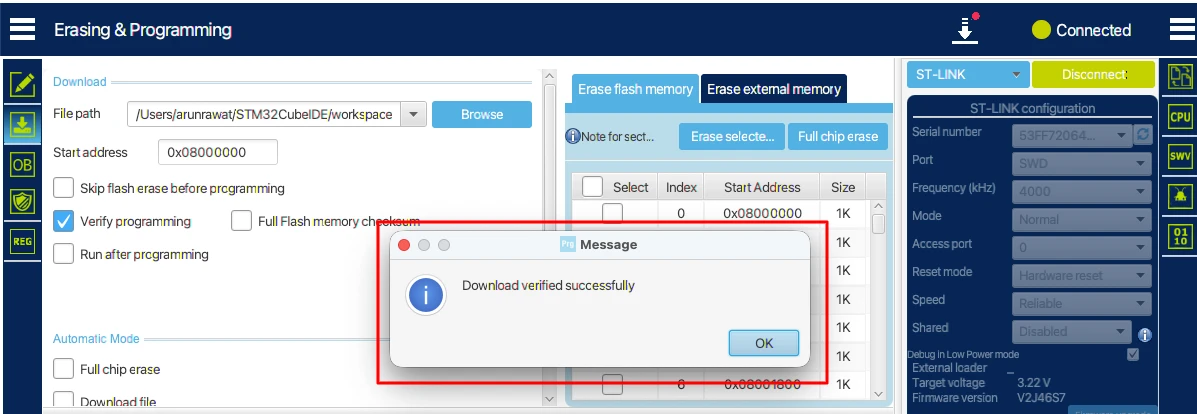
- Set the flash address to the start of flash memory (
0x08000000). - Browse and select the bootloader binary generated earlier.
- Double-check the address and click Start Programming.
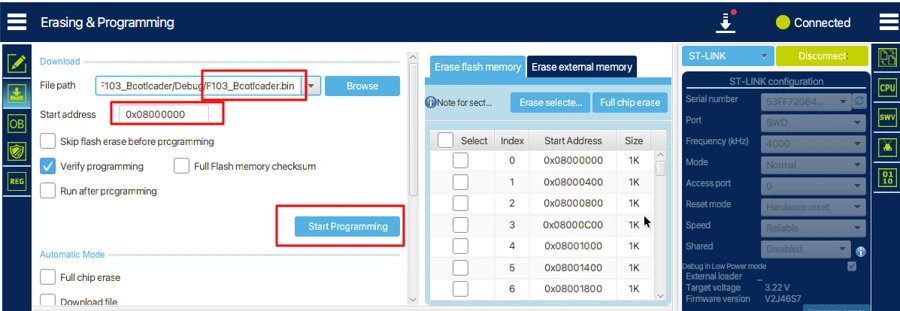
Output
The image below shows the bootloader binary successfully flashed at the start of flash memory.
Why Not Flash BIN for the Application
Flashing the application as a BIN file causes an important problem. A BIN file does not store any address or section information. It is only a raw stream of bytes.
When the programmer flashes a BIN file, it writes data sequentially starting from the selected address. Because of this, all sections inside the application, including the application header, get merged together.
In our case, the application header is supposed to be placed at a fixed APP_HEADER address. When a BIN file is used, this address remains erased, and the magic number ends up inside the application code region instead. As a result, the bootloader fails to validate the application.
Why Use ELF Instead
An ELF file preserves complete memory layout information. It contains section names, sizes, and exact flash addresses as defined in the linker script.
When flashing an ELF file, the programmer automatically writes each section to its correct address. There is no need to manually provide a flash address. The application header is placed in the APP_HEADER region, and the application code is placed in the application flash region.
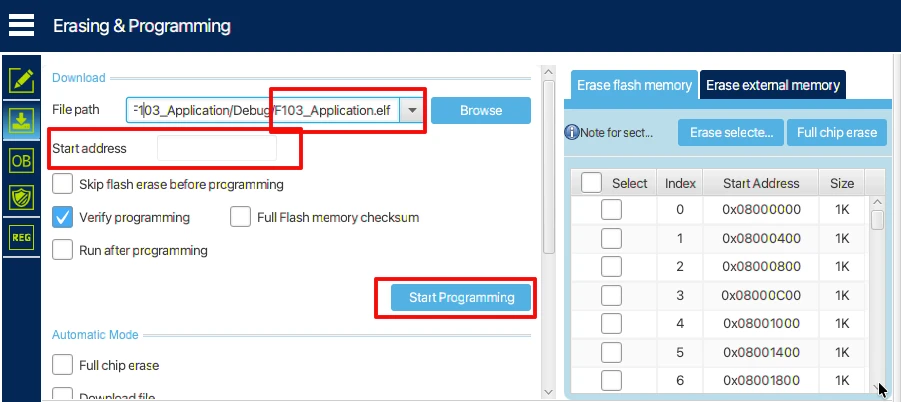
This is why flashing the application using ELF ensures that the bootloader can correctly read the magic number and validate the application.
Testing the Bootloader Validation
After flashing both images, disconnect the ST-Link and reset the board.
The gif below shows the bootloader running first and printing the startup message over UART. The bootloader then validates the application header and successfully jumps to the application.

You can see the application UART message and the green LED blinking, which confirms that the jump was successful and the application is running normally.
This confirms that the magic number validation logic is working as expected.
Video Tutorial
STM32 Custom Bootloader Part 2 – Video Tutorial
Prefer video learning? Watch this tutorial where we implement application validation in a custom STM32 bootloader. This video explains how the application stores a magic number at a fixed flash address and how the bootloader validates it before jumping to the application. You will also learn why flashing the application using ELF is important and how incorrect BIN flashing can break bootloader validation.
Watch the STM32 Bootloader Part 2 VideoConclusion
In this part of the STM32 custom bootloader series, we implemented application validation using a magic number. We created a dedicated application header, placed it at a fixed flash address, and updated the linker script to ensure it is preserved. On the bootloader side, we wrote a simple validation function that checks the magic number and verifies the reset handler address before jumping to the application. This ensures that only valid firmware is executed, making the system more reliable and safe.
This approach is very useful in real-world applications where firmware updates can fail or become corrupted. By validating the application first, the bootloader prevents the system from running faulty code, reducing crashes and improving overall device stability. We also explained why flashing the application using ELF or HEX is necessary and how it ensures that the bootloader can always find the application header correctly.
In the next part of this series, we will implement strict validation, including checking the application size and CRC along with the magic number. This will provide an extra layer of safety, ensuring that the bootloader can detect any corruption in the firmware before execution. Keep following this series to build a fully reliable and professional STM32 bootloader.
Browse More STM32 Tutorials
Display Clock on TM1637

GLCD 128×64 ST7920 interfacing with STM32

Esp8266 WebServer using STM32 HAL

How to communicate between HC-12 using STM32

STM32 ADC PART 7 – ADC External Trigger Source Selection

Modbus #7. STM32 as Slave || Writing Coils

STM32 USB CDC Tutorial: Device and Host Example Using HAL + CubeMX
STM32 Bootloader Project Download
STM32 Bootloader Validation FAQs
Subscribe
Login
0 Comments
Newest