
Understanding the CANopen Protocol
We have already covered CAN and FDCAN protocols in the past, where we saw how to transmit and receive messages from the bus and how to configure the filters to allow messages from one or more IDs. Now in this series, we will cover the CANopen protocol, which is a layer that sits on top of CAN and gives every message a defined meaning.
This is the first part of CANopen with STM32 series, where we will build a working CANopen node on an STM32 microcontroller. In this Part 1 tutorial we will cover what the CANopen protocol is, how it uses the CAN peripheral and what communication services it offers.
This series assumes you are already familiar with the CAN or FDCAN peripheral on STM32. If you are not, you should through the CAN and FDCAN tutorials on this site first. This series will not cover peripheral level details. Instead, we will stay focused on the CANopen protocol itself.
CANopen with STM32 Part 1: Understanding the CANopen Protocol — Video Tutorial
This video covers the fundamentals of the CANopen protocol before writing any code on STM32. We look at why CAN alone isn’t enough, walk through the core communication services — NMT, SDO, PDO, Heartbeat, EMCY, and SYNC — and explore the Object Dictionary and its standard index ranges, laying the groundwork for building a working CANopen node later in the series.
Why CAN Alone Is Not Enough
CAN (Controller Area Network) defines how devices talk to each other on a shared bus. It handles arbitration, error detection, and message transmission, but it says nothing about what the data inside a message actually represents. Two bytes on the bus could mean a temperature reading, a motor speed, or nothing meaningful at all. CAN is only responsible for moving bytes from one node to another, it does not care what those bytes stand for.
This is exactly the gap that CANopen fills. It is a higher level protocol built on top of CAN that defines a standard structure for interpreting the data inside those messages. Instead of every manufacturer inventing their own way of packing data into a CAN frame, CANopen gives everyone a common set of rules to follow. This is why a CANopen master built by one company can talk to a CANopen node built by a completely different company, as long as both sides follow the same standard.
CANopen introduces its own set of concepts on top of CAN, such as Node IDs, NMT, SDO, PDO, Heartbeat, Emergency messages, and the Object Dictionary. We will use all of these throughout this series.
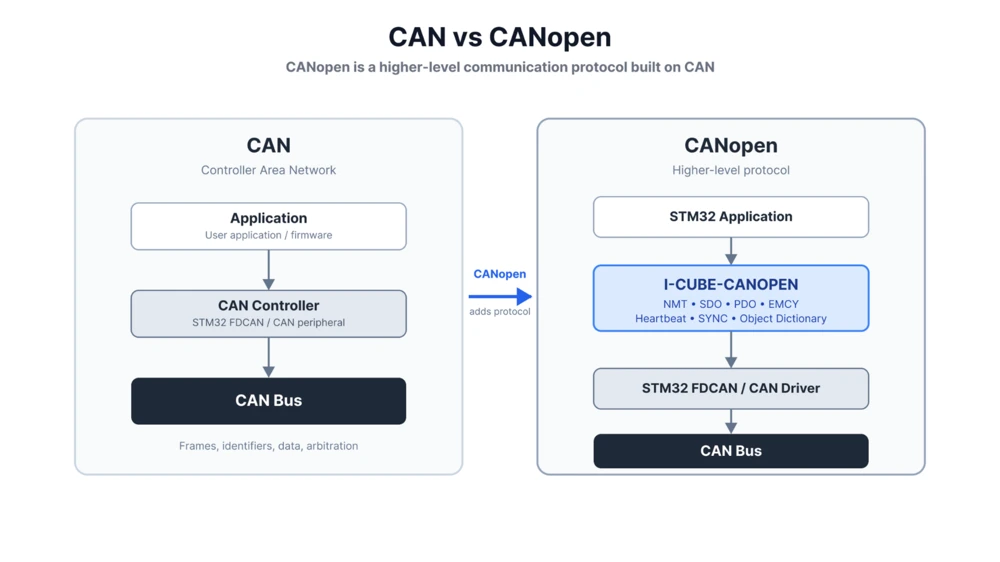
Basically, CAN is the mechanism that moves data across the bus, and CANopen is the rulebook that defines how that data should be organized and understood.
CANopen Communication Services
CANopen is a collection of communication services, and each one is designed to solve a specific problem. These are the services we will work with throughout this series.
NMT (Network Management) controls the state of a node. Every CANopen node moves through different states such as Initialization, Pre-operational, and Operational. NMT lets a master decide when a node should participate fully in the network. Think of it as the on-off switch and mode selector for a device, controlled remotely by the master.
SDO (Service Data Object) is used to read and write entries in a node’s Object Dictionary. It is used for configuring a device or checking its current parameters.
PDO (Process Data Object) is designed for the opposite priority. It moves process data with very little protocol overhead, which makes it the right choice when data needs to move quickly and frequently between nodes. Where SDO trades speed for reliability and confirmation, PDO trades some of that confirmation for speed. Therefor it is used when we want to read like live sensor readings or motor control values.
Heartbeat lets a node periodically announce that it is still alive, giving the rest of the network a straightforward way to detect if a device has stopped responding. It is a small message sent at a fixed interval, but it plays a big role in keeping a network reliable.
EMCY (Emergency) messages report error conditions from a device as soon as they happen, so other nodes on the network can react without delay. Unlike Heartbeat, which is sent on a schedule, EMCY is event driven and only shows up when something actually goes wrong.
SYNC is used to synchronize communication across nodes, which becomes important when PDOs need to be transmitted in a coordinated, synchronous manner. If multiple nodes need to sample or update data at the same moment, SYNC is what keeps them aligned.
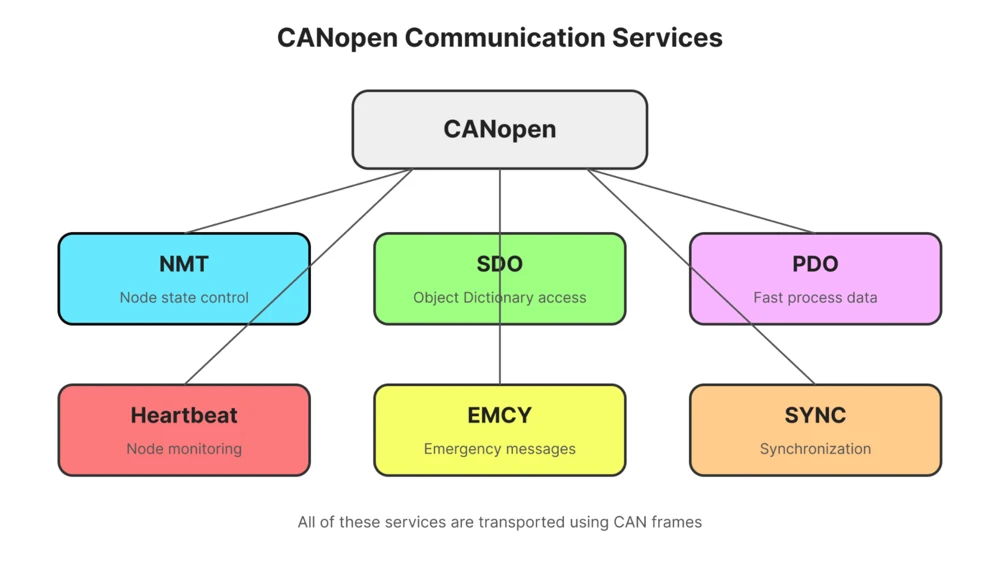
We do not need to understand the internal details of these services yet. For now, it is enough to know that each one serves a distinct purpose, and that all of them are carried inside ordinary CAN frames. We will cover each service in a separate tutorial in this series.
What is Object Dictionary
Think of CANopen service as a database inside every CANopen node, that holds all the information that node wants to expose to the rest of the network. It is not a physical file sitting somewhere on the microcontroller, it is a structured and indexed set of entries that the CANopen stack manages internally.
Every parameter or piece of application data is assigned an index, and sometimes a sub-index, so it can be located consistently regardless of which device we are talking to. For example, index 0x1000 holds the device type, 0x1017 holds the heartbeat time, and anything from 0x2000 onward is typically reserved for application specific data that we define ourselves. This last range is where most of our own project specific work will happen later in the series, once we start exposing our own sensor or actuator data through the dictionary.
Communication parameters live in the dictionary as well. SDO configuration is located around 0x1200, and PDO communication and mapping parameters are found around 0x1400 and 0x1800. These ranges are standardized across the CANopen specification, which is precisely why devices from different manufacturers can understand each other over CANopen.
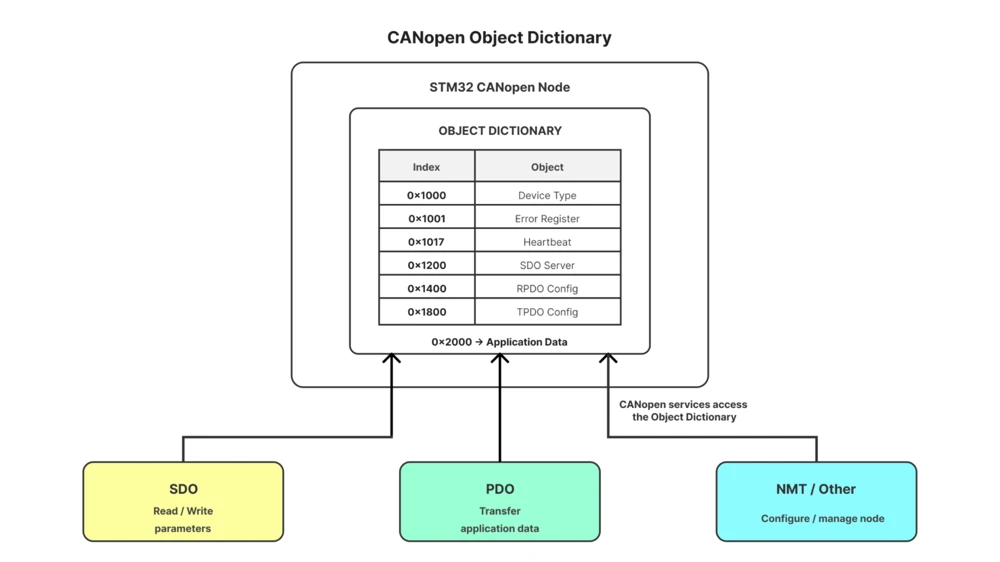
The services and the dictionary work together rather than existing separately. SDO reads and writes entries directly, one at a time, while PDOs transfer application data that has already been mapped to specific dictionary entries. Instead of deciding for ourselves what every byte on the bus means, CANopen gives that data a defined structure through the Object Dictionary, and every service simply operates on top of that shared structure. Later in this series, we will use the Object Dictionary directly to read and write parameters from the master.
What’s Coming Next in this Series
This post covered the foundation: how CANopen builds on top of CAN, what communication services it offers, and how the Object Dictionary gives structure to that communication.
In the next part, we will install and enable the I-CUBE-CANOPEN package, create the STM32 project, and configure the CAN or FDCAN peripheral along with the bitrate and other physical bus parameters.
From there, the series will move through the rest of the protocol step by step. We will look at the Object Dictionary in detail, including index and sub-index addressing, standard versus application-specific objects, and how to map dictionary entries to real STM32 variables. After that, we will cover the CANopen state machine and NMT commands, followed by SDO communication for reading and writing Object Dictionary entries from the master. Once that foundation is in place, we will move into PDOs for real-time data exchange in both directions, and finally cover Heartbeat and Emergency messages, so the master can supervise the node and react to real application faults.
STM32 CANopen Overview – Frequently Asked Questions
Yes. This series does not cover CAN peripheral configuration in detail, so you should already be comfortable sending and receiving basic CAN or FDCAN messages on STM32.
It is provided by STMicroelectronics as part of the STM32Cube ecosystem, so you can add it through STM32CubeMX without a separate purchase.
SDO is used for reliable, one at a time access to Object Dictionary entries, mainly for configuration. PDO is used for fast, frequent exchange of process data with minimal overhead.
Yes. Indexes starting from 0x2000 onward are reserved for application specific data, which is where your own sensor or actuator values would typically go.
No. A node only needs to implement the services relevant to its role, though NMT and Heartbeat are commonly present since they handle basic state and monitoring.
Browse More STM32 CANopen Tutorials
Coming Soon!