
Home ▸ Uncategorized ▸
Published: March 16, 2026
Last Updated: March 16, 2026
Last Updated: March 16, 2026
STM32 FreeRTOS Semaphores: How to Use Binary and Counting Semaphores
In the previous tutorial, we saw how to use queues in FreeRTOS for inter-task communication. Queues are great for passing data between tasks. But sometimes tasks do not need to exchange data, instead they just need to coordinate access to a shared resource.
Imagine two tasks both trying to send data over UART at the same time. The result is corrupted data. This is where semaphores come in.
In this tutorial, we will look at how to use semaphores in FreeRTOS on an STM32 microcontroller. We will cover both binary semaphores and counting semaphores, implement them in STM32CubeIDE, and observe the output on a serial console. We will also look at a common pitfall called priority inversion and how a mutex addresses it.
If you have not read the previous parts of this series, I recommend starting from Part 1.
What is a Semaphore in FreeRTOS?
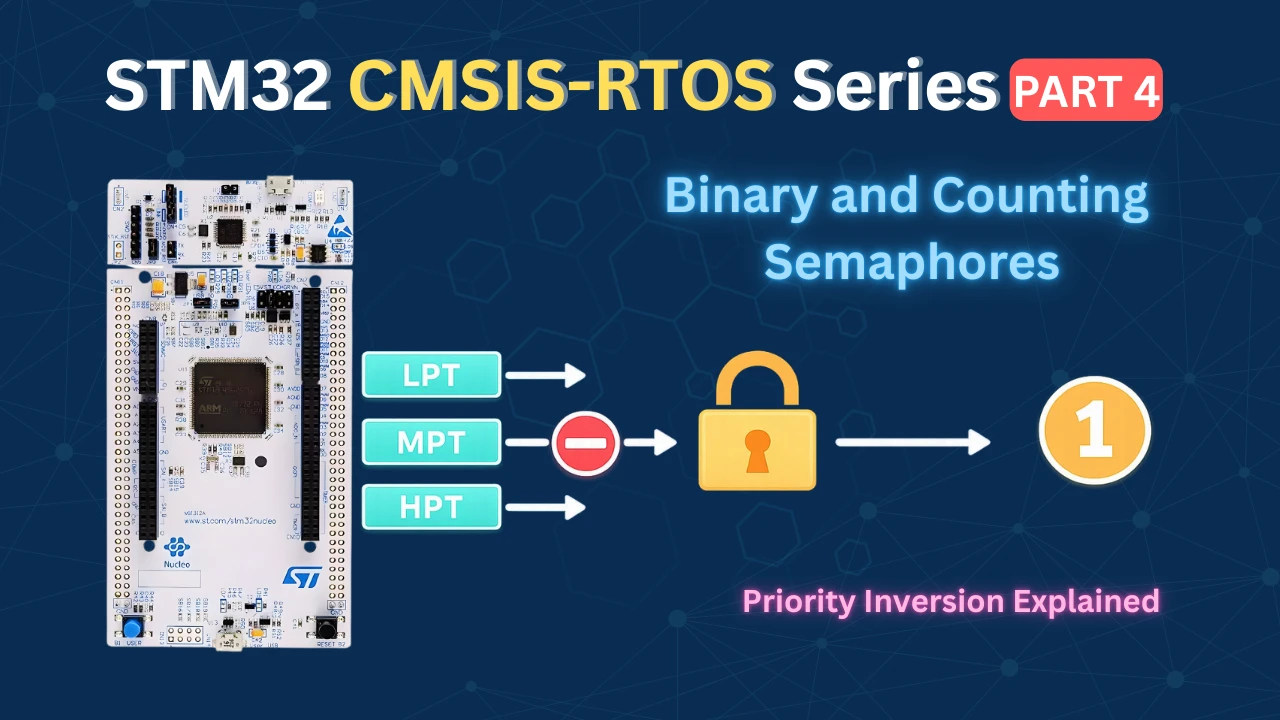
Before we start writing code, let’s understand what a semaphore is and why we need it. In FreeRTOS, a semaphore is a signalling mechanism used to control access to a shared resource. Think of it as a token — a task must hold the token before it can access the resource. If the token is not available, the task has to wait.
There are two types of semaphores in FreeRTOS: binary semaphores and counting semaphores.
Binary Semaphore
A binary semaphore has only one token. Its count can either be 0 or 1. That is it.
- When a task takes the semaphore, the count drops to 0 — meaning the resource is now occupied.
- When the task releases the semaphore, the count goes back to 1 — meaning the resource is free again.
Here is how we create a binary semaphore in FreeRTOS:
osSemaphoreId_t myBinarySemHandle;

const osSemaphoreAttr_t myBinarySem_attributes = {
  .name = "myBinarySem"
};

myBinarySemHandle = osSemaphoreNew(1, 1, &myBinarySem_attributes);The first argument of the function osSemaphoreNew() is the maximum count — which is 1 for a binary semaphore.
The second argument is the initial count. We set it to 1 so the semaphore is available by default. If this is set to 0, the semaphore will not be available after creation. Hence a task must release the semaphore first before any task try to take it.
To acquire and release the semaphore inside a task, we use these two functions:
osSemaphoreAcquire(myBinarySemHandle, osWaitForever);
// access the shared resource here
osSemaphoreRelease(myBinarySemHandle);The second argument of osSemaphoreAcquire is the timeout. We use osWaitForever so the task blocks indefinitely until the semaphore becomes available. This is important — if we set the timeout to 0, the function will return immediately with an error if the semaphore is not available, which is not what we want here.
Now consider a situation where LPT (low priority task) holds the semaphore and is accessing the UART. HPT (high priority task) wakes up and also tries to acquire the semaphore. Since the count is already 0, HPT has no choice but to wait — even though it has higher priority. LPT finishes its job, releases the semaphore, and only then does HPT get to run.
The GIF below shows how a binary semaphore controls access to the UART peripheral. Without the semaphore, both tasks write simultaneously and corrupt the data. With the semaphore, HPT is blocked until LPT finishes and releases it.
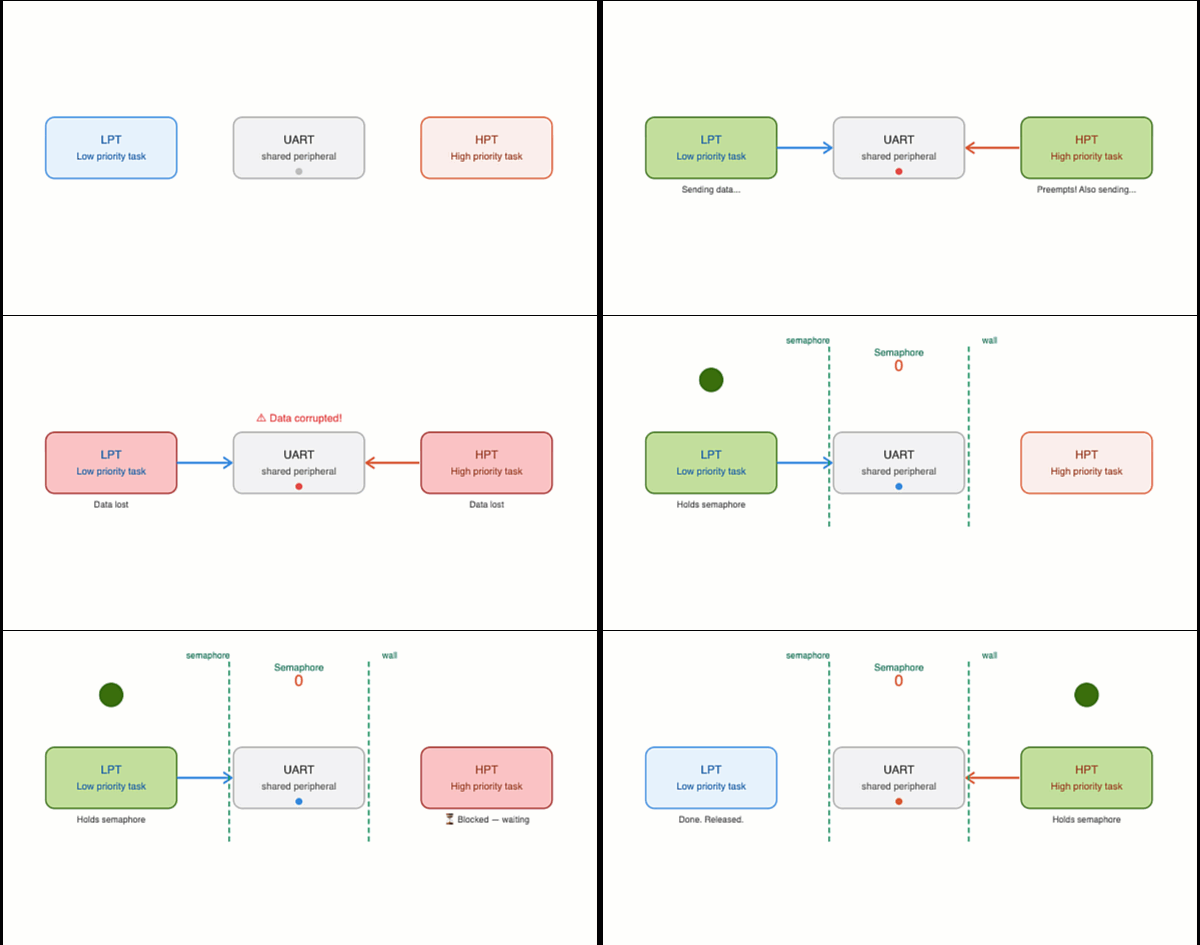
This is the core idea. The semaphore acts as a wall around the shared resource, and priority alone cannot bypass it.
Counting Semaphore
A counting semaphore works the same way, but instead of just one token, it has multiple tokens. This makes it useful when you have more than one instance of a shared resource.
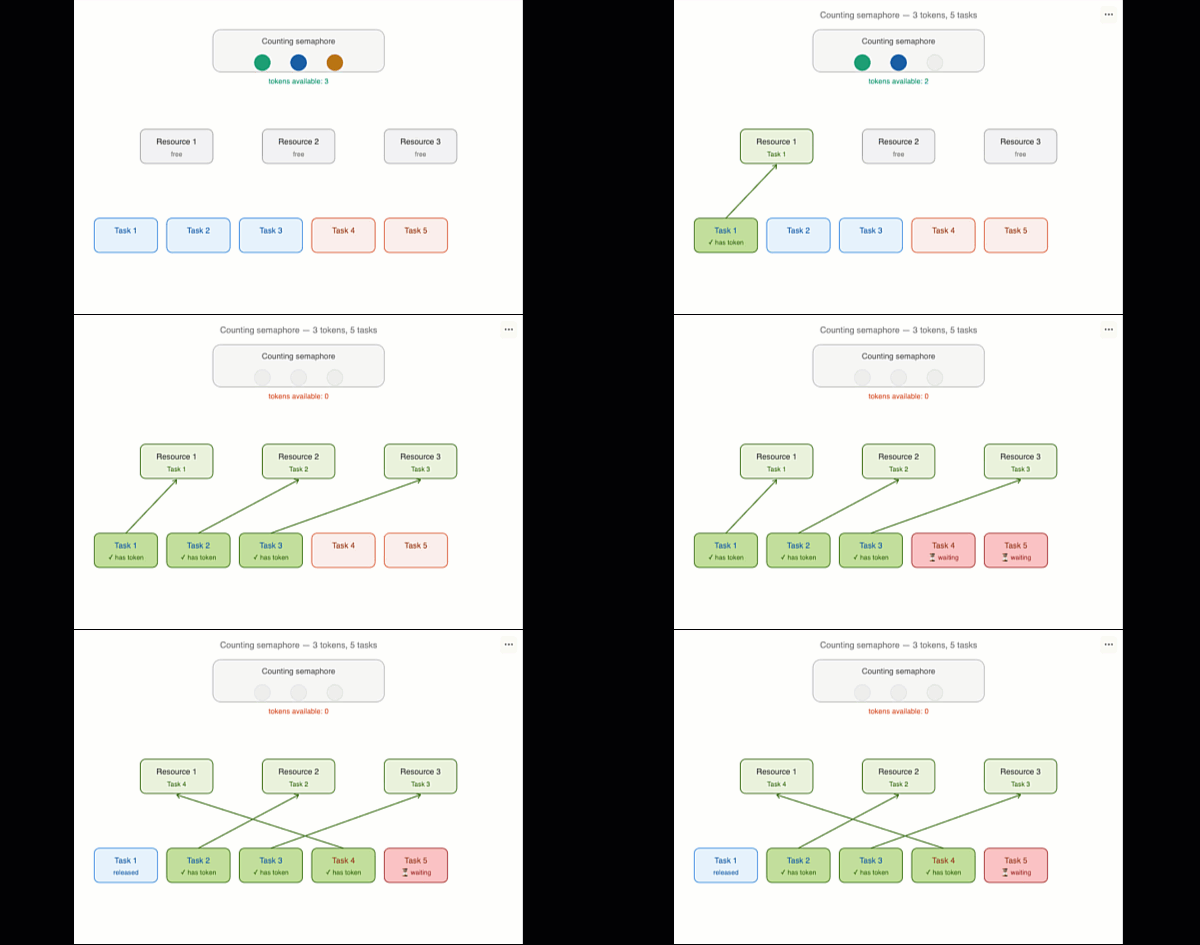
For example, if we have three UART peripherals, we can create a counting semaphore with a count of 3. Up to three tasks can acquire the semaphore simultaneously — one token each. When all three tokens are taken, any additional task trying to acquire the semaphore will be blocked until one of the three tasks releases its token.
The GIF below shows how a counting semaphore with 3 tokens manages access across 5 competing tasks. Three tasks get in immediately, while the remaining two are blocked until a token is released.
Here is how we create a counting semaphore with a max count of 3:
osSemaphoreId_t myCountingSemHandle;

const osSemaphoreAttr_t myCountingSem_attributes = {
  .name = "myCountingSem"
};

myCountingSemHandle = osSemaphoreNew(3, 3, &myCountingSem_attributes);The first argument of the function osSemaphoreNew() is the maximum count (3 in our case). The second argument is the initial count, also 3, meaning all three tokens are available at the start.
The key rule here is simple — the number of tokens should equal the number of shared resources. If you have three resources, create three tokens. This ensures that no two tasks can access the same resource at the same time, while also allowing multiple tasks to work in parallel across different resources.
We will see both of these in practice in the sections below.
Setting Up the Binary Semaphore Project in CubeMX
We need three tasks and one binary semaphore for this part. Let’s set everything up in CubeMX before we write any code.
Configuring Tasks
Go to Middleware → FreeRTOS and open the Tasks and Queues tab. We need three tasks here. LPT and HPT will compete for the shared resource, and MPT will help us demonstrate priority inversion later.
The image below shows the three tasks configured in CubeMX:
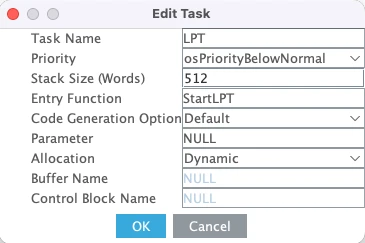
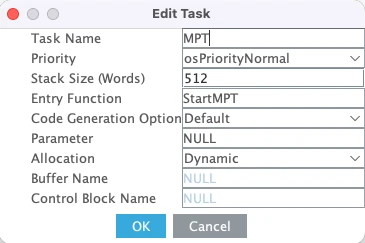
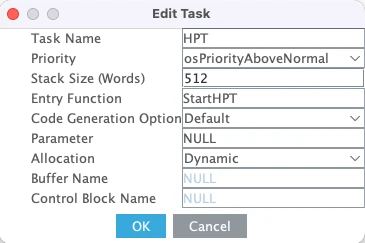
Here is a quick breakdown of each task:
- LPT is the low priority task. Set its priority to Below Normal and stack size to 512 words. This task will acquire the semaphore and simulate resource usage for a few seconds.
- MPT is the medium priority task. Set its priority to Normal and stack size to 512 words. We will use this task to demonstrate what happens when a task that does not need the semaphore preempts a task that holds it.
- HPT is the high priority task. Set its priority to Above Normal and stack size to 512 words. This task also needs the semaphore to run, so it will be blocked whenever LPT holds it.
We are using 512 words for all three tasks because we will be printing logs using printf, which needs a decent amount of stack space.
Configuring the Binary Semaphore
Now go to Timers and Semaphores. Under the binary semaphore section, click Add to add the binary semaphore.
The image below shows the binary semaphore configuration:
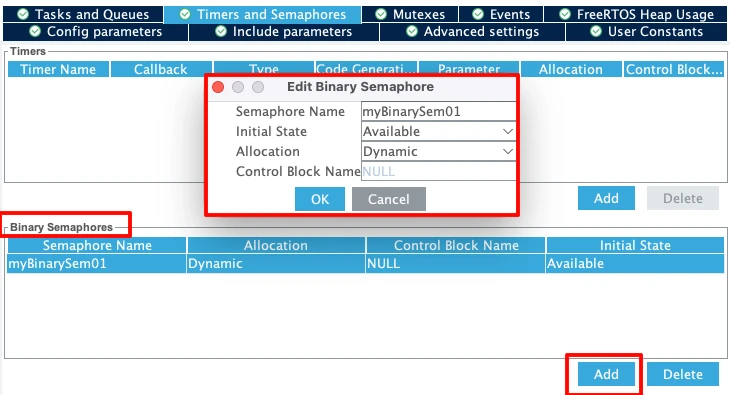
The default name of this semaphore is myBinarySem01 and I will leave it to that.
Two things to set here. First, set the Initial State to Available. This means the semaphore starts with a count of 1, so the first task that tries to acquire it will succeed right away. If we set it to Depleted, the semaphore would need to be released first before any task can take it — which is not what we want here.
Second, keep the Allocation set to Dynamic so the semaphore takes its memory from the FreeRTOS heap.
Note:
After configuring tasks and semaphore, you might see a heap size error. Go to Config Parameters and increase the Total Heap Size to around 10000 bytes. The error should go away.
Configuring LPUART1 for printf Output
We will use printf to print the received data to a serial console. On the STM32L496 Nucleo board, the Virtual COM port routes UART data through the ST-LINK USB connection. Looking at the board schematic, ST-LINK RX is connected to LPUART1 TX and ST-LINK TX is connected to LPUART1 RX. These map to pins PG7 and PG8.
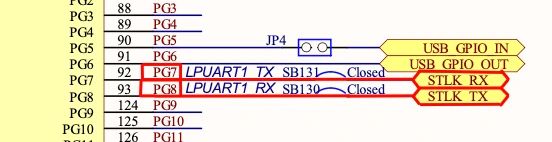
Go to Connectivity and enable LPUART1 in Asynchronous mode. By default, CubeMX assigns pins PC0 and PC1, so change these to PG7 (TX) and PG8 (RX).
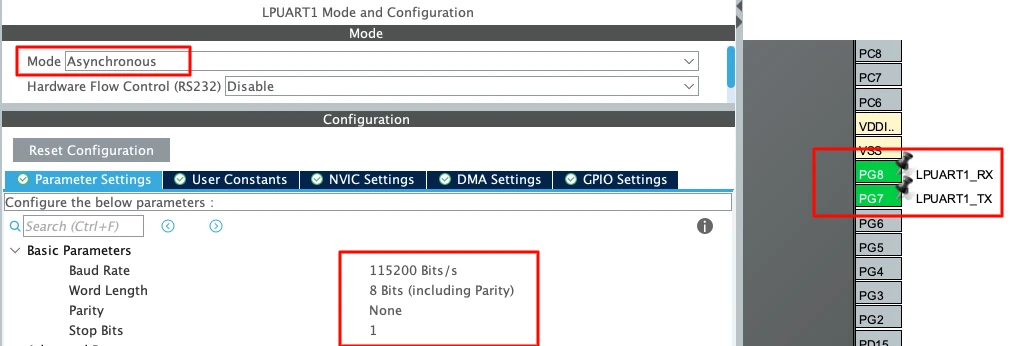
Use the following settings:
| Parameter | Value |
|---|---|
| Baud Rate | 115200 |
| Word Length | 8 bits |
| Parity | None |
| Stop Bits | 1 |
This is the standard UART configuration and matches what we will set in the serial console later.
Implementing the Binary Semaphore in Code
Once CubeMX generates the code you will see the three task functions already created — LPT_Task, MPT_Task, and HPT_Task. We will write our code inside their task functions.
Before we do that, let’s take a quick look at how the semaphore is created in main.c:
myBinarySem01Handle = osSemaphoreNew(1, 1, &myBinarySem01_attributes);The first argument is the max count — 1 for a binary semaphore. The second is the initial count — also 1 because we set it to Available in CubeMX. So the semaphore is ready to be taken as soon as the scheduler starts.
Writing the Low Priority Task (LPT)
LPT is the task that will actually use the shared resource. It acquires the semaphore, runs an empty loop to simulate resource usage, then releases the semaphore and goes to sleep.
osSemaphoreAcquire(myBinarySem01Handle, osWaitForever);Once the semaphore is acquired, we simulate resource usage with an empty loop:
wait = 50000000;
while (wait--);This runs for around five seconds on this board. It keeps the semaphore held long enough for MPT to wake up and try to take it — which is exactly what we want to demonstrate.
Here is the full LPT function:
void StartLPT(void *argument)
{
uint32_t wait;
for(;;)
{
printf("Entered LPT\n\n");
osSemaphoreAcquire(myBinarySem01Handle, osWaitForever);
printf("LPT Using Resource\n\n");
wait = 50000000;
while (wait--);
printf("LPT Finished, released Semaphore\n\n");
osSemaphoreRelease(myBinarySem01Handle);
printf("LPT going to Sleep\n\n");
osDelay(500);
}
}Writing the Medium Priority Task (MPT)
MPT is simpler. It acquires the semaphore, prints a completion log, and immediately releases it. It does not simulate any resource usage — it just needs the semaphore to print the message.
void StartMPT(void *argument)
{
for(;;)
{
printf("Entered MPT\n\n");
osSemaphoreAcquire(myBinarySem01Handle, osWaitForever);
printf("MPT completed Task, released Semaphore\n\n");
osSemaphoreRelease(myBinarySem01Handle);
printf("MPT going to Sleep\n\n");
osDelay(200);
}
}The key thing to observe here is whether MPT can jump in and print its completion message while LPT is still holding the semaphore and running its empty loop. Since MPT has higher priority than LPT, it will preempt LPT — but it still cannot acquire the semaphore until LPT releases it. This is the semaphore doing its job.
Writing the High Priority Task (HPT)
For this first demonstration, HPT does not need the semaphore at all. We just print one log from it to confirm it is running. Since it does not try to acquire the semaphore, it runs freely regardless of who holds it.
void StartHPT(void *argument)
{
for(;;)
{
printf ("Inside HPT\n\n");
osDelay(1000);
}
}This also illustrates an important point. The semaphore only blocks tasks that actually try to acquire it. HPT runs freely throughout the entire demo because it never calls osSemaphoreAcquire. Even while LPT holds the semaphore, HPT is completely unaffected.
Full Code
Here is the complete code for all three tasks combined:
void StartLPT(void *argument)
{
    uint32_t wait;

    for(;;)
    {
        printf("Entered LPT\n\n");
        osSemaphoreAcquire(myBinarySem01Handle, osWaitForever);
        printf("LPT Using Resource\n\n");
        wait = 50000000;
        while (wait--);
        printf("LPT Finished, released Semaphore\n\n");
        osSemaphoreRelease(myBinarySem01Handle);
        printf("LPT going to Sleep\n\n");
        osDelay(500);
    }
}
void StartMPT(void *argument)
{
    for(;;)
    {
        printf("Entered MPT\n\n");
        osSemaphoreAcquire(myBinarySem01Handle, osWaitForever);
        printf("MPT completed Task, released Semaphore\n\n");
        osSemaphoreRelease(myBinarySem01Handle);
        printf("MPT going to Sleep\n\n");
        osDelay(200);
    }
}
void StartHPT(void *argument)
{
    for(;;)
    {
        printf ("Inside HPT\n\n");
        osDelay(1000);
    }
}Output
The image below shows the serial console output after flashing the code.
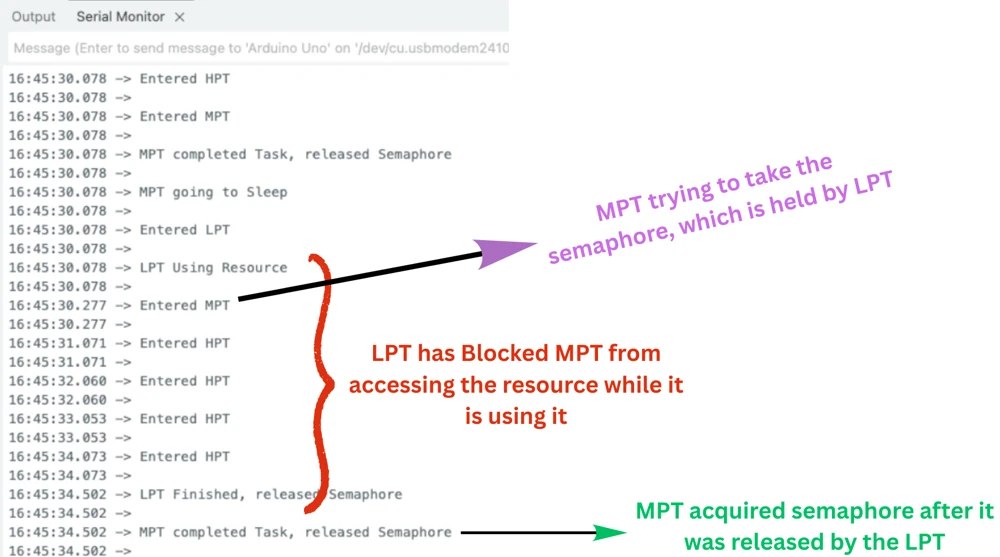
Let’s walk through what is happening.
HPT runs first as expected, since it has the highest priority. It releases the semaphore and goes to sleep. MPT then runs, acquires the semaphore, completes its task, and releases it. After that, LPT runs, acquires the semaphore, and starts its five second empty loop.
While LPT is inside that loop, MPT wakes up every 200 milliseconds and tries to acquire the semaphore. But since LPT is still holding it, MPT is blocked every single time. Meanwhile, HPT keeps running every second without any issues. It is because it never needs the semaphore in the first place.
After around five seconds, LPT finishes, releases the semaphore, and MPT immediately acquires it and completes its task. This cycle then repeats.
This confirms exactly what we expected. LPT — despite being the lowest priority task — successfully blocked MPT from accessing the shared resource for as long as it needed to. Priority alone is not enough to bypass a semaphore.
However, this setup has a subtle problem that becomes visible when we introduce a third task into the mix. We will look at that in the next section.
Understanding Priority Inversion
So far, the binary semaphore is working as expected. But there is a subtle problem that can occur in certain task configurations. Let’s modify the code slightly and see what goes wrong.
We will change the task behaviour so that:
- LPT acquires the semaphore and simulates resource usage for about one second
- MPT does not need the semaphore at all — it just runs an empty loop for around five seconds
- HPT now needs the semaphore to run
This creates the exact conditions for priority inversion. Here is the updated code:
void StartLPT(void *argument)
{
    osSemaphoreRelease(myBinarySem01Handle);
    uint32_t wait;

    for(;;)
    {
        printf("Entered LPT, waiting for Semaphore\n\n");
        osSemaphoreAcquire(myBinarySem01Handle, osWaitForever);
        printf("LPT Acquired Semaphore, using Resource\n\n");
        wait = 10000000;
        while (wait--);
        printf("LPT finished, released Semaphore\n\n");
        osSemaphoreRelease(myBinarySem01Handle);
        printf("LPT going to Sleep\n\n");
        osDelay(500);
    }
}

void StartMPT(void *argument)
{
    uint32_t wait;

    for(;;)
    {
        printf("Entered MPT, performing task\n\n");
        wait = 50000000;
        while (wait--);
        printf("MPT finished, going to Sleep\n\n");
        osDelay(500);
    }
}

void StartHPT(void *argument)
{
    for(;;)
    {
        printf("Entered HPT, waiting for Semaphore\n\n");
        osSemaphoreAcquire(myBinarySem01Handle, osWaitForever);
        printf("HPT Acquired and now releasing Semaphore\n\n");
        osSemaphoreRelease(myBinarySem01Handle);
        printf("HPT going to Sleep\n\n");
        osDelay(200);
    }
}Output
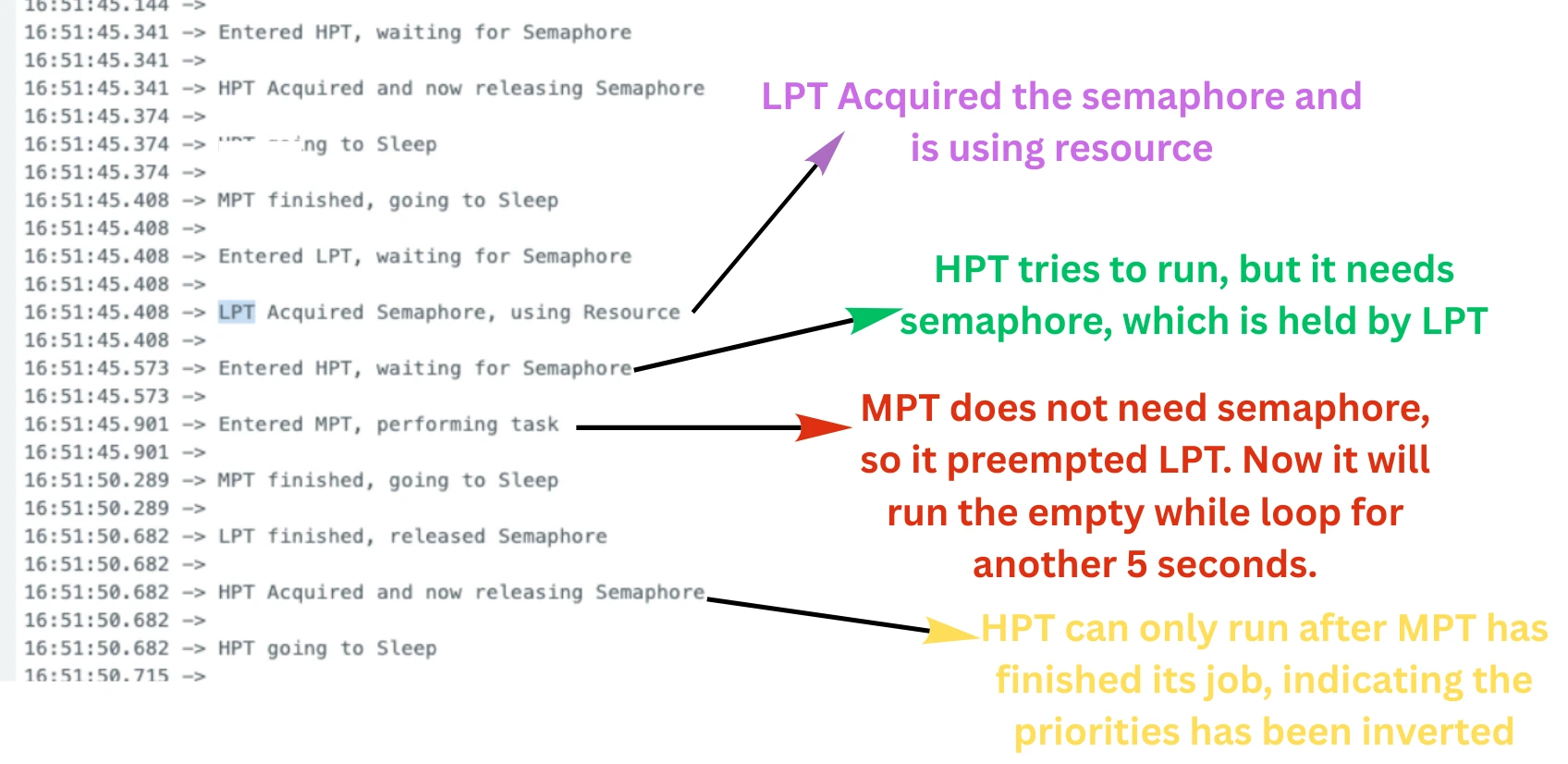
The image below shows the serial console output for this priority inversion scenario.
What Causes Priority Inversion?
Let’s walk through what is happening step by step.
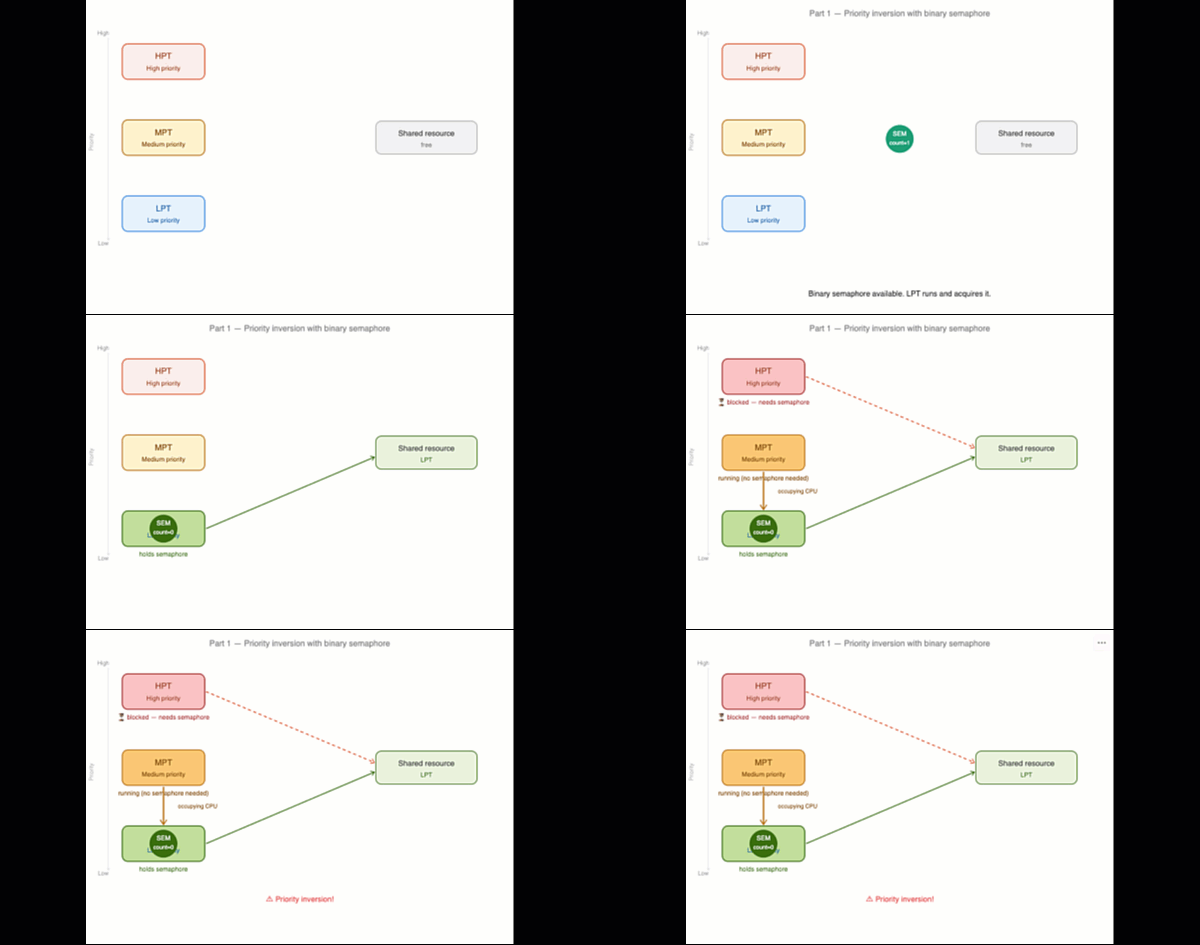
The tasks were running according to their priorities, but things change when the LPT runs. LPT acquires the semaphore and starts its one second empty loop. Before LPT finishes, HPT wakes up and tries to acquire the semaphore. But LPT is still holding it, so it will wait for the LPT to release the semaphore.
MPT wakes up and preempts the LPT. MPT has higher priority than LPT, and since it does not need the semaphore, it runs freely — blocking LPT from finishing its loop.
We now have this situation:
- HPT is blocked — waiting for the semaphore
- LPT is holding the semaphore — but cannot run because MPT keeps preempting it
- MPT is running freely — without holding any semaphore at all
The highest priority task in the system is sitting idle, waiting for the lowest priority task to release a resource. And the lowest priority task cannot run because a medium priority task keeps occupying the CPU. HPT is effectively being held up by MPT — even though MPT has absolutely nothing to do with the shared resource.
This is exactly what priority inversion is. A medium priority task is indirectly blocking a high priority task, not by holding the semaphore, but simply by occupying the CPU and starving the task that does hold it.
The GIF below shows how this plays out visually.
How Mutex Solves Priority Inversion with Priority Inheritance
Priority inversion is a well known problem in RTOS systems and the standard solution is to use a mutex instead of a binary semaphore.
A mutex works very similarly to a binary semaphore — it has a count of 1 and protects access to a shared resource. But it has one extra feature called priority inheritance. Here is how priority inheritance works:
When HPT starts waiting for the mutex that LPT holds, the RTOS automatically raises LPT’s priority to match HPT’s priority (temporarily). This means LPT now runs at the same priority level as HPT, which is higher than MPT. So MPT can no longer preempt LPT. LPT gets to finish its job, releases the mutex, and HPT acquires it immediately.
Once LPT releases the mutex, its priority drops back to normal. Everything returns to the way it was — but HPT has already been unblocked and can run without delay.
We will cover mutex in the next tutorial.
Setting Up the Counting Semaphore Project in CubeMX
Now that we are done with the binary semaphore, let’s move on to the counting semaphore. We need to go back to CubeMX and make a couple of changes, i.e. add a fourth task and configure the counting semaphore.
Adding the Fourth Task (VHPT)
Go to Middleware → FreeRTOS and open the Tasks and Queues tab. We already have LPT, MPT, and HPT from the previous setup. We just need to add one more task.
The image below shows all four tasks configured in CubeMX:
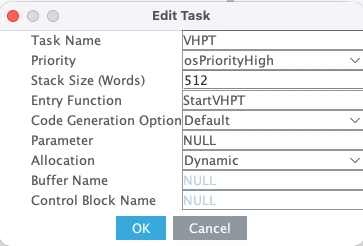
VHPT stands for Very High Priority Task. Its priority is set to High — higher than all three existing tasks. We need this fourth task to demonstrate the core behaviour of the counting semaphore: with only three tokens available, one of the four competing tasks will always be blocked.
Configuring the Counting Semaphore
No go to Timers and Semaphores. Scroll down to the counting semaphore section, click Add to create one.
The image below shows the counting semaphore configuration
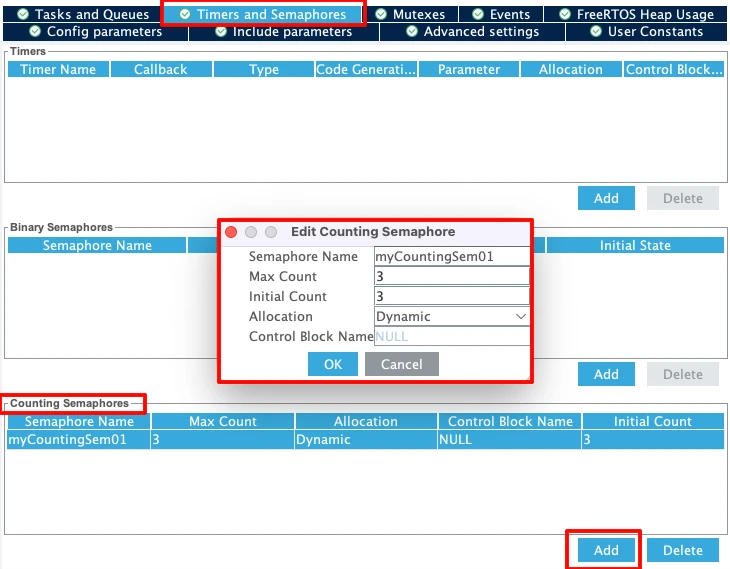
Two values to set here:
- Max Count → set to
3. This is the total number of tokens the semaphore can hold. We have three shared resources, so we need three tokens. - Initial Count → also set to
3. This means all three tokens are available right from the start.
Keep the Allocation set to Dynamic. With four tasks competing for three tokens, the fourth task will always be blocked until one of the other three releases its token. That is exactly the behaviour we want to demonstrate.
Implementing the Counting Semaphore in Code
Before we write the task functions, we need to set up the shared resources and a few helper functions that all four tasks will use.
Setting Up Resources and Helper Functions
We have three shared resources in this example. Think of them as three instances of a peripheral, such as three UARTs, three ADCs, or anything similar. We represent them as an integer array:
int resource[3] = {111, 222, 333};We also need to track which task owns which resource at any given time. We use a string array for that:
char *resourceOwner[3] = {"Free", "Free", "Free"};By default all three resources are free. Now we need three helper functions — one to claim a resource, one to release it, and one to print the current state of all resources.
getResource scans the owner array and assigns the first free resource to the calling task:
int getResource(char *taskName)
{
    for (int i = 0; i < 3; i++)
    {
        if (strcmp(resourceOwner[i], "Free") == 0)
        {
            resourceOwner[i] = taskName;
            return i;
        }
    }
    return -1;
}It returns the index of the resource it claimed, which the task uses later to release it. If no resource is free, it returns -1 — but since we have the semaphore protecting access, this should never happen in practice. A task only calls getResource after successfully acquiring a token, and the number of tokens equals the number of resources.
releaseResource simply marks the resource as free again:
void releaseResource(int id)
{
resourceOwner[id] = "Free";
}printResourceTable prints the current ownership of all three resources to the serial console:
void printResourceTable(void)
{
printf("\nResource Table:\n");
for (int i = 0; i < 3; i++)
{
printf("Resource %d -> %s\n", resource[i], resourceOwner[i]);
}
printf("\n");
}This is what lets us verify in the output that no two tasks ever hold the same resource at the same time. Place all of this inside the /* USER CODE BEGIN 4 */ section in main.c.
Writing the Task Functions
All four tasks follow exactly the same flow. Let’s walk through LPT first and then we can apply the same pattern to the rest.
The task starts by waiting for a token from the counting semaphore:
osSemaphoreAcquire(myCountingSem01Handle, osWaitForever);Since we have three tokens and four tasks, three tasks will acquire their tokens immediately. The fourth task will block here until one of the other three releases its token.
Once the token is acquired, the task claims a resource and prints the resource table:
resID = getResource("LPT");
printf("LPT accessing resource %d\n", resource[resID]);
printResourceTable();It then holds the resource for two seconds to simulate active usage:
osDelay(2000);Finally it releases the resource and gives the token back:
releaseResource(resID);
osSemaphoreRelease(myCountingSem01Handle);The full LPT function looks like this:
void StartLPT(void *argument)
{
int resID;
for(;;)
{
printf("LPT waiting for resource\n");
osSemaphoreAcquire(myCountingSem01Handle, osWaitForever);
resID = getResource("LPT");
printf("LPT accessing resource %d\n", resource[resID]);
printResourceTable();
osDelay(2000);
printf("LPT finished using resource\n");
releaseResource(resID);
osSemaphoreRelease(myCountingSem01Handle);
osDelay(1000);
}
}MPT, HPT, and VHPT follow the exact same structure. The only difference is the task name passed to getResource and the log messages. This is intentional as we want all four tasks to behave identically so the counting semaphore is the only variable at play.
Full Code
Here is the complete code for all four tasks along with the helper functions:
/* USER CODE BEGIN 4 */
int resource[3] = {111, 222, 333};
char *resourceOwner[3] = {"Free", "Free", "Free"};
int getResource(char *taskName)
{
    for (int i = 0; i < 3; i++)
    {
        if (strcmp(resourceOwner[i], "Free") == 0)
        {
            resourceOwner[i] = taskName;
            return i;
        }
    }
    return -1;
}
void releaseResource(int id)
{
    resourceOwner[id] = "Free";
}
void printResourceTable(void)
{
    printf("\nResource Table:\n");
    for (int i = 0; i < 3; i++)
    {
        printf("Resource %d -> %s\n", resource[i], resourceOwner[i]);
    }
    printf("\n");
}
/* USER CODE END 4 */
void StartLPT(void *argument)
{
int resID;
for(;;)
{
printf("LPT waiting for resource\n");
osSemaphoreAcquire(myCountingSem01Handle, osWaitForever);
resID = getResource("LPT");
printf("LPT accessing resource %d\n", resource[resID]);
printResourceTable();
osDelay(2000);
printf("LPT finished using resource\n");
releaseResource(resID);
osSemaphoreRelease(myCountingSem01Handle);
osDelay(1000);
}
}
void StartMPT(void *argument)
{
int resID;
for(;;)
{
printf("MPT waiting for resource\n");
osSemaphoreAcquire(myCountingSem01Handle, osWaitForever);
resID = getResource("MPT");
printf("MPT accessing resource %d\n", resource[resID]);
printResourceTable();
osDelay(2000);
printf("MPT finished using resource\n");
releaseResource(resID);
osSemaphoreRelease(myCountingSem01Handle);
osDelay(1000);
}
}
void StartHPT(void *argument)
{
int resID;
for(;;)
{
printf("HPT waiting for resource\n");
osSemaphoreAcquire(myCountingSem01Handle, osWaitForever);
resID = getResource("HPT");
printf("HPT accessing resource %d\n", resource[resID]);
printResourceTable();
osDelay(2000);
printf("HPT finished using resource\n");
releaseResource(resID);
osSemaphoreRelease(myCountingSem01Handle);
osDelay(1000);
}
}
void StartVHPT(void *argument)
{
int resID;
for(;;)
{
printf("VHPT waiting for resource\n");
osSemaphoreAcquire(myCountingSem01Handle, osWaitForever);
resID = getResource("VHPT");
printf("VHPT accessing resource %d\n", resource[resID]);
printResourceTable();
osDelay(2000);
printf("VHPT finished using resource\n");
releaseResource(resID);
osSemaphoreRelease(myCountingSem01Handle);
osDelay(1000);
}
}Output
The image below shows the serial console output after flashing the code.
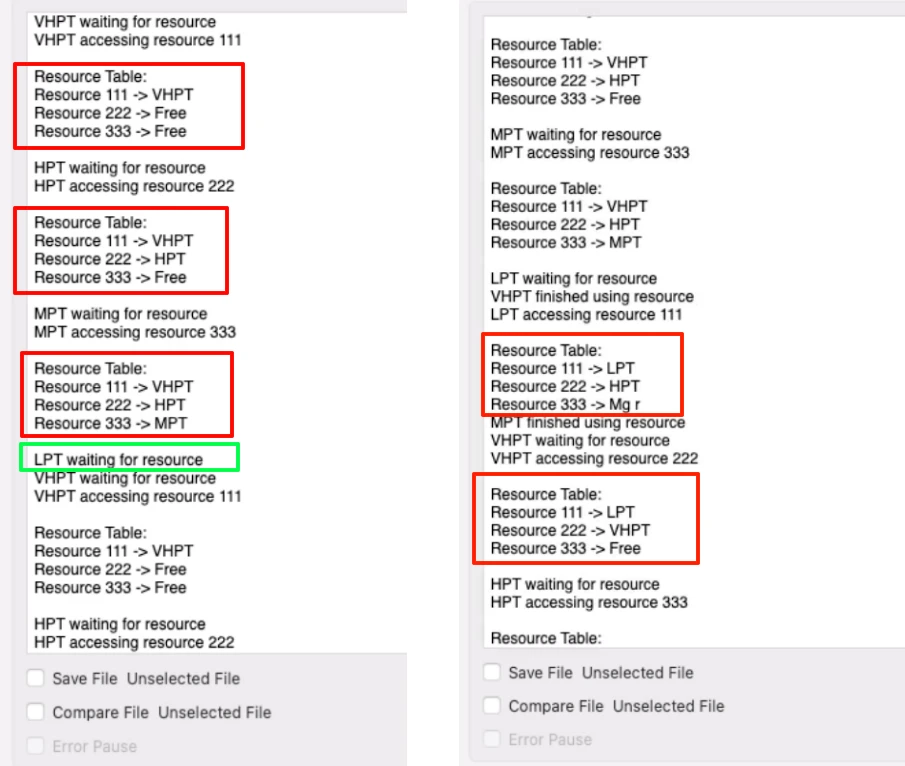
Let’s walk through what is happening. VHPT runs first since it has the highest priority. It acquires the first token and claims Resource 1. The resource table shows Resource 1 held by VHPT and the other two free. After VHPT goes into its two second delay, HPT runs and claims Resource 2, then MPT runs and claims Resource 3. At this point all three tokens are taken.
Now LPT runs and tries to acquire the semaphore, but there are no tokens left. LPT is blocked and has to wait.
While LPT is waiting, VHPT finishes its delay, releases Resource 1 and gives back its token. VHPT immediately preempts LPT again and starts its next cycle. This keeps happening, but at some point LPT does get a token and you can see it in the resource table accessing one of the three resources.
The key thing to verify here is the resource table. At no point do two tasks appear as the owner of the same resource. The counting semaphore ensures that only three tasks can be inside the critical section at any time, and the getResource function ensures each one gets a different slot.
Binary Semaphore vs Counting Semaphore — When to Use Which
Now that we have seen both types in action, let’s quickly summarise when to use each one.
A binary semaphore is the right choice when you have a single shared resource that only one task can use at a time. A UART peripheral, an SPI bus, a shared buffer — anything where simultaneous access would cause corruption. The rule is simple: one resource, one token, one task at a time.
A counting semaphore is the right choice when you have multiple instances of the same resource. If you have three UARTs or three DMA channels, you do not want all tasks to queue up for a single token. Instead, create a semaphore with a token count equal to the number of resource instances. Up to that many tasks can run in parallel, and the rest wait their turn.
Here is a quick way to decide:
- One shared resource → use a binary semaphore
- Multiple instances of the same resource → use a counting semaphore with a token count equal to the number of instances
- Tasks just need to coordinate without accessing a resource → a binary semaphore works as a simple signalling mechanism too
One thing to keep in mind is that neither binary semaphores nor counting semaphores protect against priority inversion. As we saw earlier, a medium priority task can block a high priority task simply by occupying the CPU — without holding the semaphore at all. If your application has tasks of mixed priorities competing for a shared resource, a mutex is the safer choice. It brings priority inheritance to the table, which prevents this problem entirely.
Video Tutorial
STM32 FreeRTOS Semaphores — Binary and Counting Semaphore Video Tutorial
Watch me configure the binary and counting semaphores in CubeMX, write the task functions using osSemaphoreAcquire() and osSemaphoreRelease(), demonstrate priority inversion with a binary semaphore, and verify the output on the serial console with all tasks running simultaneously.
Watch the FreeRTOS Semaphores TutorialConclusion
In this tutorial, we covered both types of semaphores available in FreeRTOS — binary and counting. We saw how a binary semaphore protects a single shared resource by allowing only one task to access it at a time, regardless of task priority. We also saw how a counting semaphore extends this idea to multiple resources, letting several tasks work in parallel while still keeping access controlled.
We also ran into one of the most common pitfalls in RTOS development — priority inversion. We saw exactly how it happens when a medium priority task occupies the CPU and indirectly blocks a high priority task from running. Understanding this problem is just as important as knowing how to use semaphores, because it shows us the limits of what a binary semaphore can do.
In the next tutorial, we will look at mutexes. A mutex works like a binary semaphore but adds priority inheritance, which is the proper fix for priority inversion. We will configure it in CubeMX, write the same scenario that caused inversion here, and see how the mutex handles it cleanly. If you have any questions about this tutorial, drop them in the comments below. You can also download the full project from the link in the description.
Browse More STM32 Tutorials
RS485 Communication with STM32 using MAX485 Module (UART Tutorial)

STM32 ADC Part 8 – Injected Conversion Mode

STM32 UART Part 4 – How to Receive Data using UART DMA
W25Q Flash Series Part 6 – Integers floats and 32bit Data
LCD 20X4 using I2C with STM32
STM32 GPIO Output Example Using Registers | BSRR, MODER, GPIOA Explained
How to Cascade Dot Matrix Displays with STM32 – Step-by-Step SPI Guide
STM32 RTOS Project Download
STM32 FreeRTOS Semaphore FAQs
Subscribe
Login
0 Comments
Newest

